


- Posts: 7
- Thank you received: 0
3 Post Moderation Rule for New Boarders (25 Jan 2021)
New boarders will have their posts moderated - Don't worry if you cannot see your post immediately.
Precision editor - please help!
- fb_100000194872388
-
 Topic Author
- Offline
- Banned
-

Less
More
09 Sep 2014 22:06 #52465
by fb_100000194872388
Precision editor - please help! was created by fb_100000194872388
Hey guys
So i have FCP 10.0.9... The Precision Editor wont seem to open no matter what i do. I am trying to figure out to to get tighter edits and ive been told the precision editor is the way. I have watched videos and read about how open the editor and it just wont open for me for some reason. The icon I see that others have is not on any of my clips... and when i click in between clips it doesn't open.
What I am trying to do is move a clip BETWEEN 00:00:30:00 and 00:00:31:00... in between the seconds...
Please help.
thanks!
So i have FCP 10.0.9... The Precision Editor wont seem to open no matter what i do. I am trying to figure out to to get tighter edits and ive been told the precision editor is the way. I have watched videos and read about how open the editor and it just wont open for me for some reason. The icon I see that others have is not on any of my clips... and when i click in between clips it doesn't open.
What I am trying to do is move a clip BETWEEN 00:00:30:00 and 00:00:31:00... in between the seconds...
Please help.
thanks!
Please Log in to join the conversation.
- Tom Wolsky
-

- Offline
- Moderator
-

09 Sep 2014 22:17 #52466
by Tom Wolsky
Replied by Tom Wolsky on topic Precision editor - please help!
Select the edit point and press Control-E. Does that work? If not post a screen shot of your timeline and what you have selected. (BTW the edit has to be on the primary storyline.)
Please Log in to join the conversation.
- fb_100000194872388
-
Topic Author
- Offline
- Banned
-
Less
More
- Posts: 7
- Thank you received: 0
09 Sep 2014 22:25 #52467
by fb_100000194872388
Replied by fb_100000194872388 on topic Precision editor - please help!
Thanks Tom,
Is was because it wasnt in the primary story line! BUT it still wont let me edit within the second... is this just not possible?
Is was because it wasnt in the primary story line! BUT it still wont let me edit within the second... is this just not possible?
Please Log in to join the conversation.
- fb_100000194872388
-
Topic Author
- Offline
- Banned
-
Less
More
- Posts: 7
- Thank you received: 0
09 Sep 2014 22:37 #52468
by fb_100000194872388
Replied by fb_100000194872388 on topic Precision editor - please help!
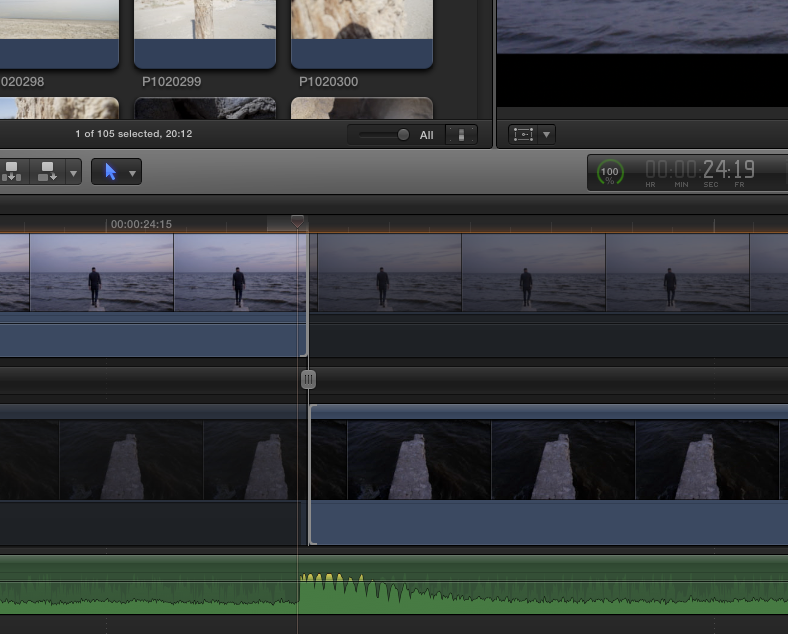
Just wanted to add that the snap is turned off... here's a screen shot below. trying to edit right to the start point of the drum hit of a song... it wont let me get in there tight enough... sure im doing something wrong.
Please Log in to join the conversation.
- Tom Wolsky
-
- Offline
- Moderator
-
09 Sep 2014 22:46 #52469
by Tom Wolsky
Replied by Tom Wolsky on topic Precision editor - please help!
You could move it one frame earlier if you wanted, but it's never going to be exactly aligned with the waveform. Video cannot be edited in less than one frame increments.
Please Log in to join the conversation.
- fb_100000194872388
-
Topic Author
- Offline
- Banned
-
Less
More
- Posts: 7
- Thank you received: 0
09 Sep 2014 23:11 #52471
by fb_100000194872388
Replied by fb_100000194872388 on topic Precision editor - please help!
wow... interesting...so just not possible to edit tightly to audio in fcp? that seems crazy to me... seems like there should be a way... or a different way of doing it....
Please Log in to join the conversation.
- Tom Wolsky
-
- Offline
- Moderator
-
09 Sep 2014 23:24 #52472
by Tom Wolsky
Replied by Tom Wolsky on topic Precision editor - please help!
No video application can edit video in less than one frame increments. You might be able to shift the audio more easily.
Please Log in to join the conversation.

10 Sep 2014 01:51 #52474
by tpayton
Replied by tpayton on topic Precision editor - please help!
You could move the audio between a frame.
Please Log in to join the conversation.
- Karsten Schlüter
-

- Offline
- Moderator
-
Less
More
- Posts: 3790
- Thank you received: 718
10 Sep 2014 06:23 #52479
by Karsten Schlüter
The shortest 'tic' in a video is a frame = US: 1/30sec, rest of world: 1/25th.
How would you display half a frame? Or a a quarter of a frame? Or a 1/217th of ... :lol:
But you can edit audio, down to sample size = 1/40.000th ... precise enough?
Replied by Karsten Schlüter on topic Precision editor - please help!
fb_100000194872388 wrote: ... just not possible to edit tightly to audio in fcp? that seems crazy to me.....
The shortest 'tic' in a video is a frame = US: 1/30sec, rest of world: 1/25th.
How would you display half a frame? Or a a quarter of a frame? Or a 1/217th of ... :lol:
But you can edit audio, down to sample size = 1/40.000th ... precise enough?
Please Log in to join the conversation.
- fb_100000194872388
-
Topic Author
- Offline
- Banned
-
Less
More
- Posts: 7
- Thank you received: 0
10 Sep 2014 21:42 #52524
by fb_100000194872388
Replied by fb_100000194872388 on topic Precision editor - please help!
hey guys!
thanks - maybe im not explaining myself correctly... im not trying to edit the clip inbetween frames - Im trying to move a new clip - from the start of the clip - to an exact spot in the audio wave form... so the clip starts all together at an exact beat...
hope i'm making sense...
thanks again!
thanks - maybe im not explaining myself correctly... im not trying to edit the clip inbetween frames - Im trying to move a new clip - from the start of the clip - to an exact spot in the audio wave form... so the clip starts all together at an exact beat...
hope i'm making sense...
thanks again!
Please Log in to join the conversation.

10 Sep 2014 21:48 #52527
by rhoydotp
Replied by rhoydotp on topic Precision editor - please help!
maybe this will help.
you can set the duration of the previous clip to an exact frame duration (control-D) and hopefully the other clip will adjust to where you want it to start.
you can set the duration of the previous clip to an exact frame duration (control-D) and hopefully the other clip will adjust to where you want it to start.
Please Log in to join the conversation.
- Tom Wolsky
-
- Offline
- Moderator
-
10 Sep 2014 21:51 #52528
by Tom Wolsky
Replied by Tom Wolsky on topic Precision editor - please help!
You cannot edit in the middle of a video frame. The project is divided up into frames, whatever frame rate you're using. You have to cut the video where there is a gap between frames. You can't cut the frame in half. How would that work? The left side of the screen would show one frame and the right side the other, or would it be based on scan lines, half the frame on top and the other half on the bottom? Cannot be done. Audio can be edited down to 1/80th of a frame. So if you can move the audio you can position it with greater precision. All that said, the point is moot. The video plays back in realtime. The viewer cannot perceive the difference you're talking about, heck most viewers don't see flash frames.
Please Log in to join the conversation.
10 Sep 2014 23:08 - 10 Sep 2014 23:09 #52533
by rhoydotp
maybe I am misunderstanding this sentence ... the middle of this on a 24fps timeline would be "00:00:30:12" (where 12 is the frame number), wouldn't it?
Replied by rhoydotp on topic Precision editor - please help!
fb_100000194872388 wrote: a clip BETWEEN 00:00:30:00 and 00:00:31:00... in between the seconds.
maybe I am misunderstanding this sentence ... the middle of this on a 24fps timeline would be "00:00:30:12" (where 12 is the frame number), wouldn't it?
Last edit: 10 Sep 2014 23:09 by rhoydotp.
Please Log in to join the conversation.
10 Sep 2014 23:15 #52535
by rhoydotp
Replied by rhoydotp on topic Precision editor - please help!
ahh! just realized the problem. the beat where the OP wants to align does not fall on an exact frame. seems like a simple thing to do, but apparently doesn't work.
learned something new today.
learned something new today.
Please Log in to join the conversation.
- Karsten Schlüter
-
- Offline
- Moderator
-
Less
More
- Posts: 3790
- Thank you received: 718
11 Sep 2014 06:25 - 11 Sep 2014 06:26 #52540
by Karsten Schlüter
fully understand - but in video, the smallest 'exactness' is 1 frame= 1/30th of second.
You can shift your video in steps smaller than a second. 1 second = 30 frames. done.
If your beat is on 'frame 22.345' - ignore it, as any editor in the passed 100 years and edit on frame# 23 - or, shift the audio - which has, I explained to you, has a much smaller, finer quantization.
a) not second, frame is the smallest 'tic' in video
b) nobody has ever noticed in a film/video, if it is just with frame-precision on the beat...
.. and when we speak of 'edit', we don't mean 'cut'
What you try to accomplish (starting a clip on a beat) is an edit-process. Possible with frame-precision. Which is a 1/30th sec. Not beyond. With no editor, presence or past.
Replied by Karsten Schlüter on topic Precision editor - please help!
fb_100000194872388 wrote: ... trying to move a new clip - from the start of the clip - to an exact spot in the audio wave form......
fully understand - but in video, the smallest 'exactness' is 1 frame= 1/30th of second.
You can shift your video in steps smaller than a second. 1 second = 30 frames. done.
If your beat is on 'frame 22.345' - ignore it, as any editor in the passed 100 years and edit on frame# 23 - or, shift the audio - which has, I explained to you, has a much smaller, finer quantization.
a) not second, frame is the smallest 'tic' in video
b) nobody has ever noticed in a film/video, if it is just with frame-precision on the beat...
.. and when we speak of 'edit', we don't mean 'cut'
What you try to accomplish (starting a clip on a beat) is an edit-process. Possible with frame-precision. Which is a 1/30th sec. Not beyond. With no editor, presence or past.
Last edit: 11 Sep 2014 06:26 by Karsten Schlüter.
Please Log in to join the conversation.
- fb_100000194872388
-
Topic Author
- Offline
- Banned
-
Less
More
- Posts: 7
- Thank you received: 0
13 Sep 2014 23:20 #52674
by fb_100000194872388
Replied by fb_100000194872388 on topic Precision editor - please help!
Well I spend most of my time in music editing land so excuse the newbie language. I have actually done a few music videos before - but this is the first time IN FCPX that i have tried to edit to the beat...exactly. This CAN be done actually in one program which i have used for this exact thing... but its windows only - Sony's Vegas. I borrowed a PC for this exact thing a while back - but it is no longer avail. You can set the BPM of the music in the project and edit EXACTLY to the beat. pretty amazing. I have spoken to many video people and apparently this doesn't exist in any other program... i assume its because Vegas was originally a music program.
ALSO:
"b) nobody has ever noticed in a film/video, if it is just with frame-precision on the beat..."
yes you can... if i didn't notice it i wouldn't be trying to fix would i?
Thanks for the help ya'll!
ALSO:
"b) nobody has ever noticed in a film/video, if it is just with frame-precision on the beat..."
yes you can... if i didn't notice it i wouldn't be trying to fix would i?
Thanks for the help ya'll!
Please Log in to join the conversation.
- Tom Wolsky
-
- Offline
- Moderator
-
14 Sep 2014 01:59 #52675
by Tom Wolsky
Replied by Tom Wolsky on topic Precision editor - please help!
You can see it in the timeline, but it is impossible to tell in real time playback whether a piece of sound is at the beginning of a frame or the end of frame. Sorry, you're kidding yourself.
Please Log in to join the conversation.
- fb_100000194872388
-
Topic Author
- Offline
- Banned
-
Less
More
- Posts: 7
- Thank you received: 0
14 Sep 2014 02:36 #52676
by fb_100000194872388
Replied by fb_100000194872388 on topic Precision editor - please help!
ha! ok.
Please Log in to join the conversation.
14 Sep 2014 05:14 - 14 Sep 2014 05:15 #52677
by BenB
Replied by BenB on topic Precision editor - please help!
Tom is correct. I'm a life long composer, I've worked on many music videos, and first, this has never been an issue for me. I can edit just fine on frames. If I'm doing 24fps, and have to edit half way through a frame, well, no one in the world is going to notice something 1/12th of a second off. If I'm editing 30fps, that's 1/30th of a second off, and if anyone notices, I doubt I'd believe them.
Vegas actually did a "trick", and it was not "exactly" on the beat, but to the closest video frame. But that's not what they called it. Physically impossible to edit video on a fraction of a frame.
Vegas actually did a "trick", and it was not "exactly" on the beat, but to the closest video frame. But that's not what they called it. Physically impossible to edit video on a fraction of a frame.
Last edit: 14 Sep 2014 05:15 by BenB.
Please Log in to join the conversation.
- Karsten Schlüter
-
- Offline
- Moderator
-
Less
More
- Posts: 3790
- Thank you received: 718
14 Sep 2014 07:39 #52680
by Karsten Schlüter
ok, it's about machine made music, machine made edits - let's switch to engineer lingo:
bpm=beats per minute!
60sec x 30frames = beats per 1800 frames
contemporary dance music has ~120bpm = every 15f a beat… and you are able to differ visually (!), that the edit is on frame #14 and not frame #15? ....
you're not looking for precision, but for automatism.
plus: never edit on the beat but to the the beat...
A very simple way to accomplish a 'clic'-track:
play the music and 'dance with your fingers' on the M-key
(have seen that doing professional editors... looks at first a bit weird)
but you then get the cue-points of the music (and no silly machine-generated beat-scheme…). Watch a few professional done music-videos - no never ever 'cut every 17th frame' ...
generating beat-makers automatically? perhaps. But who needs that?
sub-frame video-editing? No way!
Replied by Karsten Schlüter on topic Precision editor - please help!
fb_100000194872388 wrote: … You can set the BPM of the music in the project and edit EXACTLY to the beat. pretty amazing. …
ALSO:
"b) nobody has ever noticed in a film/video, if it is just with frame-precision on the beat..."
yes you can... if i didn't notice it i wouldn't be trying to fix would i?
…
ok, it's about machine made music, machine made edits - let's switch to engineer lingo:
bpm=beats per minute!
60sec x 30frames = beats per 1800 frames
contemporary dance music has ~120bpm = every 15f a beat… and you are able to differ visually (!), that the edit is on frame #14 and not frame #15? ....
you're not looking for precision, but for automatism.
plus: never edit on the beat but to the the beat...
A very simple way to accomplish a 'clic'-track:
play the music and 'dance with your fingers' on the M-key
(have seen that doing professional editors... looks at first a bit weird)
but you then get the cue-points of the music (and no silly machine-generated beat-scheme…). Watch a few professional done music-videos - no never ever 'cut every 17th frame' ...
generating beat-makers automatically? perhaps. But who needs that?
sub-frame video-editing? No way!
Please Log in to join the conversation.
