


- Posts: 9
- Thank you received: 0
3 Post Moderation Rule for New Boarders (25 Jan 2021)
New boarders will have their posts moderated - Don't worry if you cannot see your post immediately.
Everything is broken
19 Mar 2014 03:29 #42956
by ecphelps
Everything is broken was created by ecphelps
So I received the bad news from Apple last weekend that my Final Cut Express will not work under Mavericks. Awesome. So I'm forced to upgrade and learn FCPX. The learning curve is one I'm not enjoying thus far, but I feel like I'm heading in the right direction. I've been watching videos on Youtube by Larry Jordan, which are great. If anyone has suggestions for other sources of learning I'm all ears.
My main issue at the moment is Mpeg Streamclip also doesn't work with Mavericks and QT doesn't seem to be converting my mpeg2 clips properly - they look stretched and out of shape. What are my options for converting mpeg2 clips to a format FCPX can work with? And what is my best format option for FCPX, prores?
Thanks in advance.
My main issue at the moment is Mpeg Streamclip also doesn't work with Mavericks and QT doesn't seem to be converting my mpeg2 clips properly - they look stretched and out of shape. What are my options for converting mpeg2 clips to a format FCPX can work with? And what is my best format option for FCPX, prores?
Thanks in advance.
Please Log in to join the conversation.

19 Mar 2014 03:42 #42957
by dkag7
Replied by dkag7 on topic Everything is broken
sounds like your having fun..
i havent had to use mpeg 2 yet but maybe fcp can convert it for you, if it can import it..
in preferences settings, have fcp optimize media.
If it does convert it, when you create a new project have the project setup to first clip added to timeline option.. this will also help with aspect ratio or warped clips.
yes, pro res 422 is the best to work with (when you select optimize media, it auto transcodes it to 422)
QT should be able to convert your clips correctly if fcp cant (and you have the mpeg 2 plugin)
double check the 4x3 / 16x9 settings when your doing the conversions. But try fcp first.
kurt
i havent had to use mpeg 2 yet but maybe fcp can convert it for you, if it can import it..
in preferences settings, have fcp optimize media.
If it does convert it, when you create a new project have the project setup to first clip added to timeline option.. this will also help with aspect ratio or warped clips.
yes, pro res 422 is the best to work with (when you select optimize media, it auto transcodes it to 422)
QT should be able to convert your clips correctly if fcp cant (and you have the mpeg 2 plugin)
double check the 4x3 / 16x9 settings when your doing the conversions. But try fcp first.
kurt
Please Log in to join the conversation.
19 Mar 2014 03:52 #42958
by dkag7
Replied by dkag7 on topic Everything is broken
also give handbrake a try for converting.. its free
Please Log in to join the conversation.
19 Mar 2014 03:54 #42959
by ecphelps
Replied by ecphelps on topic Everything is broken
Thanks for your reply. FCPX won't import the clips because it doesn't recognize them. QT doesn't give me many options for converting them, just 720, 480, AppleTV, and audio only. Nothing beyond that. Tried both 720 and 480 with the same result in clip distortion.
Please Log in to join the conversation.
19 Mar 2014 03:59 #42961
by dkag7
Replied by dkag7 on topic Everything is broken
sorry, I forgot, you are probably using QT 10.?
If you can get QT 7 Pro, with the mpeg2 codec plugin, this will convert.
But i think.. not positive, that handbrake can import and convert them... then I think, fcpx can import these converted clips... If that works, just remember to optimize media when you import the clips so fcp will run smooth..
i think free options on mavericks to convert mpeg 2 may be limited..
If you can get QT 7 Pro, with the mpeg2 codec plugin, this will convert.
But i think.. not positive, that handbrake can import and convert them... then I think, fcpx can import these converted clips... If that works, just remember to optimize media when you import the clips so fcp will run smooth..
i think free options on mavericks to convert mpeg 2 may be limited..
Please Log in to join the conversation.
19 Mar 2014 04:06 #42962
by dkag7
Replied by dkag7 on topic Everything is broken
iskysoft will work for converting them (into 422 as well) .. give the free trial a try
www.iskysoft.com/convert-mov/convert-mpg...time-mov-on-mac.html
kurt
www.iskysoft.com/convert-mov/convert-mpg...time-mov-on-mac.html
kurt
Please Log in to join the conversation.
- Tom Wolsky
-

- Offline
- Moderator
-

19 Mar 2014 04:49 #42963
by Tom Wolsky
Replied by Tom Wolsky on topic Everything is broken
Streamclip works fine in 10.9. Don't use Handbrake, which isn't designed for production but delivery, nor iSkySoft, which doesn't use the correct settings for pro apps.
If your video is anamorphic maje sure you select the 16:9 option in Options next to the codec.
www.fcpxbook.com/tips/ripping-vob-and-dvd-files.html
If your video is anamorphic maje sure you select the 16:9 option in Options next to the codec.
www.fcpxbook.com/tips/ripping-vob-and-dvd-files.html
Please Log in to join the conversation.
19 Mar 2014 05:02 #42967
by ecphelps
Replied by ecphelps on topic Everything is broken
Streamclip keeps asking for a mpeg plugin which I had purchased at one time, but that Apple now says isn't needed.
Please Log in to join the conversation.
- Tom Wolsky
-
- Offline
- Moderator
-
19 Mar 2014 05:11 #42968
by Tom Wolsky
Replied by Tom Wolsky on topic Everything is broken
Did you read the page I linked? The information is on the Streamclip page for the latest version as well. The OS doesn't need the playback component any more but Streamclip does. It comes with an action script that allows you to install it.
Please Log in to join the conversation.

19 Mar 2014 07:04 #42975
by Navigator
Replied by Navigator on topic Everything is broken
Some great tutorials:
www.izzyvideo.com
Please Log in to join the conversation.
19 Mar 2014 14:58 #42991
by dkag7
Replied by dkag7 on topic Everything is broken
We are dealing with MPEG 2 clips here... So getting them into a format like mp4 so fcp can see them is not the end of the world.. If you can not get mpegstream clip going, handbrake is fine. Delivery or not. they will be encoded on fcp import anyway. I have to work with mp4 cliops all the time.. if there going to the web, no big deal. some color info is lost, but if there for the web, its fine to have fcp optimize them.
Also iskysoft is fine for conversion, especially mpeg 2 clips. As for the settings, they are very easy to change, frame rate, res, codec , etc.. can all be changed (and audio as well). however in the latest versions usually the auto set feature (what ever its called) works fine. Again, if you cant get mpegstream clip going, try this software.
kurt
Also iskysoft is fine for conversion, especially mpeg 2 clips. As for the settings, they are very easy to change, frame rate, res, codec , etc.. can all be changed (and audio as well). however in the latest versions usually the auto set feature (what ever its called) works fine. Again, if you cant get mpegstream clip going, try this software.
kurt
Please Log in to join the conversation.
- Tom Wolsky
-
- Offline
- Moderator
-
19 Mar 2014 19:51 #43009
by Tom Wolsky
Replied by Tom Wolsky on topic Everything is broken
The problem is not only the MPEG-4 format but the stupid compressed audio in the video file. Do whatever you want but please don't make recommendations for crap solutions. Streamclip provides a high quality production solution. If low res for the web is good enough for you that's great, but this is an open forum that people coming looking to for answers. Handbrake and iSkySoft are poor answers.
Please Log in to join the conversation.
- Nervebroke
-

- Offline
- Elite Member
-

Less
More
- Posts: 177
- Thank you received: 12
19 Mar 2014 19:59 #43010
by Nervebroke
Replied by Nervebroke on topic Everything is broken
Please Log in to join the conversation.
19 Mar 2014 20:09 #43012
by dkag7
Replied by dkag7 on topic Everything is broken
Are you for real?
Again, we are talking about converting MPEG2 clips.
There is nothing wrong with iskysoft converter.
Would you prefer he blow 1K (or whatever the cost) on Episode or Sorenson to convert MPEG 2 clip?
Yes it is an open forum, so he can take whatever answers people give him for help.
No need for your opinions on other peoples suggestions.
If you bothered to read my comments before your childish comments to me, I mentioned to use Mpegstream clip if he could get it to work.
It is free and can do the job.
If we were not talking about mpeg2 then I would have recommended some better software to use.
Again, we are talking about converting MPEG2 clips.
There is nothing wrong with iskysoft converter.
Would you prefer he blow 1K (or whatever the cost) on Episode or Sorenson to convert MPEG 2 clip?
Yes it is an open forum, so he can take whatever answers people give him for help.
No need for your opinions on other peoples suggestions.
If you bothered to read my comments before your childish comments to me, I mentioned to use Mpegstream clip if he could get it to work.
It is free and can do the job.
If we were not talking about mpeg2 then I would have recommended some better software to use.
Please Log in to join the conversation.
- Tom Wolsky
-
- Offline
- Moderator
-
20 Mar 2014 01:45 #43022
by Tom Wolsky
Replied by Tom Wolsky on topic Everything is broken
WTF. I didn't say anything about Episode or Sorenson. Streamclip is free.
iSkySoft has a pretty poor reputation. In the tests I did some time ago it was pretty bad. Handbrake is great for what it does. It's not designed for production and it's output shouldn't be used in production.
iSkySoft has a pretty poor reputation. In the tests I did some time ago it was pretty bad. Handbrake is great for what it does. It's not designed for production and it's output shouldn't be used in production.
Please Log in to join the conversation.
20 Mar 2014 02:08 - 20 Mar 2014 03:09 #43024
by tpayton
Replied by tpayton on topic Everything is broken
OS X can read most MPEG2s and convert them to ProRes using encoding services. Just right click on a clip in the Finder:
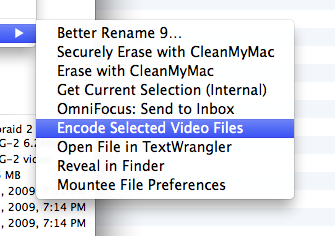
And then choose to encode to ProRes.
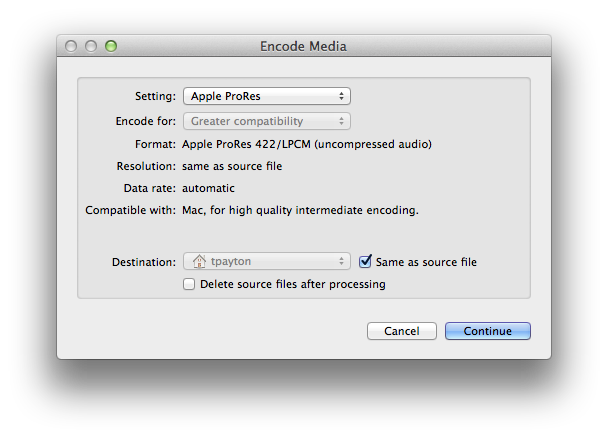
I'm doing a project for the US military and a lot of their old footage is in SD MPEG2. It converted all of them in a flash.
And then choose to encode to ProRes.
I'm doing a project for the US military and a lot of their old footage is in SD MPEG2. It converted all of them in a flash.
Last edit: 20 Mar 2014 03:09 by tpayton.
Please Log in to join the conversation.
20 Mar 2014 03:08 #43029
by dkag7
Replied by dkag7 on topic Everything is broken
Nice!
never knew that was even there...
never knew that was even there...
Please Log in to join the conversation.
21 Mar 2014 04:38 #43101
by ecphelps
Replied by ecphelps on topic Everything is broken
That's really cool, but I get this error.
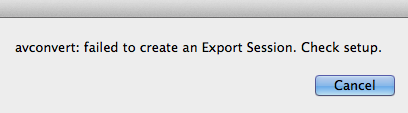
tpayton wrote: OS X can read most MPEG2s and convert them to ProRes using encoding services. Just right click on a clip in the Finder:
And then choose to encode to ProRes.
I'm doing a project for the US military and a lot of their old footage is in SD MPEG2. It converted all of them in a flash.
Please Log in to join the conversation.
21 Mar 2014 14:53 #43138
by tpayton
Replied by tpayton on topic Everything is broken
There are some flavors of MPEG2 it work work with, but to troubleshoot does the MPEG2 file in question open in quick view? (i.e. select file in finder and press space bar)
Please Log in to join the conversation.
21 Mar 2014 17:10 #43153
by ecphelps
Replied by ecphelps on topic Everything is broken
It opens - won't play, but I can skim through it manually.
tpayton wrote: There are some flavors of MPEG2 it work work with, but to troubleshoot does the MPEG2 file in question open in quick view? (i.e. select file in finder and press space bar)
Please Log in to join the conversation.
