


- Posts: 244
- Thank you received: 12
3 Post Moderation Rule for New Boarders (25 Jan 2021)
New boarders will have their posts moderated - Don't worry if you cannot see your post immediately.
So this FCPX lag that creeps into the UI with complex projects...I decided to measure it
- Doug Suiter
-
 Topic Author
- Offline
- Elite Member
-

Less
More
17 Feb 2014 02:22 - 17 Feb 2014 02:26 #41261
by Doug Suiter
So this FCPX lag that creeps into the UI with complex projects...I decided to measure it was created by Doug Suiter
Does this reflect your experiences? In particular look at how the UI lag doubles in a compound clip...
Last edit: 17 Feb 2014 02:26 by Doug Suiter.
Please Log in to join the conversation.
- ronny courtens
-

- Offline
- Moderator
-

Less
More
- Posts: 4455
- Thank you received: 962
17 Feb 2014 06:33 - 17 Feb 2014 06:34 #41265
by ronny courtens
Replied by ronny courtens on topic So this FCPX lag that creeps into the UI with complex projects...I decided to measure it
Hey Doug,
Thank you for taking the time to measure this, very interesting.
As more people are reporting sluggishness and UI quirks in Mavericks/10.1.1 while we don't have any issues at all, even with complex Libraries and Projects, I'm trying to find out what's really causing this. So I would be grateful if you could give me some more information:
- When you installed Mavericks, did you install it over your older OS or did you perform a clean install (wipe the system drive and install OS and applications on the clean drive)?
- Did you have any finder windows open or other applications running when you did the test?
- Can you have a look in your user Library > Preferences > ByHost folder. Open the ByHost folder and see if you have a file called "com.apple.FinalCut (with some random characters at the end)" file.
- When you create a new admin user account do you still see the same sluggishness with complex Libraries and Projects?
This information would be really helpful.
-Ronny
Thank you for taking the time to measure this, very interesting.
As more people are reporting sluggishness and UI quirks in Mavericks/10.1.1 while we don't have any issues at all, even with complex Libraries and Projects, I'm trying to find out what's really causing this. So I would be grateful if you could give me some more information:
- When you installed Mavericks, did you install it over your older OS or did you perform a clean install (wipe the system drive and install OS and applications on the clean drive)?
- Did you have any finder windows open or other applications running when you did the test?
- Can you have a look in your user Library > Preferences > ByHost folder. Open the ByHost folder and see if you have a file called "com.apple.FinalCut (with some random characters at the end)" file.
- When you create a new admin user account do you still see the same sluggishness with complex Libraries and Projects?
This information would be really helpful.
-Ronny
Last edit: 17 Feb 2014 06:34 by ronny courtens.
Please Log in to join the conversation.

17 Feb 2014 07:30 #41267
by Shane M
Replied by Shane M on topic So this FCPX lag that creeps into the UI with complex projects...I decided to measure it
I notice this too...I have a pretty maxed out late 2013 iMac (i7 - 24gb RAM - 4gb GFX) and Pegasus R4...still gets very bogged down sometimes. FCPX is so fast, but certain situations just make it move as if you are running through a swimming pool...
I think it might have something to do with RAM for me personally...
When I open FCPX it runs alright but after working in it a while and opening safari or something, activity monitor reflects the 24gb of ram maxing out somehow...and crappy performance accompanies this...
Guess i need 32gb...?
I think it might have something to do with RAM for me personally...
When I open FCPX it runs alright but after working in it a while and opening safari or something, activity monitor reflects the 24gb of ram maxing out somehow...and crappy performance accompanies this...
Guess i need 32gb...?
Please Log in to join the conversation.
- ronny courtens
-
- Offline
- Moderator
-
Less
More
- Posts: 4455
- Thank you received: 962
17 Feb 2014 07:44 #41268
by ronny courtens
Replied by ronny courtens on topic So this FCPX lag that creeps into the UI with complex projects...I decided to measure it
Guess i need 32gb...?
Nope, that's a myth unless your Library contains tons of oversized stills and/or 4K clips, or you have tons of un-rendered heavy titles on your timeline. We have some 2013 i7 iMacs with "only" 16 GB RAM and they perform perfectly with large projects and big libraries.
FCPX tends to take every bit of RAM it can find, so you could get sloppy system performance with any amount of RAM if you open other apps while editing.
- Ronny
Nope, that's a myth unless your Library contains tons of oversized stills and/or 4K clips, or you have tons of un-rendered heavy titles on your timeline. We have some 2013 i7 iMacs with "only" 16 GB RAM and they perform perfectly with large projects and big libraries.
FCPX tends to take every bit of RAM it can find, so you could get sloppy system performance with any amount of RAM if you open other apps while editing.
- Ronny
Please Log in to join the conversation.
- Tom Wolsky
-

- Offline
- Moderator
-
17 Feb 2014 07:58 #41269
by Tom Wolsky
Replied by Tom Wolsky on topic So this FCPX lag that creeps into the UI with complex projects...I decided to measure it
Sorry, but is there supposed to be a link or something here. I'm not seeing it.
Please Log in to join the conversation.
- ronny courtens
-
- Offline
- Moderator
-
Less
More
- Posts: 4455
- Thank you received: 962
17 Feb 2014 08:01 #41270
by ronny courtens
Replied by ronny courtens on topic So this FCPX lag that creeps into the UI with complex projects...I decided to measure it
Tom,
Don't you see the video window in your browser? If not, here's the direct link to the video on Vimeo:
vimeo.com/86859858
- Ronny
Don't you see the video window in your browser? If not, here's the direct link to the video on Vimeo:
vimeo.com/86859858
- Ronny
Please Log in to join the conversation.
- Tom Wolsky
-
- Offline
- Moderator
-
17 Feb 2014 08:06 #41271
by Tom Wolsky
Replied by Tom Wolsky on topic So this FCPX lag that creeps into the UI with complex projects...I decided to measure it
Not seeing that. Thanks for the link Ronny.
Please Log in to join the conversation.
17 Feb 2014 08:25 #41272
by Shane M
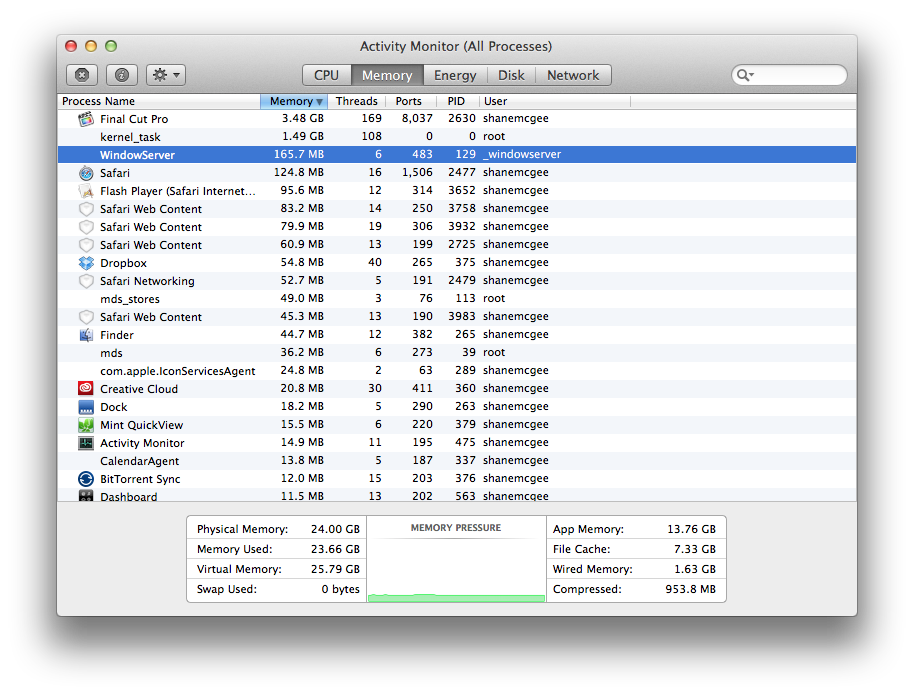
This is my current RAM usage right now...I have this window of safari open with 2 other tabs (not youtube or anything) and that is it as far as apps in addition to FCPX. No Mail, iChat, iTunes, etc.
The project I'm working on is a simple b-roll to music type of thing with zero titles or effects at this point. Its 5D Mark III footage...weird.
Replied by Shane M on topic So this FCPX lag that creeps into the UI with complex projects...I decided to measure it
ronny courtens wrote: Guess i need 32gb...?
Nope, that's a myth unless your Library contains tons of oversized stills and/or 4K clips, or you have tons of un-rendered heavy titles on your timeline. We have some 2013 i7 iMacs with "only" 16 GB RAM and they perform perfectly with large projects and big libraries.
FCPX tends to take every bit of RAM it can find, so you could get sloppy system performance with any amount of RAM if you open other apps while editing.
- Ronny
This is my current RAM usage right now...I have this window of safari open with 2 other tabs (not youtube or anything) and that is it as far as apps in addition to FCPX. No Mail, iChat, iTunes, etc.
The project I'm working on is a simple b-roll to music type of thing with zero titles or effects at this point. Its 5D Mark III footage...weird.
Please Log in to join the conversation.
- Doug Suiter
-
Topic Author
- Offline
- Elite Member
-
Less
More
- Posts: 244
- Thank you received: 12
17 Feb 2014 09:05 #41273
by Doug Suiter
Replied by Doug Suiter on topic So this FCPX lag that creeps into the UI with complex projects...I decided to measure it
Thanks for chiming in everyone:
I have an update.
I took this library with the particularly complex library and connected it to a New Mac Pro (12 core, top spec GFX cards). The library lives on an R6 Raid so it was easy.
Results were unfortunately exactly the same.
Like Shane, much of my footage is from a Canon Mark III. There's around 80 hours of footage I need to randomly access so transcoding is not really on option.
Yes I have been running other applications but the Mac Pro test was only running FCPX.
I have been experiencing some crashing of various types and one happened on the Mac Pro Test just as I was quitting FCPX. Crashes are usually related to a plugin, but never the same one.
I have removed plugins without improvement.
Ronny's comment about oversized stills is interesting. I will check for those.
Shane said "FCPX is so fast, but certain situations just make it move as if you are running through a swimming pool..." - i love that analogy - it's exactly how I feel.
To answer Ronnie's questions:
- When you installed Mavericks, did you install it over your older OS or did you perform a clean install (wipe the system drive and install OS and applications on the clean drive)?
Over the older OS - but the Mac Pro was a clean install.
- Did you have any finder windows open or other applications running when you did the test?
As stated, yes but not on the other machine
- Can you have a look in your user Library > Preferences > ByHost folder. Open the ByHost folder and see if you have a file called "com.apple.FinalCut (with some random characters at the end)" file.
Yes I Do: com.apple.FinalCutPro.PreferredEffects.C2CB1886-4B55-526A-9FAE-86D4B939C604.plist
- When you create a new admin user account do you still see the same sluggishness with complex Libraries and Projects?
Yes I do
I have an update.
I took this library with the particularly complex library and connected it to a New Mac Pro (12 core, top spec GFX cards). The library lives on an R6 Raid so it was easy.
Results were unfortunately exactly the same.
Like Shane, much of my footage is from a Canon Mark III. There's around 80 hours of footage I need to randomly access so transcoding is not really on option.
Yes I have been running other applications but the Mac Pro test was only running FCPX.
I have been experiencing some crashing of various types and one happened on the Mac Pro Test just as I was quitting FCPX. Crashes are usually related to a plugin, but never the same one.
I have removed plugins without improvement.
Ronny's comment about oversized stills is interesting. I will check for those.
Shane said "FCPX is so fast, but certain situations just make it move as if you are running through a swimming pool..." - i love that analogy - it's exactly how I feel.
To answer Ronnie's questions:
- When you installed Mavericks, did you install it over your older OS or did you perform a clean install (wipe the system drive and install OS and applications on the clean drive)?
Over the older OS - but the Mac Pro was a clean install.
- Did you have any finder windows open or other applications running when you did the test?
As stated, yes but not on the other machine
- Can you have a look in your user Library > Preferences > ByHost folder. Open the ByHost folder and see if you have a file called "com.apple.FinalCut (with some random characters at the end)" file.
Yes I Do: com.apple.FinalCutPro.PreferredEffects.C2CB1886-4B55-526A-9FAE-86D4B939C604.plist
- When you create a new admin user account do you still see the same sluggishness with complex Libraries and Projects?
Yes I do
Please Log in to join the conversation.
- ronny courtens
-
- Offline
- Moderator
-
Less
More
- Posts: 4455
- Thank you received: 962
17 Feb 2014 11:57 #41279
by ronny courtens
Replied by ronny courtens on topic So this FCPX lag that creeps into the UI with complex projects...I decided to measure it
@Shane:
Yes this is weird. A project such as you describe should play perfectly with only 8 GB RAM, and I see FCPX is only taking up 3.48 GB while your total App Memory usage with no other significant processes running shows 13.76 GB with 7.33 GB in cache.
Could you do a little test for me?
- Close FCPX, then launch it again with the same project and look at your Activity Monitor: does it read the same? If it shows the same:
- Close CPX, then shut down your computer. Start up the computer and launch FCPX with the same project. Do you still get the same results in Activity Monitor now?
@Doug,
Thank you for further testing, this is interesting. A managed Library of 80 hours of non-optimized H.264 files certainly is not a small thing to load, but I have seen bigger projects work without significant problems in 10.0.9.
You experience the same sluggishness working with a fresh user account, so I don't think your issue will be related to installing Mavericks over the older OS as has been the case with many others. Can you post a screenshot of your memory usage in Activity Monitor with that big Library opened in FCPX?
- Ronny
Yes this is weird. A project such as you describe should play perfectly with only 8 GB RAM, and I see FCPX is only taking up 3.48 GB while your total App Memory usage with no other significant processes running shows 13.76 GB with 7.33 GB in cache.
Could you do a little test for me?
- Close FCPX, then launch it again with the same project and look at your Activity Monitor: does it read the same? If it shows the same:
- Close CPX, then shut down your computer. Start up the computer and launch FCPX with the same project. Do you still get the same results in Activity Monitor now?
@Doug,
Thank you for further testing, this is interesting. A managed Library of 80 hours of non-optimized H.264 files certainly is not a small thing to load, but I have seen bigger projects work without significant problems in 10.0.9.
You experience the same sluggishness working with a fresh user account, so I don't think your issue will be related to installing Mavericks over the older OS as has been the case with many others. Can you post a screenshot of your memory usage in Activity Monitor with that big Library opened in FCPX?
- Ronny
Please Log in to join the conversation.
- FilipVandoorne
-

- Offline
- New Member
-

Less
More
- Posts: 3
- Thank you received: 0
17 Feb 2014 16:30 #41286
by FilipVandoorne
Replied by FilipVandoorne on topic So this FCPX lag that creeps into the UI with complex projects...I decided to measure it
i see you have the audiometers open - in the past some people reported a slower interface when this as open - right to the timeline.
does it make a difference ?
does it make a difference ?
Please Log in to join the conversation.
17 Feb 2014 18:51 #41298
by Shane M
Replied by Shane M on topic So this FCPX lag that creeps into the UI with complex projects...I decided to measure it
Yeah i did a quick test myself and I closed out FCPX after that and my RAM usage dropped to 11GB from nearly 24GB...even though its only apparently using 3.48GB...
It shows less ram usage when I relaunch or restart, but tends to creep back in and performance tends to creep downwards after working for a while. I'm sure this exasperated when adding filters, plugins, etc...but even if you remove them or turn them off, its as if it "won't let go" of this extra weight and will not snap back to for until you restart...which kinda sucks.
It shows less ram usage when I relaunch or restart, but tends to creep back in and performance tends to creep downwards after working for a while. I'm sure this exasperated when adding filters, plugins, etc...but even if you remove them or turn them off, its as if it "won't let go" of this extra weight and will not snap back to for until you restart...which kinda sucks.
Please Log in to join the conversation.
- ronny courtens
-
- Offline
- Moderator
-
Less
More
- Posts: 4455
- Thank you received: 962
17 Feb 2014 19:35 #41302
by ronny courtens
Replied by ronny courtens on topic So this FCPX lag that creeps into the UI with complex projects...I decided to measure it
11 GB RAM usage after restarting FCPX is quite normal because for your project FCPX uses 3.48 GB for its internal work and 7.33 GB to cache your files and effects.
The problem seems indeed that your unused RAM does not get released properly, causing your RAM usage to increase over time while you work. This has been reported before, so the best thing you can do is send feedback to Apple about this. You are certainly not the only one with these RAM issues and the more people complain about this the better
- Ronny
The problem seems indeed that your unused RAM does not get released properly, causing your RAM usage to increase over time while you work. This has been reported before, so the best thing you can do is send feedback to Apple about this. You are certainly not the only one with these RAM issues and the more people complain about this the better
- Ronny
Please Log in to join the conversation.
- Doug Suiter
-
Topic Author
- Offline
- Elite Member
-
Less
More
- Posts: 244
- Thank you received: 12
24 Feb 2014 11:58 - 24 Feb 2014 12:01 #41637
by Doug Suiter
Replied by Doug Suiter on topic So this FCPX lag that creeps into the UI with complex projects...I decided to measure it
UPDATE: So I completely reinstalled Mavericks and FCPX. I also left all the plugins uninstalled. I also removed all images from the library completely as several were quite large (Over 4k). No improvement. Two alternatives remain as far as I can tell: 1. FCPX can't handle a project of this complexity without slowing to a crawl, which I sincerely hope that isn't the case - or 2. The problem is specific to this library.
The only way to eliminate the second possibility is to create a new library from scratch and import edits as they exist with XMLs. That's going to be a lot of work, but I don't see any other alternative. Also, I'm afraid i might lose a *lot* of key wording.
To round this discussion off, I'd like to know if anyone is editing long form H.264 projects, with sync'd spilt audio, with basic grading and GFX and not experiencing the user interface sluggishness I am experiencing. I'd just like to know if it's reasonable for me to expect to able to do this given thunderbolt throughput (500 MB/s) Ram (32GB) and processing power (quad core i7 iMac)
The only way to eliminate the second possibility is to create a new library from scratch and import edits as they exist with XMLs. That's going to be a lot of work, but I don't see any other alternative. Also, I'm afraid i might lose a *lot* of key wording.
To round this discussion off, I'd like to know if anyone is editing long form H.264 projects, with sync'd spilt audio, with basic grading and GFX and not experiencing the user interface sluggishness I am experiencing. I'd just like to know if it's reasonable for me to expect to able to do this given thunderbolt throughput (500 MB/s) Ram (32GB) and processing power (quad core i7 iMac)
Last edit: 24 Feb 2014 12:01 by Doug Suiter.
Please Log in to join the conversation.
- Doug Suiter
-
Topic Author
- Offline
- Elite Member
-
Less
More
- Posts: 244
- Thank you received: 12
24 Feb 2014 12:36 #41639
by Doug Suiter
Replied by Doug Suiter on topic So this FCPX lag that creeps into the UI with complex projects...I decided to measure it
I should add to this... I just copied a project to a new library and associated media with it to test is a fresh library behaved any better with a 24 minute edit.
FCPX warned me that it was going to copy media used in that project which is normal. "Copy files to current library" is checked in preferences.
I had 4.87 TB free on my RAID.
The new library was a little over 800 GB according to Finder.
However, once the new library is created my free space on my Raid is still 4.87TB. Once I delete it, still 4.87TB remain.
Any ideas? Stills attached
www.evernote.com/shard/s3/sh/71cae4eb-3e...2d780afdf73caa987c65
www.evernote.com/shard/s3/sh/7e807e01-97...3089347da416a2c261a4
FCPX warned me that it was going to copy media used in that project which is normal. "Copy files to current library" is checked in preferences.
I had 4.87 TB free on my RAID.
The new library was a little over 800 GB according to Finder.
However, once the new library is created my free space on my Raid is still 4.87TB. Once I delete it, still 4.87TB remain.
Any ideas? Stills attached
www.evernote.com/shard/s3/sh/71cae4eb-3e...2d780afdf73caa987c65
www.evernote.com/shard/s3/sh/7e807e01-97...3089347da416a2c261a4
Please Log in to join the conversation.
- Tom Wolsky
-
- Offline
- Moderator
-
24 Feb 2014 12:48 #41640
by Tom Wolsky
Replied by Tom Wolsky on topic So this FCPX lag that creeps into the UI with complex projects...I decided to measure it
Yes. That's because when copying to a library on the same drive FCP uses hard links so the media is not duplicated on the disk. You have to delete both libraries to free the drive space. Great feature in 10.1.
Please Log in to join the conversation.

24 Feb 2014 14:03 #41642
by Wildgiles
Replied by Wildgiles on topic So this FCPX lag that creeps into the UI with complex projects...I decided to measure it
You may want to try transcoding all the media to Proxy and edit in Proxy. I find a substantial increase in performance in working with long H264 projects if I transcode the media.
Please Log in to join the conversation.


24 Feb 2014 14:59 #41644
by TGC
Replied by TGC on topic So this FCPX lag that creeps into the UI with complex projects...I decided to measure it
Are you doing a lot of duplicating as snapshot? I found on a recent project that this slowed my entire library hugely.
Please Log in to join the conversation.

24 Feb 2014 15:54 #41650
by BenB
Replied by BenB on topic So this FCPX lag that creeps into the UI with complex projects...I decided to measure it
H.264 can be taxing on any system. A large project should be using Proxy, or better yet, Optimized media. It will save you tons of time through the editing process, as well as during the export process.
Please Log in to join the conversation.
- Doug Suiter
-
Topic Author
- Offline
- Elite Member
-
Less
More
- Posts: 244
- Thank you received: 12
24 Feb 2014 22:14 #41680
by Doug Suiter
Thank you for pointing this out Tom. I had read that moving media between libraries always resulted in duplicated media. It is a great feature.
Replied by Doug Suiter on topic So this FCPX lag that creeps into the UI with complex projects...I decided to measure it
Tom Wolsky wrote: Yes. That's because when copying to a library on the same drive FCP uses hard links so the media is not duplicated on the disk. You have to delete both libraries to free the drive space. Great feature in 10.1.
Thank you for pointing this out Tom. I had read that moving media between libraries always resulted in duplicated media. It is a great feature.
Please Log in to join the conversation.
