


- Posts: 1
- Thank you received: 0
3 Post Moderation Rule for New Boarders (25 Jan 2021)
New boarders will have their posts moderated - Don't worry if you cannot see your post immediately.
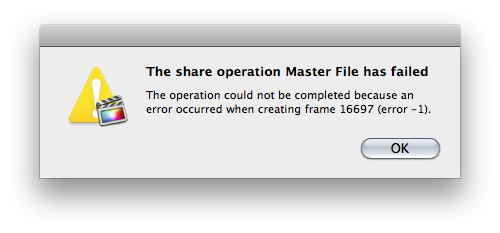
Pieces of Clips won't render & cannot export without errors
23 Jan 2014 07:08 #39578
by duncan916
I have two serious problems. I cannot get sections of clips in my timeline to render. I've even tried dumping all the render files for the project and re-rendering from scratch - same thing. Tiny pieces of a few clips won't render. I cannot afford to start over from scratch and I am really hoping someone can help me solve this problem.
My second problem is exporting. It never works with either of the projects I am working on. To be honest the only things I have ever gotten FCP X to export successfully were aprox. 1 min clips. I am so frustrated and disappointed with FCP X, I would ask Apple for a refund if I actually thought they would give me one. I cannot believe how bad this software is. It should have been the next version of iMovie.
My second problem is exporting. It never works with either of the projects I am working on. To be honest the only things I have ever gotten FCP X to export successfully were aprox. 1 min clips. I am so frustrated and disappointed with FCP X, I would ask Apple for a refund if I actually thought they would give me one. I cannot believe how bad this software is. It should have been the next version of iMovie.
Please Log in to join the conversation.
- ronny courtens
-

- Offline
- Moderator
-

Less
More
- Posts: 4455
- Thank you received: 962
23 Jan 2014 09:13 #39595
by ronny courtens
Replied by ronny courtens on topic Pieces of Clips won't render & cannot export without errors
In fact that's only one problem. As some parts of your clips won't render this means there is a problem with those clips, so it's normal your export will stop there.
What version of FCPX and OS are you running?
What are the clips that won't render? (Stills, graphics, video?)
Do you have any effects applied to the problematic clips? If so: which ones?
- Ronny
What version of FCPX and OS are you running?
What are the clips that won't render? (Stills, graphics, video?)
Do you have any effects applied to the problematic clips? If so: which ones?
- Ronny
Please Log in to join the conversation.
- orangebeard
-

- Offline
- New Member
-

Less
More
- Posts: 8
- Thank you received: 2
23 Jan 2014 17:02 - 23 Jan 2014 17:04 #39634
by orangebeard
Replied by orangebeard on topic Pieces of Clips won't render & cannot export without errors
I've had a very similar problem with a project I was working on. I had a wedding ceremony that I have been editing, with four separate story lines (4 camera angles). A small section of one of the clips (shot at 30fps and slowed down to 24fps) wouldn't finish rendering. It stayed orange forever, never changed, and the GPU fans spun up to max speed. The progress indicator kept going from 0-100 forever. I let it just sit there (over an hour) in hopes it would finish rendering, but it never stopped. Infinite loop of sorts for sure.
The only fix I found to help was to find the exact clip in the event browser and replace the clip. Fortunately, that was the only clip that needed fixing and it was small (5 seconds).
The only thing I can think of that might have caused the problem is, I've been changing out video cards in my 2008 Mac Pro to see which ones worked best. No idea if this would have caused it.
Hope some of the details I've mentioned can help. Wish you the best because it can be very frustrating.
The only fix I found to help was to find the exact clip in the event browser and replace the clip. Fortunately, that was the only clip that needed fixing and it was small (5 seconds).
The only thing I can think of that might have caused the problem is, I've been changing out video cards in my 2008 Mac Pro to see which ones worked best. No idea if this would have caused it.
Hope some of the details I've mentioned can help. Wish you the best because it can be very frustrating.
Last edit: 23 Jan 2014 17:04 by orangebeard.
Please Log in to join the conversation.
