


- Posts: 14
- Thank you received: 0
3 Post Moderation Rule for New Boarders (25 Jan 2021)
New boarders will have their posts moderated - Don't worry if you cannot see your post immediately.
Media Management - Workflow
09 Nov 2013 18:53 #33907
by Whoopa
Media Management - Workflow was created by Whoopa
Hey All,
I've been struggling for some time to get a good workflow when it comes to media management. I'm a GoPro shooter, often with more than 3 angle cameras at once.
I end up with a bunch of SD-cards with the content. Usually it's 5-6 files on each and one problem is that they are labeled similarly (GOPR00XX.mp4). To solve this, I simply put them in different sub folders in a parent event folder.
So it's Event -> Session -> Camera
Would you do it this way?
This means I don't copy the files to the FCP Event folder. Folders will set the keyword collection instead.
Optimized and Proxy are disabled, since it takes too long time and source is in H.264.
Once done, I'll create a project and do my editing. Then export.
The problem comes when I want to duplicate projects.
When selecting:
- Duplicate project and Referenced Events
- Duplicate project + Used Clips
I'll get the "Two or more media files use the same name. Rename the file or files and try again"
Is there anyone else who films with several cameras and have a good workflow around this?
I'm thinking of relabeling the camera files so I get DATE_CAMERA_FILE.mp4 instead. But perhaps there is a better way?
I've been struggling for some time to get a good workflow when it comes to media management. I'm a GoPro shooter, often with more than 3 angle cameras at once.
I end up with a bunch of SD-cards with the content. Usually it's 5-6 files on each and one problem is that they are labeled similarly (GOPR00XX.mp4). To solve this, I simply put them in different sub folders in a parent event folder.
So it's Event -> Session -> Camera
Would you do it this way?
This means I don't copy the files to the FCP Event folder. Folders will set the keyword collection instead.
Optimized and Proxy are disabled, since it takes too long time and source is in H.264.
Once done, I'll create a project and do my editing. Then export.
The problem comes when I want to duplicate projects.
When selecting:
- Duplicate project and Referenced Events
- Duplicate project + Used Clips
I'll get the "Two or more media files use the same name. Rename the file or files and try again"
Is there anyone else who films with several cameras and have a good workflow around this?
I'm thinking of relabeling the camera files so I get DATE_CAMERA_FILE.mp4 instead. But perhaps there is a better way?
Please Log in to join the conversation.
- Tom Wolsky
-

- Offline
- Moderator
-

09 Nov 2013 19:21 #33909
by Tom Wolsky
Replied by Tom Wolsky on topic Media Management - Workflow
You don't need proxies, but the MPEG-4 media should be optimized.
Please Log in to join the conversation.
- ronny courtens
-

- Offline
- Moderator
-
Less
More
- Posts: 4455
- Thank you received: 962
09 Nov 2013 19:55 #33910
by ronny courtens
Replied by ronny courtens on topic Media Management - Workflow
It's an ongoing problem with cameras that don't add unique identifiers to their recorded files. I often work with multiple angles from different cameras, but these cameras add true metadata with unique identifiers to each clip, so we don't have these problems.
Yes I think your solution of renaming the .mp4 clips prior to importing will work. You simply cannot have clips with exactly the same name in any Original media folders if you want to manage media from different Events.
- Ronny
Yes I think your solution of renaming the .mp4 clips prior to importing will work. You simply cannot have clips with exactly the same name in any Original media folders if you want to manage media from different Events.
- Ronny
Please Log in to join the conversation.
- MadsLarsenNielsen
-

- Offline
- New Member
-

Less
More
- Posts: 14
- Thank you received: 2
09 Nov 2013 21:08 #33911
by MadsLarsenNielsen
Replied by MadsLarsenNielsen on topic Media Management - Workflow
Whoopa, you should definitely rename your files before importing them into FCP X.
Use either Automator (available in your OSX) or Name Mangler ($19) to batch rename the files.
For reconnect reasons I always try to keep my media in just one folder. I throw the files into Automator and add the production title/number, the scene, maybe even the shooting date, and most importantly the camera name/number and card number before the existing files name. This way I keep the original numbering, just adding data to the file name.
So the file originally was named GOPR00XX.mp4, now it's ProductionSomething_E03_BeachScene_Cam2_Card4_GOPR00XX.mp4
And depending on the amount of footage and angles in the multicam project, I would probably convert the mp4 to a ProRes format before importing, or at the very least let FCP X make proxies. I ALWAYS convert GoPro.
Regards,
Mads
Use either Automator (available in your OSX) or Name Mangler ($19) to batch rename the files.
For reconnect reasons I always try to keep my media in just one folder. I throw the files into Automator and add the production title/number, the scene, maybe even the shooting date, and most importantly the camera name/number and card number before the existing files name. This way I keep the original numbering, just adding data to the file name.
So the file originally was named GOPR00XX.mp4, now it's ProductionSomething_E03_BeachScene_Cam2_Card4_GOPR00XX.mp4
And depending on the amount of footage and angles in the multicam project, I would probably convert the mp4 to a ProRes format before importing, or at the very least let FCP X make proxies. I ALWAYS convert GoPro.
Regards,
Mads
Please Log in to join the conversation.
- Darren Roark
-
- Offline
- Platinum Member
-

09 Nov 2013 21:23 #33912
by Darren Roark
Replied by Darren Roark on topic Media Management - Workflow
If you import using the import window and then add camera angle tags does it still give the error? When I import files to an event doing this it adds (fcp) or (fcp 2) and so on to the duplicate file names.
It's when I drag things straight in to the event is when I have problems.
It's when I drag things straight in to the event is when I have problems.
Please Log in to join the conversation.
09 Nov 2013 22:16 #33913
by Whoopa
Replied by Whoopa on topic Media Management - Workflow
Thanks for input, Editing format is another topic. 
Right now I lean towards changing the workflow and add a step with batch name conversion. If anyone has a good workflow for working around this. Please share!
I've found two ways FCPX works with events is:
A. Two footage files with the same name - into the same event:
Footage is stored in same folders.
Name change from FCPX, adds (fcp1), (fcp2), etc..
B. Two footage files with the same name - into different events:
Footage is stored in different folders.
No name change from FCPX.
The conflict reveals itself in projects thought:
Once you want to duplicate your project and copy the relevant/all events. FCPX wants to create a third Event containing the clips. It results in:
Footage is stored in same folders.
No name change from FCPX.
...and this is where the conflict occurs.
So it seems it will be:
1. Batch rename
2. Choose option B.
3. Create project...
4. Duplicate without file conflict.
Right now I lean towards changing the workflow and add a step with batch name conversion. If anyone has a good workflow for working around this. Please share!
I've found two ways FCPX works with events is:
A. Two footage files with the same name - into the same event:
Footage is stored in same folders.
Name change from FCPX, adds (fcp1), (fcp2), etc..
B. Two footage files with the same name - into different events:
Footage is stored in different folders.
No name change from FCPX.
The conflict reveals itself in projects thought:
Once you want to duplicate your project and copy the relevant/all events. FCPX wants to create a third Event containing the clips. It results in:
Footage is stored in same folders.
No name change from FCPX.
...and this is where the conflict occurs.
So it seems it will be:
1. Batch rename
2. Choose option B.
3. Create project...
4. Duplicate without file conflict.
Please Log in to join the conversation.
10 Nov 2013 10:51 #33938
by Whoopa
Replied by Whoopa on topic Media Management - Workflow
This is starting to feel silly.
I'm renaming all clips with: DATE_PRODUCTION_EVENT_CAMERA_ORGINALFILENAME.XXX
Then I'm in FCPX and start to create events, clip names, key words, camera angles... again. I feel I'm doing redundant work in FINDER and in FCPX.
No one else who perhaps have a better workflow for this?
I'm renaming all clips with: DATE_PRODUCTION_EVENT_CAMERA_ORGINALFILENAME.XXX
Then I'm in FCPX and start to create events, clip names, key words, camera angles... again. I feel I'm doing redundant work in FINDER and in FCPX.
No one else who perhaps have a better workflow for this?
Please Log in to join the conversation.
- ronny courtens
-
- Offline
- Moderator
-
Less
More
- Posts: 4455
- Thank you received: 962
10 Nov 2013 12:46 #33939
by ronny courtens
Replied by ronny courtens on topic Media Management - Workflow
I know, it's a pain. Camera manufacturers should be forced by law to add unique file names to all their clips. Fortunately most cameras don't have this problem.
But if you have to work with video recorded by such cameras the only thing you can do is to manually change the clip names to avoid duplicate file names during media management. As said before: you can do this yourself clip by clip or you can use Automator or a batch renaming application for this.
At this point you cannot rename original clips from within FCPX. But even if you could do this you still would have to do it the same way you are doing it now: clip by clip or in batch.
So I'm afraid there is no better workflow at this moment. There are strong indications that media management will completely change in the next FCPX update, so there may be better hope for the near future. Still the real underlying problem is with the camera.
- Ronny
But if you have to work with video recorded by such cameras the only thing you can do is to manually change the clip names to avoid duplicate file names during media management. As said before: you can do this yourself clip by clip or you can use Automator or a batch renaming application for this.
At this point you cannot rename original clips from within FCPX. But even if you could do this you still would have to do it the same way you are doing it now: clip by clip or in batch.
So I'm afraid there is no better workflow at this moment. There are strong indications that media management will completely change in the next FCPX update, so there may be better hope for the near future. Still the real underlying problem is with the camera.
- Ronny
Please Log in to join the conversation.
10 Nov 2013 13:17 #33941
by Whoopa
Replied by Whoopa on topic Media Management - Workflow
I'm hoping for the best for next update. It's been some time since FCPX was updated.
Great to hear the input though. Glad I wasn't missing something completely obvious..
Great to hear the input though. Glad I wasn't missing something completely obvious..
Please Log in to join the conversation.
- Scrubelicious
-

- Offline
- Platinum Member
-
Less
More
- Posts: 1228
- Thank you received: 114
10 Nov 2013 14:13 #33943
by Scrubelicious
Replied by Scrubelicious on topic Media Management - Workflow
Name Mangler is good tool to have it will give you some really cool options and flexibility.
One suggestion would be renaming your files to: CAM(X)_Date_Time
(X) letter or number of camera.

One suggestion would be renaming your files to: CAM(X)_Date_Time
(X) letter or number of camera.
Please Log in to join the conversation.
- ronny courtens
-
- Offline
- Moderator
-
Less
More
- Posts: 4455
- Thank you received: 962
10 Nov 2013 14:49 #33944
by ronny courtens
Replied by ronny courtens on topic Media Management - Workflow
No it's absolutely not your fault, this has been an ongoing issue for a long time now. I do have great hopes for FCPX 10.1. In fact I think I have some good news for you.
When I first opened the new iMovie I became convinced that it contained a lot of signs about the next iteration of FCPX. In the meantime this has been confirmed by some excellent detective work from Alex 4D. So I just launched iMovie X and did a test.
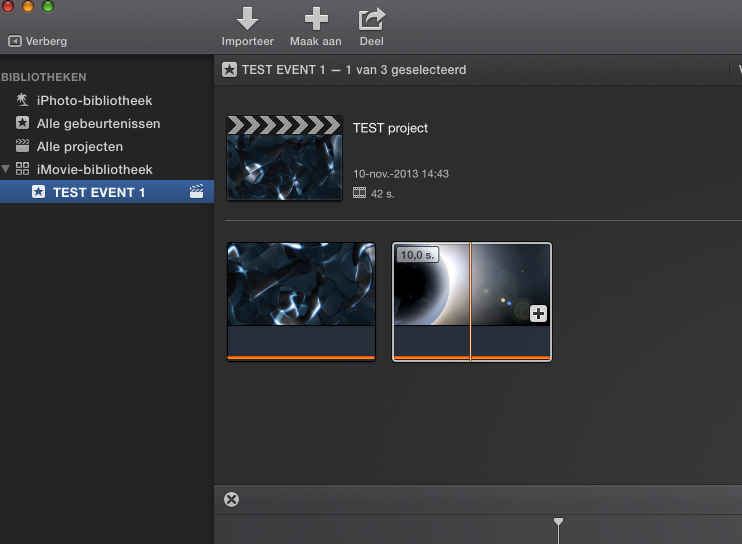
First I created two Events: Test Event 1 and Test Event 2. I also created a new "Test" Project in Test Event 1.
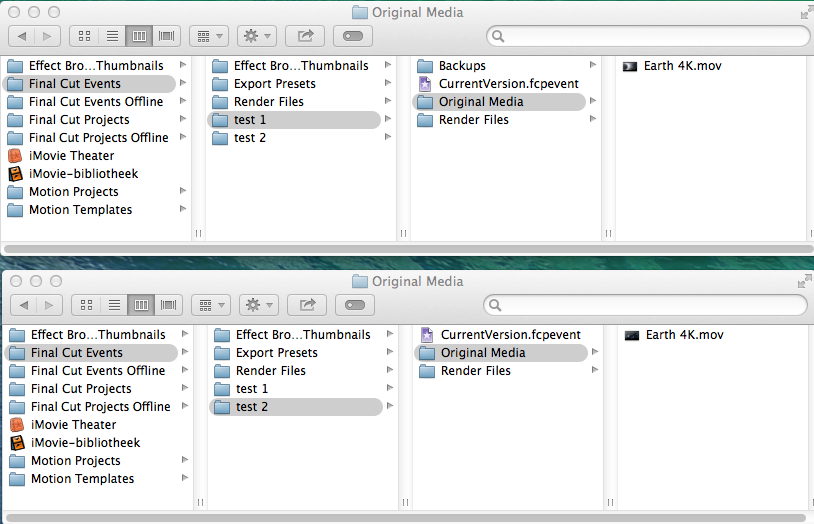
Then I took two mov files I had and gave these files exactly the same name: "Earth 4K". I then imported one of these files in Test Event 1:
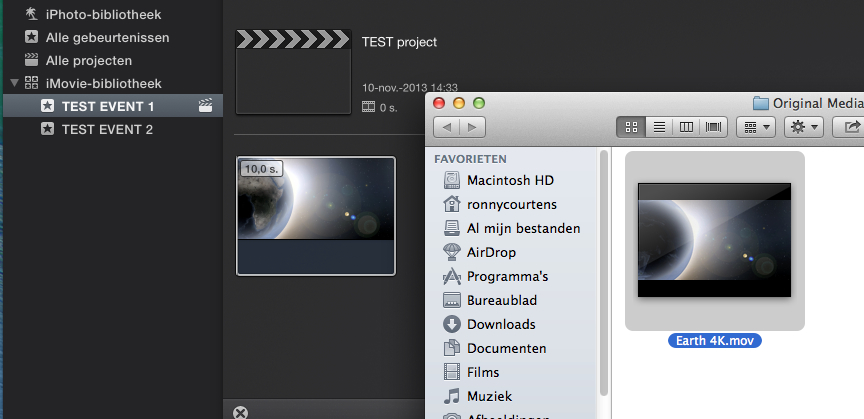
Then I imported the other file (with exactly the same name) in Test Event 2:
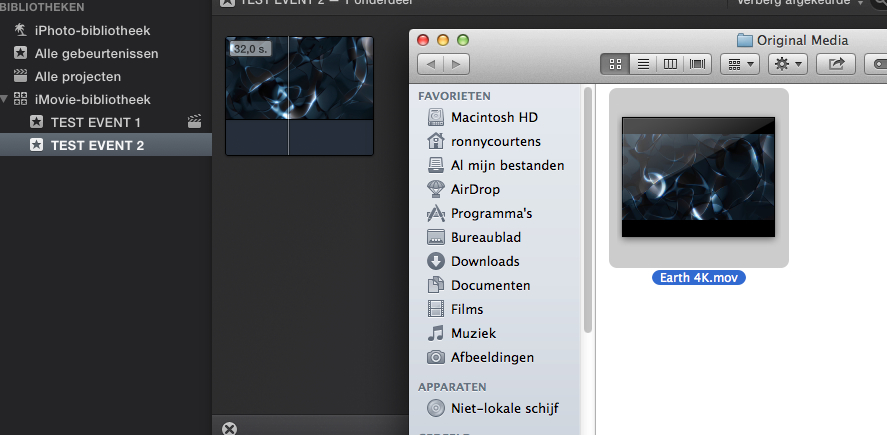
As you can see the names of the files were not modified in the Original Media folders by iMovie X. Then I put the two clips on the Test Project timeline:
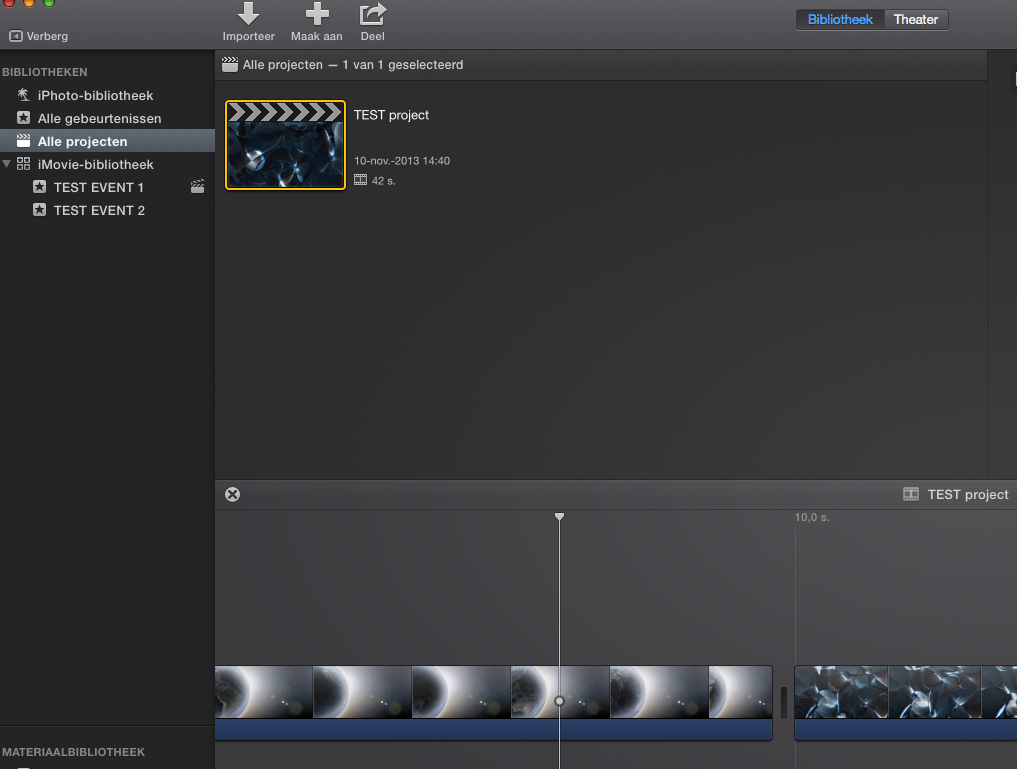
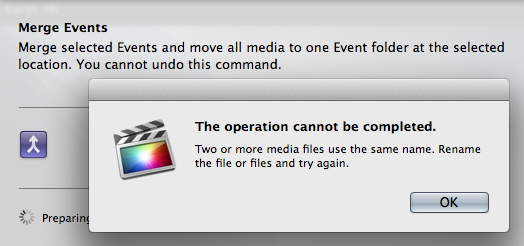
Finally I merged the two Events by dragging Test Event 2 onto Test Event 1 in the Event Browser. In current FCPX this would lead to an error message saying that the operation could not be completed because of the duplicate file names. This is what I got doing exactly the same thing in FCPX:
But in iMovie X it works. When you merge Events with clips that have the same file names iMovie X changes the names of the duplicate files and it successfully puts all the clips into one Original Media folder:
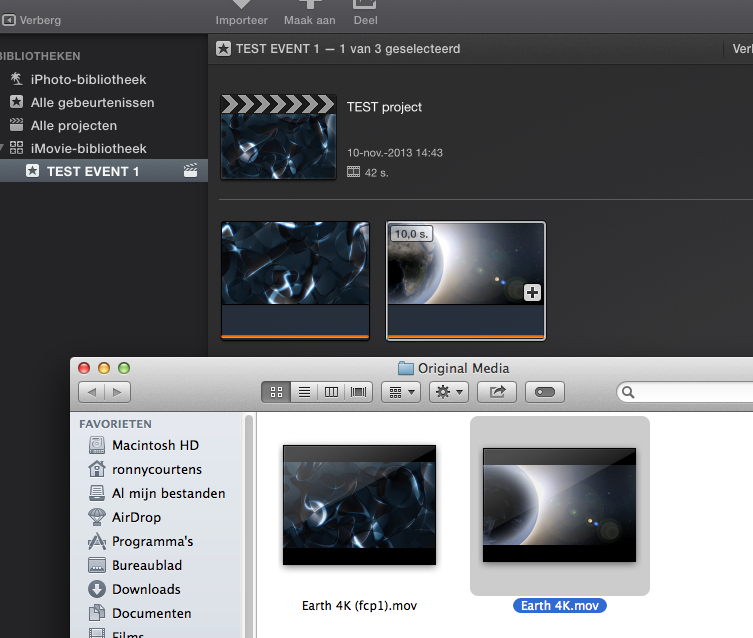
So yes, this issue will probably be solved in the next FCPX update.
- Ronny
When I first opened the new iMovie I became convinced that it contained a lot of signs about the next iteration of FCPX. In the meantime this has been confirmed by some excellent detective work from Alex 4D. So I just launched iMovie X and did a test.
First I created two Events: Test Event 1 and Test Event 2. I also created a new "Test" Project in Test Event 1.
Then I took two mov files I had and gave these files exactly the same name: "Earth 4K". I then imported one of these files in Test Event 1:
Then I imported the other file (with exactly the same name) in Test Event 2:
As you can see the names of the files were not modified in the Original Media folders by iMovie X. Then I put the two clips on the Test Project timeline:
Finally I merged the two Events by dragging Test Event 2 onto Test Event 1 in the Event Browser. In current FCPX this would lead to an error message saying that the operation could not be completed because of the duplicate file names. This is what I got doing exactly the same thing in FCPX:
But in iMovie X it works. When you merge Events with clips that have the same file names iMovie X changes the names of the duplicate files and it successfully puts all the clips into one Original Media folder:
So yes, this issue will probably be solved in the next FCPX update.
- Ronny
Please Log in to join the conversation.
- Tom Wolsky
-
- Offline
- Moderator
-
10 Nov 2013 17:51 #33947
by Tom Wolsky
Replied by Tom Wolsky on topic Media Management - Workflow
Actually FCP does exactly the sane thing already. The duplicate file name issue never arises in FCP, in my experience, when the media is inside the event folder. The only time the problem occurs is when the media is referenced and outside the event folder. Then the merge function creates a problem. I don't know if you can test this state in the current iMovie.
Please Log in to join the conversation.
- ronny courtens
-
- Offline
- Moderator
-
Less
More
- Posts: 4455
- Thank you received: 962
10 Nov 2013 18:04 #33948
by ronny courtens
Replied by ronny courtens on topic Media Management - Workflow
Tom, before posting my findings I also did the test in FCPX and as you can see in the screenshot the media were imported in both Events and did not reference media outside the Event folder. Nevertheless I got the error message and was unable to merge the Events. In iMovie the exact same test did work.
- Ronny
- Ronny
Please Log in to join the conversation.
- Tom Wolsky
-
- Offline
- Moderator
-
10 Nov 2013 18:08 #33949
by Tom Wolsky
Replied by Tom Wolsky on topic Media Management - Workflow
How are you importing and then merging the events? FCP usually tags the name with an identifier. I will test it again, but that's not what I've seen in the past.
Please Log in to join the conversation.
- ronny courtens
-
- Offline
- Moderator
-
Less
More
- Posts: 4455
- Thank you received: 962
10 Nov 2013 18:22 #33950
by ronny courtens
Replied by ronny courtens on topic Media Management - Workflow
I have imported each file in a separate Event ("Test 1" and "Test 2") with "Copy files to Event" checked.
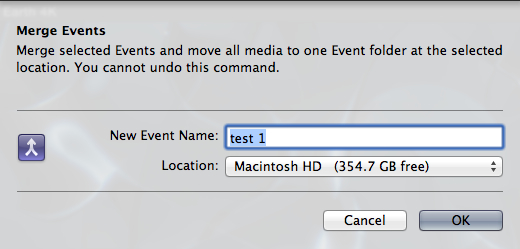
I then dragged Event 2 onto Event 1 in the Event Browser to merge them, which is a standard procedure. When you do this you get a window asking you to name the merged Event:
First I chose to merge everything into "test 1" and I got the error message:
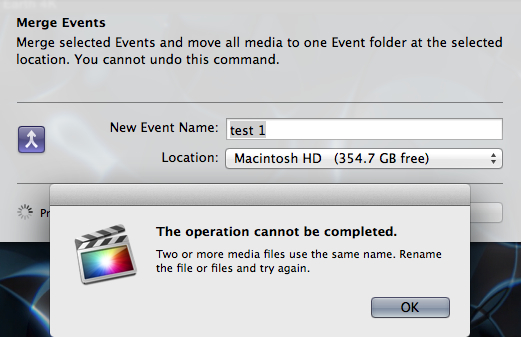
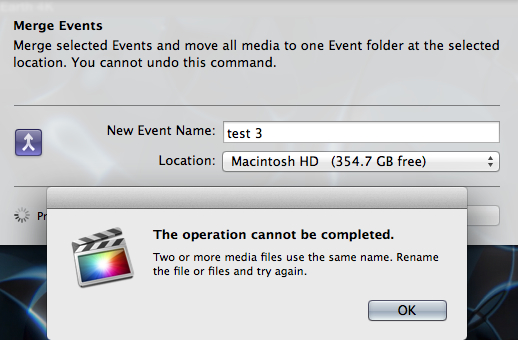
Then I thought I got the error because I did not create a new Event, so I named the merged Event "test 3"instead, but I got the same error message:
Doing exactly the same thing in iMovie merged both Events into one without any problem.
- Ronny
I then dragged Event 2 onto Event 1 in the Event Browser to merge them, which is a standard procedure. When you do this you get a window asking you to name the merged Event:
First I chose to merge everything into "test 1" and I got the error message:
Then I thought I got the error because I did not create a new Event, so I named the merged Event "test 3"instead, but I got the same error message:
Doing exactly the same thing in iMovie merged both Events into one without any problem.
- Ronny
Please Log in to join the conversation.
- Tom Wolsky
-
- Offline
- Moderator
-
10 Nov 2013 19:19 #33952
by Tom Wolsky
Replied by Tom Wolsky on topic Media Management - Workflow
I don't get. I absolutely cannot reproduce this in 19.0.9. Either by drag merging? By using the merge function, by using an existing name or a new name for the event, the files always merge correctly. Even if I have the two clips in two separate projects referencing separate events it still merges correctly. I end up with a single clip not a duplicate and it is used in two projects both referencing the merged event.
Please Log in to join the conversation.
- ronny courtens
-
- Offline
- Moderator
-
Less
More
- Posts: 4455
- Thank you received: 962
10 Nov 2013 19:27 #33953
by ronny courtens
Replied by ronny courtens on topic Media Management - Workflow
Tom, have you made sure that the imported files in the Original Media folders of both Events have exactly the same file format and exactly the same name? That's the issue the OP had and that we are trying to reproduce. If FCPX adds unique metadata to your files while importing (which it does for most files from camera cards except for some cameras such as the one the OP has used) there won't be any error.
- Ronny
- Ronny
Please Log in to join the conversation.
- Tom Wolsky
-
- Offline
- Moderator
-
10 Nov 2013 19:36 #33954
by Tom Wolsky
Replied by Tom Wolsky on topic Media Management - Workflow
I used an old DV file with a unique name Archer1.mov. If I merge the events there is a single Archer1.mov in the merged event and in the browser. If I use the two clips from the two events in two projects, the merged event shows two clips in the browser with the same name, and they are both referencing the same file in the merged event folder.
Please Log in to join the conversation.
- ronny courtens
-
- Offline
- Moderator
-
Less
More
- Posts: 4455
- Thank you received: 962
10 Nov 2013 19:45 #33955
by ronny courtens
Replied by ronny courtens on topic Media Management - Workflow
Ah, I see. Yes this will work without any issues. The problem only arises when you import two different clips (from different camera folders) that have the same names such as "MOV.00001" into two different Events. When you then merge the Events you will get the error message because the Original Media folders from both Events contain different clips with exactly the same names, so they cannot be put together in the merged Original Media folder. It is a known issue that has been causing anger for a long time now.
- Ronny
- Ronny
Please Log in to join the conversation.
- Tom Wolsky
-
- Offline
- Moderator
-
10 Nov 2013 20:19 #33956
by Tom Wolsky
Replied by Tom Wolsky on topic Media Management - Workflow
So how does iMovie merge them? Puts two clips in the same place with the same name?
Please Log in to join the conversation.
