


- Posts: 379
- Thank you received: 6
3 Post Moderation Rule for New Boarders (25 Jan 2021)
New boarders will have their posts moderated - Don't worry if you cannot see your post immediately.
Original Media Folder
- Marc Lucas
-
 Topic Author
- Offline
- Platinum Member
-

Less
More
28 Oct 2013 23:57 #33393
by Marc Lucas
Original Media Folder was created by Marc Lucas
Inside my original media folder in my Event I had a folder within that folder I had 4 separate time-lapses each in their own folder. when I open FCPX all the .jpgs are in a smart collection called 'Stills' if I then go to my original media folder ALL the .jpgs have been moved out of their folders and now reside in the main Original media folder.
Does this mean you can't have folder within a folder inside the original media folder?
Does this mean you can't have folder within a folder inside the original media folder?
Please Log in to join the conversation.


29 Oct 2013 00:57 #33395
by Ellard
Replied by Ellard on topic Original Media Folder
Yup
Please Log in to join the conversation.
29 Oct 2013 00:59 #33396
by plysat
Can't sleep? Try this: fcpxpert.net ;-)
Replied by plysat on topic Original Media Folder
"Does this mean you can't have folder within a folder inside the original media folder?"
You should absolutely not be making folders or doing *anything* inside that folder from the Finder. Bad things can result....
You should absolutely not be making folders or doing *anything* inside that folder from the Finder. Bad things can result....
Can't sleep? Try this: fcpxpert.net ;-)
Please Log in to join the conversation.
29 Oct 2013 08:20 #33402
by Julian
Replied by Julian on topic Original Media Folder
If you want to organize your files at the finder level you can do that before you bring the footage into FCPX. When you import footage, leave the box unchecked that says "copy files to final cut event folder" or something along those lines. But I'd just use the event browser in FCPX to organize events. Smart collections are essential to good media management.
If you still want to somewhat keep these files organized in the original media folder, just tag them if you have mavericks installed. You'll be able to search for that tag and it will basically give you the same results as a folder.
If you still want to somewhat keep these files organized in the original media folder, just tag them if you have mavericks installed. You'll be able to search for that tag and it will basically give you the same results as a folder.
Please Log in to join the conversation.
- Marc Lucas
-
Topic Author
- Offline
- Platinum Member
-
Less
More
- Posts: 379
- Thank you received: 6
29 Oct 2013 10:09 #33404
by Marc Lucas
Replied by Marc Lucas on topic Original Media Folder
But that is what I did Julian. The stills (time lapses) were in a folder in the Original media folder. I didn't import them into the Event because there where just media associated to the Event because I made the time-lapse movies out of them in AE. I had a smart collection that collected all stills in the Event maybe that affected the things? I didn't import them in.
Please Log in to join the conversation.
- Tom Wolsky
-

- Offline
- Moderator
-

29 Oct 2013 10:31 #33405
by Tom Wolsky
Replied by Tom Wolsky on topic Original Media Folder
Did you just put the folder in Original Media without importing it?
Please Log in to join the conversation.
- Marc Lucas
-
Topic Author
- Offline
- Platinum Member
-
Less
More
- Posts: 379
- Thank you received: 6
29 Oct 2013 10:38 #33406
by Marc Lucas
Replied by Marc Lucas on topic Marc Lucas
Yes. Thats what I can't understand. The folder was put in there before I opened FCPX
Please Log in to join the conversation.
- ronny courtens
-

- Offline
- Moderator
-
Less
More
- Posts: 4455
- Thank you received: 962
29 Oct 2013 11:39 - 29 Oct 2013 11:44 #33409
by ronny courtens
Replied by ronny courtens on topic Marc Lucas
Hi Marc,
The FCPX database works with very distinct naming and format conventions. When you launch FCPX it looks for original media and to find these it goes to the folder named "Original Media". Inside that folder it looks for files that have file format extensions (or symlinks to files with format extensions). Every file with a file format extension will be recognized by FCPX and listed in the Event Browser.
Folders inside the Original Media folder don't have file format extensions, so they will not be recognized by FCPX and the folder or the media inside it will not appear in the Event Browser. That's why you cannot have folders inside the Original Media folder. It's always best to let FCPX do the importing and organizing and not do it yourself using the Finder.
- Ronny
The FCPX database works with very distinct naming and format conventions. When you launch FCPX it looks for original media and to find these it goes to the folder named "Original Media". Inside that folder it looks for files that have file format extensions (or symlinks to files with format extensions). Every file with a file format extension will be recognized by FCPX and listed in the Event Browser.
Folders inside the Original Media folder don't have file format extensions, so they will not be recognized by FCPX and the folder or the media inside it will not appear in the Event Browser. That's why you cannot have folders inside the Original Media folder. It's always best to let FCPX do the importing and organizing and not do it yourself using the Finder.
- Ronny
Last edit: 29 Oct 2013 11:44 by ronny courtens.
Please Log in to join the conversation.
- Marc Lucas
-
Topic Author
- Offline
- Platinum Member
-
Less
More
- Posts: 379
- Thank you received: 6
29 Oct 2013 12:31 #33412
by Marc Lucas
Replied by Marc Lucas on topic Original Media Folder
So then Ronny try this.
Make a new Event in FCPX with no media in it. Make a smart collection in the Event and select media type Stills, then close FCPX.
Go to the location of the Event and make a folder named Original Media (you will have to do this because you didn't import anything into the Event was setup) Now within that Original Media folder make a new folder call it whatever you want and place few 'Stills' in that folder .jpegs or .png's etc
Now open FCPX and go to the Event you setup and the 'Stills' will appear in the Event, even though they were INSIDE the folder inside the Original Media folder???
Let me know if they are for you? I have just tested this and they appeared for me which goes against what you state and backs up my original post. Thats why I couldn't understand what was going on.
Make a new Event in FCPX with no media in it. Make a smart collection in the Event and select media type Stills, then close FCPX.
Go to the location of the Event and make a folder named Original Media (you will have to do this because you didn't import anything into the Event was setup) Now within that Original Media folder make a new folder call it whatever you want and place few 'Stills' in that folder .jpegs or .png's etc
Now open FCPX and go to the Event you setup and the 'Stills' will appear in the Event, even though they were INSIDE the folder inside the Original Media folder???
Let me know if they are for you? I have just tested this and they appeared for me which goes against what you state and backs up my original post. Thats why I couldn't understand what was going on.
Please Log in to join the conversation.
- ronny courtens
-
- Offline
- Moderator
-
Less
More
- Posts: 4455
- Thank you received: 962
30 Oct 2013 14:54 #33485
by ronny courtens
Replied by ronny courtens on topic Original Media Folder
Hi Marc,
I have tested this just now and when you create an Event, then close FCPX and in the Finder you add a folder with media to the Original Media folder FCPX will recognize the files inside the folder (so you are correct). But as I said it won't recognize the folder, only the media files. And even more: it will throw the media out of the folder and put the individual files to the top level of the Original Media folder. So I have to repeat: you cannot have folders inside the Original Media folder. It's always best to let FCPX do the importing and organizing and not do it yourself using the Finder.
- Ronny
I have tested this just now and when you create an Event, then close FCPX and in the Finder you add a folder with media to the Original Media folder FCPX will recognize the files inside the folder (so you are correct). But as I said it won't recognize the folder, only the media files. And even more: it will throw the media out of the folder and put the individual files to the top level of the Original Media folder. So I have to repeat: you cannot have folders inside the Original Media folder. It's always best to let FCPX do the importing and organizing and not do it yourself using the Finder.
- Ronny
Please Log in to join the conversation.
- Marc Lucas
-
Topic Author
- Offline
- Platinum Member
-
Less
More
- Posts: 379
- Thank you received: 6
30 Oct 2013 15:24 #33488
by Marc Lucas
Replied by Marc Lucas on topic Original Media Folder
Yes Ronny all you have stated was in my previous post. The point I was making or trying to find out was WHY FCPX was in effect extracting this files out of the folder I couldn't understand it.
Please Log in to join the conversation.

30 Oct 2013 15:52 #33491
by anickt
Replied by anickt on topic Original Media Folder
I think it's because FCP X determines the file structure of the folders inside of the Projects and Events folders in order to maintain it's database properly. I stay out of those folders completely. Never touch them. Anything I don't directly import into an event is in an "elements" folder on the same RAID so that FCP X just creates aliases to files in that folder. I have never (touch wood) had a problem with missing files, projects, events etc. since I started using FCP X 10.0.0.
Please Log in to join the conversation.
- Marc Lucas
-
Topic Author
- Offline
- Platinum Member
-
Less
More
- Posts: 379
- Thank you received: 6
30 Oct 2013 16:20 #33496
by Marc Lucas
Replied by Marc Lucas on topic Original Media Folder
If you import 'directly' into an Event the media goes in the Original Media folder?? So how can you 'never touch them'?
Please Log in to join the conversation.
30 Oct 2013 18:17 #33504
by anickt
Replied by anickt on topic Original Media Folder
Any files in the Original Media folder were imported through FCP X and not via the Finder. I don't add any files to the Event folder other than through the FCP X import function. The only actual media I have in my Original Media folders is camera footage imported from P2 cards. Everything else is aliases to files (graphics, audio files etc.) in the "elements" folder which sits on the same RAID.
Please Log in to join the conversation.
20 Nov 2013 18:19 #34434
by LesWilson
Replied by LesWilson on topic Original Media Folder
I'm starting the transition to X, drinking from a fire hose, noob question. I sometimes get improved stills over the course of a project from my photographer or do it myself and generate a new .jpg.
Can you edit/replace a still photo in the Original media folder (or for that matter on another drive) outside of FCP? Will FCP reconnect to it transparently as it did before as long as you keep it's name?
Can you edit/replace a still photo in the Original media folder (or for that matter on another drive) outside of FCP? Will FCP reconnect to it transparently as it did before as long as you keep it's name?
Please Log in to join the conversation.
- ronny courtens
-
- Offline
- Moderator
-
Less
More
- Posts: 4455
- Thank you received: 962
20 Nov 2013 18:56 #34435
by ronny courtens
Replied by ronny courtens on topic Original Media Folder
This is easy, and the file name does not even have to be the same 
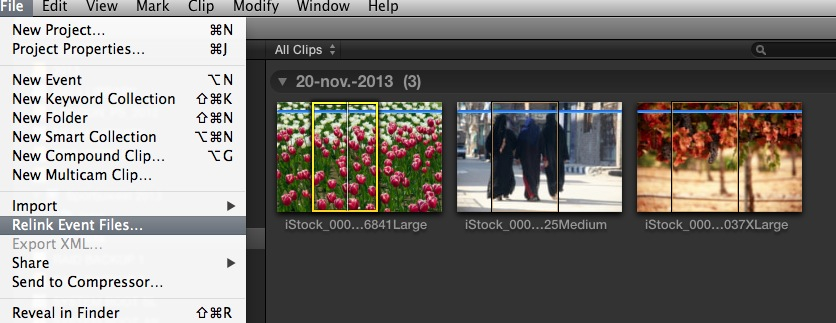
Select the "old" still on the Timeline or in the Event Browser and choose File > Relink Project Files (for a still in the Timeline) or File > Relink Event Files (for a still in the Event Browser).
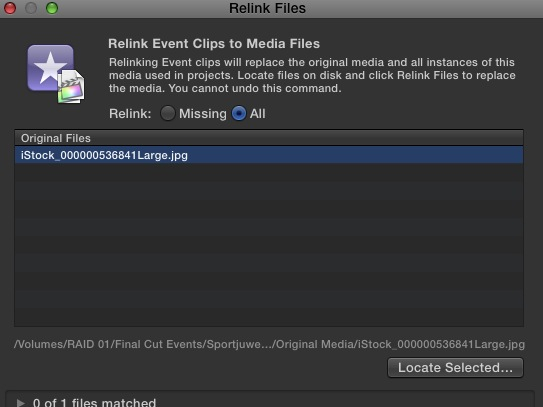
The Relink Files window will open. In this window select your file, then press the Locate Selected button.
In the Finder window that opens, select your new still and press Choose.

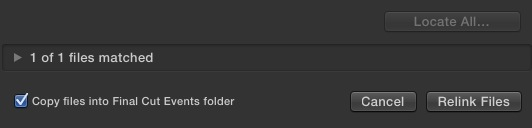
The Finder will close, now all you have to do is press Relink Files in the Relink Files window. You can even choose to have FCPX automatically add the new file into your Final Cut Events folder, so you don't have to mess with this folder yourself.
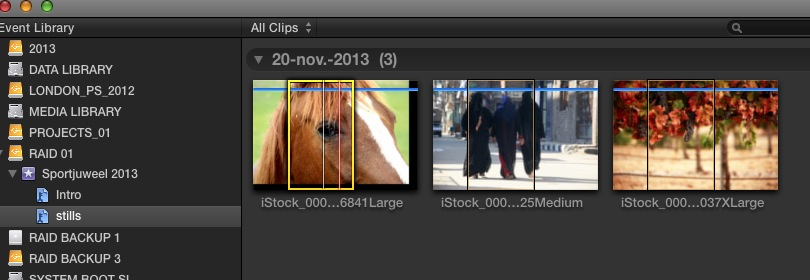
If you relink in the Event Browser your clip in the Event Browser will be replaced with the new still and every instance of the old clip in your Timeline will be replaced with the new one.
If you relink in the Timeline your clip on the Timeline will be replaced with the new clip and the new clip will also be added to your Event Browser. The old clip in the Event Browser will not be replaced.
If you have many instances of the still on your Timeline: relink in the Event Browser and all the instances of the old still will be replaced with the new still.
If you only have one instance of the old still on your Timeline and you want to keep the old still in your Event Browser, relink on the Timeline and the clip on the Timeline will be replaced. The new still will be added to your Event Browser and the old still will also stay there.
- Ronny
Select the "old" still on the Timeline or in the Event Browser and choose File > Relink Project Files (for a still in the Timeline) or File > Relink Event Files (for a still in the Event Browser).
The Relink Files window will open. In this window select your file, then press the Locate Selected button.
In the Finder window that opens, select your new still and press Choose.
The Finder will close, now all you have to do is press Relink Files in the Relink Files window. You can even choose to have FCPX automatically add the new file into your Final Cut Events folder, so you don't have to mess with this folder yourself.
If you relink in the Event Browser your clip in the Event Browser will be replaced with the new still and every instance of the old clip in your Timeline will be replaced with the new one.
If you relink in the Timeline your clip on the Timeline will be replaced with the new clip and the new clip will also be added to your Event Browser. The old clip in the Event Browser will not be replaced.
If you have many instances of the still on your Timeline: relink in the Event Browser and all the instances of the old still will be replaced with the new still.
If you only have one instance of the old still on your Timeline and you want to keep the old still in your Event Browser, relink on the Timeline and the clip on the Timeline will be replaced. The new still will be added to your Event Browser and the old still will also stay there.
- Ronny
Please Log in to join the conversation.
20 Nov 2013 20:46 #34440
by LesWilson
Replied by LesWilson on topic Original Media Folder
I just am talking about updating some stills... same name and all by copying them from someplace else using the finder. There might be 50 of them. Are saying if the stills are modified or replaced FCP X loses track of them and I have to relink all 50?
Please Log in to join the conversation.
- Tom Wolsky
-
- Offline
- Moderator
-
20 Nov 2013 21:08 #34446
by Tom Wolsky
Replied by Tom Wolsky on topic Original Media Folder
That's correct. If the stills are only aliases in the event moving them in the finder will break the alias link to the original location.
Please Log in to join the conversation.
- Tom Wolsky
-
- Offline
- Moderator
-
20 Nov 2013 21:11 #34447
by Tom Wolsky
Replied by Tom Wolsky on topic Original Media Folder
All things being equal simply replacing the file with an updates file in the same location will automatically update in FCP.
Please Log in to join the conversation.
- ronny courtens
-
- Offline
- Moderator
-
Less
More
- Posts: 4455
- Thank you received: 962
20 Nov 2013 21:16 - 20 Nov 2013 21:22 #34448
by ronny courtens
Replied by ronny courtens on topic Original Media Folder
This can be done very easily. Say you want to import 50 stills and you know that at a given time all or some of these stills will have to be replaced with newer versions. This is what you do:
1. Put the stills in a folder somewhere on your system.
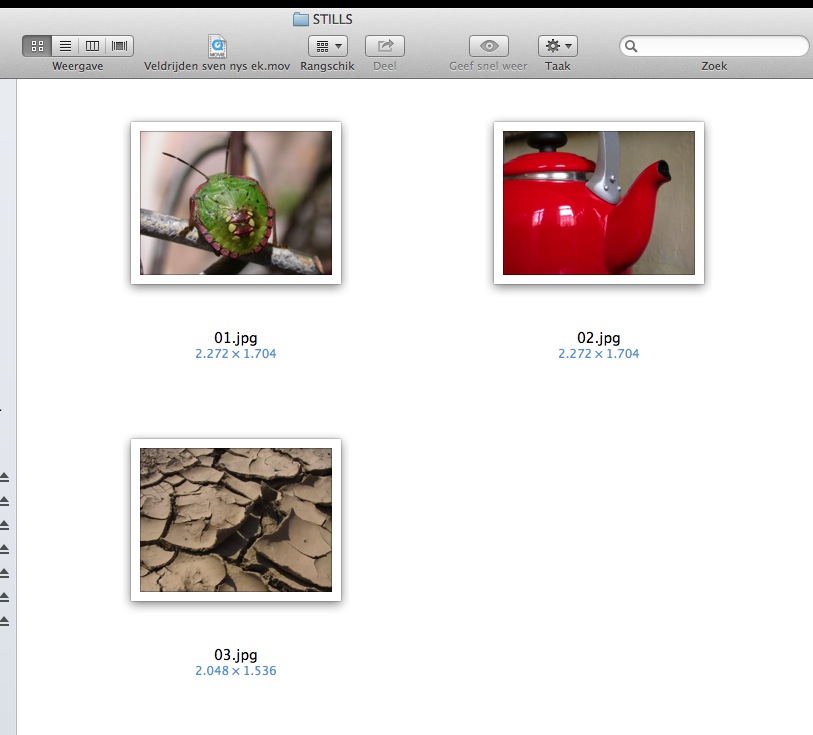
2. Create an Event in FCPX and import the folder using the FCPX Import window.
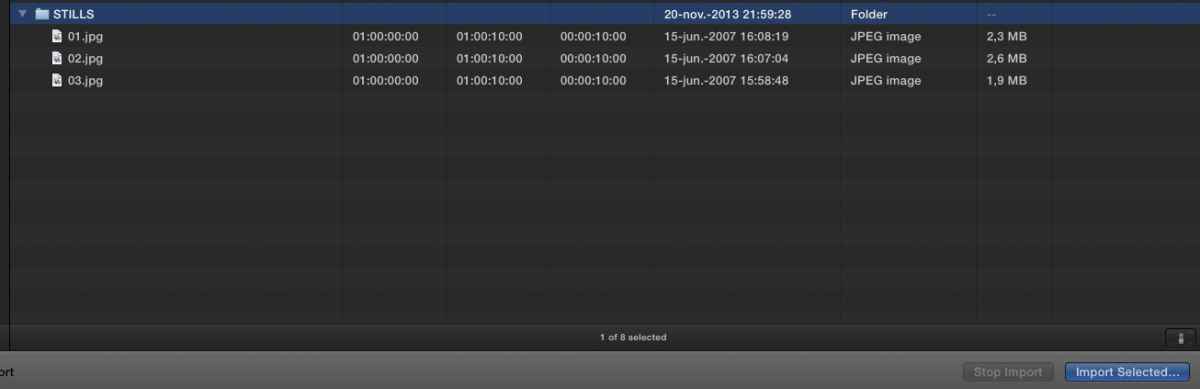
3. When the Import settings window opens make sure to de-select the "Copy Files to Final Cut Events folder" option.
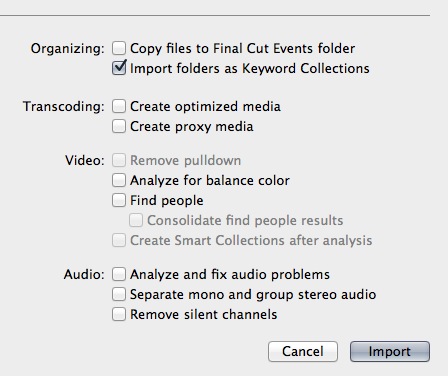
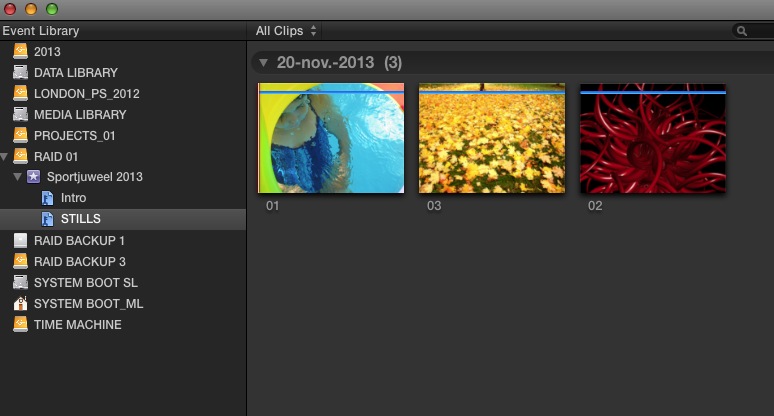
4. Press Import and the folder will be imported as a Keyword Collection in your Event Library.
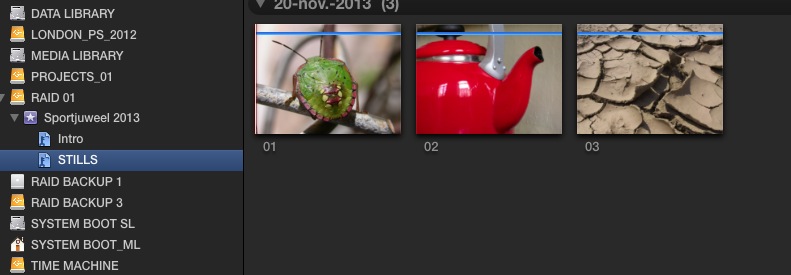
5. When you want to replace some or all of the stills all you have to do is to drag the new stills (which in this case must have the same name as the original ones) into the original stills folder. A message will pop asking you if you want to replace the old stills with the new ones. Confirm this and the old stills will be replaced.
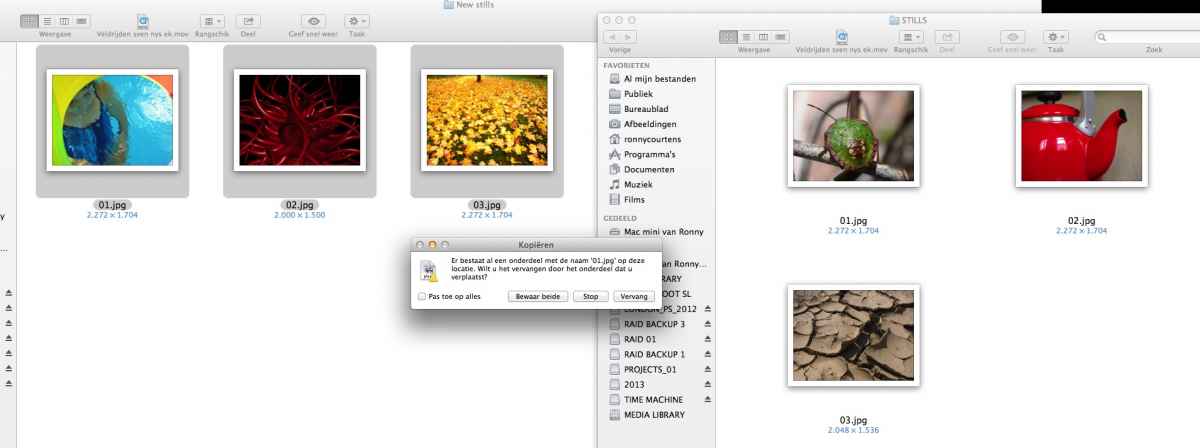
6. Now when you launch FCPX all the old stills will be correctly replaced by the new ones in your Event Browser and on your Timeline. No issues at all.
- Ronny
1. Put the stills in a folder somewhere on your system.
2. Create an Event in FCPX and import the folder using the FCPX Import window.
3. When the Import settings window opens make sure to de-select the "Copy Files to Final Cut Events folder" option.
4. Press Import and the folder will be imported as a Keyword Collection in your Event Library.
5. When you want to replace some or all of the stills all you have to do is to drag the new stills (which in this case must have the same name as the original ones) into the original stills folder. A message will pop asking you if you want to replace the old stills with the new ones. Confirm this and the old stills will be replaced.
6. Now when you launch FCPX all the old stills will be correctly replaced by the new ones in your Event Browser and on your Timeline. No issues at all.
- Ronny
Last edit: 20 Nov 2013 21:22 by ronny courtens.
Please Log in to join the conversation.
