


- Posts: 23
- Thank you received: 0
3 Post Moderation Rule for New Boarders (25 Jan 2021)
New boarders will have their posts moderated - Don't worry if you cannot see your post immediately.
PLEASE HELP! Can't use 2 of my hard drives - checked everything! camera/video files on root, etc
- jSantella99
-
 Topic Author
- Offline
- Junior Member
-

Less
More
04 Sep 2013 23:05 #30769
by jSantella99
PLEASE HELP! Can't use 2 of my hard drives - checked everything! camera/video files on root, etc was created by jSantella99
this only happens with two of my hard drives,
Can this be because of drive formatting?
One is formatted as
Mac OS Extended (Journaled)
and the other
Mac OS Extended
1= SSD thunderbolt OWC drive
2= eSata 2tb hard drive
I checked everything I can think of
- Both drives have ignore ownership checked in the get info tab
- I have repaired both hard drives using disk utility
- no event names are shared
- no camera files, video files, or folders are even near the root of either drive
- both drives show up as devices in the import window, and neither recognized as a camera
both work fine on there own, I have used event manager to hide everything from both drives, and only one will stay visible in the event library
if I unmount each one of the drives, they load fine into fcp x
ANY HELP WOULD BE GREATLY GREATLY APPRECIATED!
I don't want to reformat a drive unless I have too
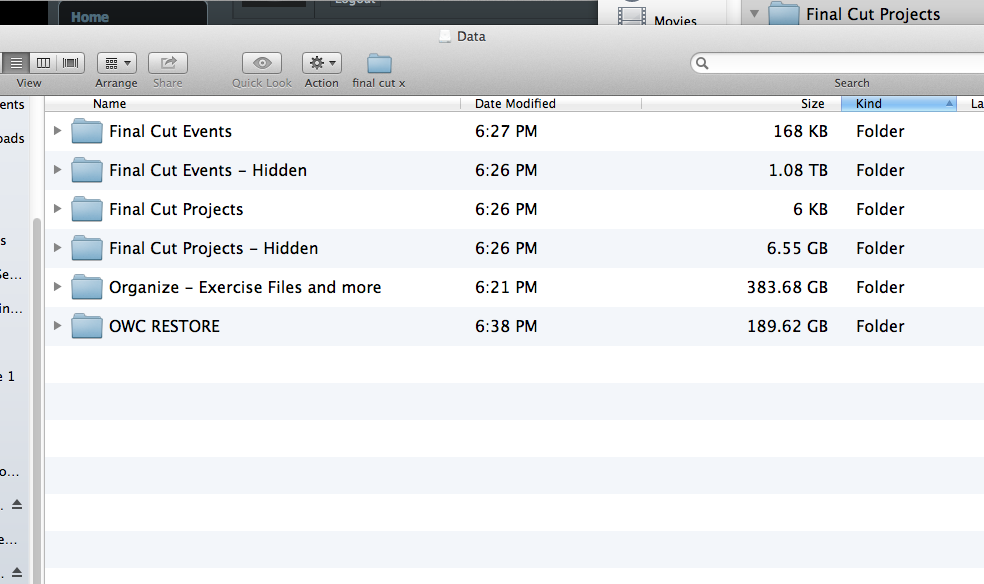
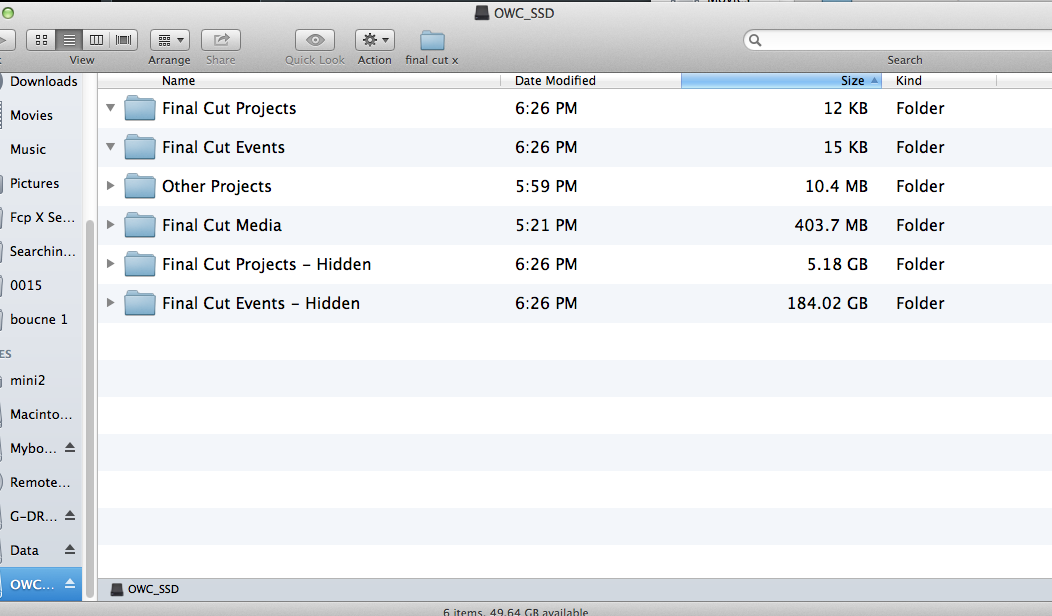
I have attached screen shots of the two drives at the root
thank you in advance, idk what I would do without help from this forum
Can this be because of drive formatting?
One is formatted as
Mac OS Extended (Journaled)
and the other
Mac OS Extended
1= SSD thunderbolt OWC drive
2= eSata 2tb hard drive
I checked everything I can think of
- Both drives have ignore ownership checked in the get info tab
- I have repaired both hard drives using disk utility
- no event names are shared
- no camera files, video files, or folders are even near the root of either drive
- both drives show up as devices in the import window, and neither recognized as a camera
both work fine on there own, I have used event manager to hide everything from both drives, and only one will stay visible in the event library
if I unmount each one of the drives, they load fine into fcp x
ANY HELP WOULD BE GREATLY GREATLY APPRECIATED!
I don't want to reformat a drive unless I have too
I have attached screen shots of the two drives at the root
thank you in advance, idk what I would do without help from this forum
Please Log in to join the conversation.
- jSantella99
-
Topic Author
- Offline
- Junior Member
-
Less
More
- Posts: 23
- Thank you received: 0
04 Sep 2013 23:09 #30770
by jSantella99
Replied by jSantella99 on topic PLEASE HELP! Can't use 2 of my hard drives - checked everything! camera/video files on root, etc
PS I have tried
Restarting, multiple times,
Restoring final cut to 10.0.8
Restoring final cut to 10.0.9
Restarting, multiple times,
Restoring final cut to 10.0.8
Restoring final cut to 10.0.9
Please Log in to join the conversation.

04 Sep 2013 23:33 #30771
by marchyman
What, exactly, does that mean? I'm reading that as you can use either drive as long as only one is plugged in at a time. Is that what you mean?
If that is the case I'd suspect a drive name issue or something similar.
Replied by marchyman on topic PLEASE HELP! Can't use 2 of my hard drives - checked everything! camera/video files on root, etc
jSantella99 wrote: if I unmount each one of the drives, they load fine into fcp x
What, exactly, does that mean? I'm reading that as you can use either drive as long as only one is plugged in at a time. Is that what you mean?
If that is the case I'd suspect a drive name issue or something similar.
Please Log in to join the conversation.
- jSantella99
-
Topic Author
- Offline
- Junior Member
-
Less
More
- Posts: 23
- Thank you received: 0
04 Sep 2013 23:38 #30772
by jSantella99
Replied by jSantella99 on topic PLEASE HELP! Can't use 2 of my hard drives - checked everything! camera/video files on root, etc
Sorry for not being clear
what I meant was that If I eject either one of the hard drives, the other one will show up normally in final cut
Meaning they individually will be visible in the project and event library
However if both drives are mounted
then they both show up in Final cut for a quick second, then one of the hard drives is no longer visible in final cut
they both will show up in the devices section of the import window but no longer in the event/project library at the same time
what I meant was that If I eject either one of the hard drives, the other one will show up normally in final cut
Meaning they individually will be visible in the project and event library
However if both drives are mounted
then they both show up in Final cut for a quick second, then one of the hard drives is no longer visible in final cut
they both will show up in the devices section of the import window but no longer in the event/project library at the same time
Please Log in to join the conversation.

05 Sep 2013 04:13 #30776
by lost
Replied by lost on topic PLEASE HELP! Can't use 2 of my hard drives - checked everything! camera/video files on root, etc
I am admittedly not a fcpx ninja...I recently ran into the same type of problem. From what I was able to gather from the good folks on this forum (sadly the thread seems to have been deleted, or I'd link to it) the problem is with mounting the drive. I've been having a whole lot of problems moving events and projects around to external drives (within fcpx) through a usb3 - esata connection (I have a 2012 era Mac Pro). To this day I haven't been able to figure out if it is an issue with the usb3 card, the driver, or an issue within fcpx. Bottom line - I too am having major issues with project management and external drives...when I use the internal drives everything works fine, but the second I introduce external drives (usb3 or esata, I don't have thunderbolt or firewire drives)things go south.
Is this a hardware issue? Or an OS issue? I can mount drives and move things around at the finder level with no problem outside of fcpx, but if I mount up and try to move around with in the program things get wonky as hell!
Is this a hardware issue? Or an OS issue? I can mount drives and move things around at the finder level with no problem outside of fcpx, but if I mount up and try to move around with in the program things get wonky as hell!
Please Log in to join the conversation.
- ronny courtens
-

- Offline
- Moderator
-

Less
More
- Posts: 4455
- Thank you received: 962
05 Sep 2013 07:25 #30780
by ronny courtens
Replied by ronny courtens on topic PLEASE HELP! Can't use 2 of my hard drives - checked everything! camera/video files on root, etc
Check on both of your drives if you have any DCIM folders on them. If you have DCIM folders at the top level of any or both of the drives put them inside a new folder (just don't name the new folder DCIM). Then launch FCPX and see if both drives show up.
- Ronny
- Ronny
Please Log in to join the conversation.

05 Sep 2013 07:52 #30782
by Seanus
Sean Lander - Editing since 1982 - AVID 1991 - FCP 1999 - FCPX 2011
Replied by Seanus on topic PLEASE HELP! Can't use 2 of my hard drives - checked everything! camera/video files on root, etc
Are you copying Events and projects to these external drives?
Sean Lander - Editing since 1982 - AVID 1991 - FCP 1999 - FCPX 2011
Please Log in to join the conversation.
05 Sep 2013 08:49 #30783
by Dave_EP
Replied by Dave_EP on topic PLEASE HELP! Can't use 2 of my hard drives - checked everything! camera/video files on root, etc
It's probably unrelated, but I had a disk image than FCPX wouldn't see. Disk Image Utility said there were no problems, but creating a new image and copying the event/project folders from the none working to the new image fixed the problem (as in FCPX could see the events/projects on the new one but not the old one).
It was not a permissions problem either.
Never did figure out why / what happened.
It was not a permissions problem either.
Never did figure out why / what happened.
Please Log in to join the conversation.

05 Sep 2013 14:24 #30800
by dinerdog
Replied by dinerdog on topic PLEASE HELP! Can't use 2 of my hard drives - checked everything! camera/video files on root, etc
First I would try to repair the drives with Disk Warrior. Then, I would get a 2TB Western Digital USB drive and and in the finder make the proper folder structure and copy all the data from the 2 drives onto that one (maybe attaching only one of your problem drives at a time). Reboot with just the USB drive and see what shows up. You may just need to relink some media.
Please Log in to join the conversation.
05 Sep 2013 14:36 #30801
by tpayton
Replied by tpayton on topic PLEASE HELP! Can't use 2 of my hard drives - checked everything! camera/video files on root, etc
Puzzling. My first bet would be permissions issues, but if you ruled that out, I would give Apple support a call about this, they will be able to help. They have a new system that is very nice here:
getsupport.apple.com/GetproductgroupList.action
getsupport.apple.com/GetproductgroupList.action
Please Log in to join the conversation.
05 Sep 2013 16:20 - 05 Sep 2013 16:22 #30810
by VidGreg
Replied by VidGreg on topic PLEASE HELP! Can't use 2 of my hard drives - checked everything! camera/video files on root, etc
Never had this happen to me, however your screen shots are not the same for both drives. In one the Events and Project file folders is open (downward facing triangle) and there are not any events or projects within the folders and in the other the events and projects folders are not open. Show us the drives with open (expanded) folders for all folders and I think we may see your problem.
Also no media folder on one drive?
I may be wrong about this but I think FCPX is seeing the drives upon first launching, then drops the drive without events/projects, then when you close the current event, FCPX switches to the other drive. You would need to check what assets are being used for the event/project you are using.
Does each drive have different media being used on the event/project?
At first I thought you may have duplicated an event/media and FCPX was only using one drive because all media was available on both drives.(possible?) Also sometimes moving files via finder may cause problems.
It may also be possible that Event Manager has goofed up somehow. Used different settings for different drives?
Shot in the dark, but hope this helps, Greg
Also no media folder on one drive?
I may be wrong about this but I think FCPX is seeing the drives upon first launching, then drops the drive without events/projects, then when you close the current event, FCPX switches to the other drive. You would need to check what assets are being used for the event/project you are using.
Does each drive have different media being used on the event/project?
At first I thought you may have duplicated an event/media and FCPX was only using one drive because all media was available on both drives.(possible?) Also sometimes moving files via finder may cause problems.
It may also be possible that Event Manager has goofed up somehow. Used different settings for different drives?
Shot in the dark, but hope this helps, Greg
Last edit: 05 Sep 2013 16:22 by VidGreg. Reason: Added missing media folder
Please Log in to join the conversation.
- soarininmotion
-
- Offline
- Junior Member
-
Less
More
- Posts: 35
- Thank you received: 3
05 Sep 2013 17:16 #30813
by soarininmotion
Replied by soarininmotion on topic PLEASE HELP! Can't use 2 of my hard drives - checked everything! camera/video files on root, etc
check case sensitivity maybe. also, if one of those drives is or has ever been used with time machine for backups, i don't think final cut will be happy.
Please Log in to join the conversation.
- jSantella99
-
Topic Author
- Offline
- Junior Member
-
Less
More
- Posts: 23
- Thank you received: 0
06 Sep 2013 16:12 #30862
by jSantella99
Replied by jSantella99 on topic PLEASE HELP! Can't use 2 of my hard drives - checked everything! camera/video files on root, etc
thanks for all the help and suggestions
I REALLY APPRECIATE IT!
Just wanted to let everyone know that be reformatting the one drive that was not in mac os x extended, not journaled
It fixed the problem
I have no idea if it was the formatting that caused the problem, though my guess would be that it was because this happened after I reformatted the drive ,
I just wanted to let you guys know in case this can help someone down the line
thanks again!
I REALLY APPRECIATE IT!
Just wanted to let everyone know that be reformatting the one drive that was not in mac os x extended, not journaled
It fixed the problem
I have no idea if it was the formatting that caused the problem, though my guess would be that it was because this happened after I reformatted the drive ,
I just wanted to let you guys know in case this can help someone down the line
thanks again!
Please Log in to join the conversation.
- ronny courtens
-
- Offline
- Moderator
-
Less
More
- Posts: 4455
- Thank you received: 962
06 Sep 2013 16:16 #30863
by ronny courtens
Replied by ronny courtens on topic PLEASE HELP! Can't use 2 of my hard drives - checked everything! camera/video files on root, etc
Hi Jeremy,
Glad you have been able to fix this, and thank you for posting your solution. This has been a strange issue indeed!
- Ronny
Glad you have been able to fix this, and thank you for posting your solution. This has been a strange issue indeed!
- Ronny
Please Log in to join the conversation.
