


- Posts: 25
- Thank you received: 0
3 Post Moderation Rule for New Boarders (25 Jan 2021)
New boarders will have their posts moderated - Don't worry if you cannot see your post immediately.
trying to burn project on DVD - won't continue after 66%
26 Aug 2013 01:14 #30389
by scottk23
trying to burn project on DVD - won't continue after 66% was created by scottk23
i am trying to burn a short film onto a dvd off of final cut pro x and it stops at 66% every time. I have burned DVDs before off of Final Cut pro x and it worked fine
i have no idea what is wrong.
thanks
scott
OSX Version 10.8.4
i have no idea what is wrong.
thanks
scott
OSX Version 10.8.4
Please Log in to join the conversation.
- ronny courtens
-

- Offline
- Moderator
-

Less
More
- Posts: 4455
- Thank you received: 962
26 Aug 2013 13:54 #30409
by ronny courtens
Replied by ronny courtens on topic trying to burn project on DVD - won't continue after 66%
Do you get any error messages?
Try deleting your render files and see if this helps.
- Ronny
Try deleting your render files and see if this helps.
- Ronny
Please Log in to join the conversation.
26 Aug 2013 14:01 #30410
by scottk23
Replied by scottk23 on topic trying to burn project on DVD - won't continue after 66%
I do not get any error messages.
I tried deleting my render files but nothing happens. Should something pop up when I delete them? Be cause I click delete render files and nothing happens.
I tried deleting my render files but nothing happens. Should something pop up when I delete them? Be cause I click delete render files and nothing happens.
Please Log in to join the conversation.
- ronny courtens
-
- Offline
- Moderator
-
Less
More
- Posts: 4455
- Thank you received: 962
26 Aug 2013 14:23 - 26 Aug 2013 14:24 #30411
by ronny courtens
Replied by ronny courtens on topic trying to burn project on DVD - won't continue after 66%
The only message that pop ups when you delete your Project Render Files is this one:
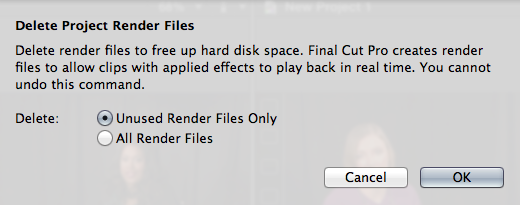
If you have seen this message, you have selected "All Render Files" and you have pressed OK your render files should be deleted.
- Ronny
If you have seen this message, you have selected "All Render Files" and you have pressed OK your render files should be deleted.
- Ronny
Last edit: 26 Aug 2013 14:24 by ronny courtens.
Please Log in to join the conversation.
26 Aug 2013 14:56 #30412
by scottk23
Replied by scottk23 on topic trying to burn project on DVD - won't continue after 66%
Is there any other way to fix this? I'll try this out later but I'm just wondering if there is a second option in case this doesn't work.
Thanks so much
Scott.
Thanks so much
Scott.
Please Log in to join the conversation.
- ronny courtens
-
- Offline
- Moderator
-
Less
More
- Posts: 4455
- Thank you received: 962
26 Aug 2013 15:07 #30413
by ronny courtens
Replied by ronny courtens on topic trying to burn project on DVD - won't continue after 66%
Scott,
Yes there are other options, but it would help us if you could provide some more information:
- How long is your Project?
- What is the format of your video clips? (codec and frame size)?
- Are you sharing directly to a DVD disc or are you creating a DVD image?
- Have you added any background images to the DVD menu?
- When your DVD burning process stopped did you get a spinning beach-ball or a system freeze? Did you get any error messages?
And also helpful:
- Which version of FCPX and OS are you running?
- How much RAM do you have?
- Are your Project and Event on your system drive or on an external drive?
- How full is your system drive?
With this info we can narrow down the issue and give you more efficient advice.
- Ronny
Yes there are other options, but it would help us if you could provide some more information:
- How long is your Project?
- What is the format of your video clips? (codec and frame size)?
- Are you sharing directly to a DVD disc or are you creating a DVD image?
- Have you added any background images to the DVD menu?
- When your DVD burning process stopped did you get a spinning beach-ball or a system freeze? Did you get any error messages?
And also helpful:
- Which version of FCPX and OS are you running?
- How much RAM do you have?
- Are your Project and Event on your system drive or on an external drive?
- How full is your system drive?
With this info we can narrow down the issue and give you more efficient advice.
- Ronny
Please Log in to join the conversation.
26 Aug 2013 17:02 #30420
by scottk23
Replied by scottk23 on topic trying to burn project on DVD - won't continue after 66%
im not as savy with some of the terms you mentioned, but ill try my best.
-My laptop is a Mountain Lion OSX
-Project is just over 3 minutes
-i do not get the spinning beach ball
-no background images on the dvd
-29.97p
-FCPX Version 10.0.9. My laptop is Version OSX 10.8.4
- My system drive (im assuming you mean the amount of memory or space on my laptop) is nearly full, which may be the problem.
again, im not that good when it comes to listing certain info but i hope this is helpful
thanks
scott
-My laptop is a Mountain Lion OSX
-Project is just over 3 minutes
-i do not get the spinning beach ball
-no background images on the dvd
-29.97p
-FCPX Version 10.0.9. My laptop is Version OSX 10.8.4
- My system drive (im assuming you mean the amount of memory or space on my laptop) is nearly full, which may be the problem.
again, im not that good when it comes to listing certain info but i hope this is helpful
thanks
scott
Please Log in to join the conversation.
- ronny courtens
-
- Offline
- Moderator
-
Less
More
- Posts: 4455
- Thank you received: 962
26 Aug 2013 17:09 #30421
by ronny courtens
Replied by ronny courtens on topic trying to burn project on DVD - won't continue after 66%
Hi Scott,
Thank you for the information. I think you have found the cause of this problem yourself: if your system drive is nearly full it has no place anymore to store the temporary files that are created while the DVD files are being created. This can slow down your system or even crash it.
I think before trying anything else you should make space on your drive. Any drive needs to have at least 15% of its total capacity unused. So if your drive has a capacity of 500 GB you need at least 75 GB free available space on it.
- Ronny
Thank you for the information. I think you have found the cause of this problem yourself: if your system drive is nearly full it has no place anymore to store the temporary files that are created while the DVD files are being created. This can slow down your system or even crash it.
I think before trying anything else you should make space on your drive. Any drive needs to have at least 15% of its total capacity unused. So if your drive has a capacity of 500 GB you need at least 75 GB free available space on it.
- Ronny
Please Log in to join the conversation.
26 Aug 2013 21:04 #30431
by scottk23
Replied by scottk23 on topic trying to burn project on DVD - won't continue after 66%
Hi.
I erased a lot if old footage that I have no is for. I put it in the trash and emptied it. But it still stopped at 66% and did nothing. I tried deleting my render files again and nothing happened either.
I'm at a loss here. Thanks again for helping.
Scott
I erased a lot if old footage that I have no is for. I put it in the trash and emptied it. But it still stopped at 66% and did nothing. I tried deleting my render files again and nothing happened either.
I'm at a loss here. Thanks again for helping.
Scott
Please Log in to join the conversation.
- ronny courtens
-
- Offline
- Moderator
-
Less
More
- Posts: 4455
- Thank you received: 962
26 Aug 2013 21:07 - 26 Aug 2013 21:18 #30432
by ronny courtens
Replied by ronny courtens on topic trying to burn project on DVD - won't continue after 66%
You have done the right thing. Now we know the cause of the DVD issue is somewhere else. Let's do this step by step.
Instead of sharing to DVD try exporting the Project. Does that work without any issues?
- Ronny
Instead of sharing to DVD try exporting the Project. Does that work without any issues?
- Ronny
Last edit: 26 Aug 2013 21:18 by ronny courtens.
Please Log in to join the conversation.
26 Aug 2013 21:18 #30433
by scottk23
Replied by scottk23 on topic trying to burn project on DVD - won't continue after 66%
I'm currently away from my computer so I can't be positive. But I did export the project sometime before I tried getting it onto a DVD. It worked with no problems.
I don't know if the DVDs have any effect on them. I've used them before and they were fine.
I don't know if the DVDs have any effect on them. I've used them before and they were fine.
Please Log in to join the conversation.
- ronny courtens
-
- Offline
- Moderator
-
Less
More
- Posts: 4455
- Thank you received: 962
26 Aug 2013 21:52 #30436
by ronny courtens
Replied by ronny courtens on topic trying to burn project on DVD - won't continue after 66%
If you can export your Project as a Master file this means at least you have no corrupted clips or render files. So we should know for sure.
It's getting close to midnight where I live so I won't be here much longer. When you get back to your computer just try exporting the Project as a Master file. If this works without any problems do the following:
1. Take another DVD, preferably of a different brand, and try again. Only use high a quality brand for burning, do not use rewritable DVDs. Just be aware that sometimes the progress counter will stop for a while, that's normal. Wait until it finishes. If this still does not work:
2. Select Share > DVD again. The DVD Share window will open. Click the Settings tab. Go to Background and press the Add button. When the Finder window opens just click Cancel, then try burning again. If this does not work:
3. Create a new Project, then copy all the media from your original project and paste them into the new one. Then try burning the new Project to DVD. If still no luck:
4. Take the ProRes QT movie you have exported from your Project and import the QT movie in FCPX. Create a new Project and drop the QT movie on the timeline. Then try burning this Project to DVD. If this still doesn't work here's the final test:
5. Select Share > DVD and in the DVD Share window that opens set Output Device to "Hard Drive". Then press Next to export your project as a DVD disk image. When it's done open the disk image and open your Mac's DVD player. See if it plays your DVD image. If it does play the DVD image close the DVD player, R-click the disc image and select "Burn to disc". Insert a DVD disc in your Mac and start burning.
If none of the above helps: post back here.
- Ronny
It's getting close to midnight where I live so I won't be here much longer. When you get back to your computer just try exporting the Project as a Master file. If this works without any problems do the following:
1. Take another DVD, preferably of a different brand, and try again. Only use high a quality brand for burning, do not use rewritable DVDs. Just be aware that sometimes the progress counter will stop for a while, that's normal. Wait until it finishes. If this still does not work:
2. Select Share > DVD again. The DVD Share window will open. Click the Settings tab. Go to Background and press the Add button. When the Finder window opens just click Cancel, then try burning again. If this does not work:
3. Create a new Project, then copy all the media from your original project and paste them into the new one. Then try burning the new Project to DVD. If still no luck:
4. Take the ProRes QT movie you have exported from your Project and import the QT movie in FCPX. Create a new Project and drop the QT movie on the timeline. Then try burning this Project to DVD. If this still doesn't work here's the final test:
5. Select Share > DVD and in the DVD Share window that opens set Output Device to "Hard Drive". Then press Next to export your project as a DVD disk image. When it's done open the disk image and open your Mac's DVD player. See if it plays your DVD image. If it does play the DVD image close the DVD player, R-click the disc image and select "Burn to disc". Insert a DVD disc in your Mac and start burning.
If none of the above helps: post back here.
- Ronny
Please Log in to join the conversation.
