


- Posts: 23
- Thank you received: 0
3 Post Moderation Rule for New Boarders (25 Jan 2021)
New boarders will have their posts moderated - Don't worry if you cannot see your post immediately.
Please Help !! Need to clean up a event to be able to edit the media - will loose job if i don't
- jSantella99
-
 Topic Author
- Offline
- Junior Member
-

Less
More
18 May 2013 22:22 #25977
by jSantella99
Please Help !! Need to clean up a event to be able to edit the media - will loose job if i don't was created by jSantella99
original event and media is split between two disk images, I need to clean out these two disk images for this one event, because final cut constantly crashes or hangs at the slightest edit operation
I cant take the risk of doing this on the original
I would get fired if I lost my edits and/or the media
PLEASE ANY HELP IS GREATLY APPRECIATED!!
I used two sparediskimage bundles to organize all the media for this one event
Its overloaded with crap I don't need, but I can't fix it
I am trying to make a duplicate of the event so I can clean it out and still have my original incase I screw up
Unfortunately the fastest connection to these two scratch disks is daisy chaining two firewire 800 gdrive to the one firewire port on my mac mini
I have a mac min, mountain lion, 2.3
I tried every method I could think of
1---- Duplicating event inside final cut x
> THIS DID NOT WORK BECAUSE FINAL CUT CONSTANTLY freezes up and never makes it passed 40 or so gigs, and the entire event is around 1 terabyte
2
Physically copying the final cut events folder (in finder)
> THIS DID NOT WORK BECAUSE FINAL CUT DOES NOT RECOGNIZE THE MAJORITY OF FILES AS BEING THE ORIGINALS
EVERY ATTEMP AT RELINKING THE EVENT FILES EITHER CAUSES IT TO FREEZE OR IT WILL SAY THE FILES ARE INCOMPATIBLE
Here is my cp info incase that info is useful
Mac mini
Model Identifier: Macmini5,1
Processor Name: Intel Core i5
Processor Speed: 2.3 GHz
Number of Processors: 1
Total Number of Cores: 2
L2 Cache (per Core): 256 KB
L3 Cache: 3 MB
Memory: 16 GB
Again any help would be so greatly appreciated, I am in dire need of finishing these videos
I cant take the risk of doing this on the original
I would get fired if I lost my edits and/or the media
PLEASE ANY HELP IS GREATLY APPRECIATED!!
I used two sparediskimage bundles to organize all the media for this one event
Its overloaded with crap I don't need, but I can't fix it
I am trying to make a duplicate of the event so I can clean it out and still have my original incase I screw up
Unfortunately the fastest connection to these two scratch disks is daisy chaining two firewire 800 gdrive to the one firewire port on my mac mini
I have a mac min, mountain lion, 2.3
I tried every method I could think of
1---- Duplicating event inside final cut x
> THIS DID NOT WORK BECAUSE FINAL CUT CONSTANTLY freezes up and never makes it passed 40 or so gigs, and the entire event is around 1 terabyte
2
Physically copying the final cut events folder (in finder)
> THIS DID NOT WORK BECAUSE FINAL CUT DOES NOT RECOGNIZE THE MAJORITY OF FILES AS BEING THE ORIGINALS
EVERY ATTEMP AT RELINKING THE EVENT FILES EITHER CAUSES IT TO FREEZE OR IT WILL SAY THE FILES ARE INCOMPATIBLE
Here is my cp info incase that info is useful
Mac mini
Model Identifier: Macmini5,1
Processor Name: Intel Core i5
Processor Speed: 2.3 GHz
Number of Processors: 1
Total Number of Cores: 2
L2 Cache (per Core): 256 KB
L3 Cache: 3 MB
Memory: 16 GB
Again any help would be so greatly appreciated, I am in dire need of finishing these videos
Please Log in to join the conversation.
- cinemaloha
-
- Offline
- Elite Member
-

Less
More
- Posts: 163
- Thank you received: 36
18 May 2013 23:04 #25979
by cinemaloha
Replied by cinemaloha on topic Please Help !! Need to clean up a event to be able to edit the media - will loose job if i don't
Make duplicate of both original media disk image and then try to merge the two images into one. Open both disk images, take all the files from both and create one disk image.
Then re-import that into a new event. Duplicate your project & rename it so it is different from the other, add "(new)" or whatever you like.
If your project has missing files, go to inspector/info and modify event reference to the new event.
Hope this helps.
Then re-import that into a new event. Duplicate your project & rename it so it is different from the other, add "(new)" or whatever you like.
If your project has missing files, go to inspector/info and modify event reference to the new event.
Hope this helps.
Please Log in to join the conversation.
- jSantella99
-
Topic Author
- Offline
- Junior Member
-
Less
More
- Posts: 23
- Thank you received: 0
18 May 2013 23:11 #25980
by jSantella99
Replied by jSantella99 on topic Please Help !! Need to clean up a event to be able to edit the media - will loose job if i don't
will try that
thanks so much
just to be clear, id be making duplicates with something like carbon copy cloner right?
and if this does work,
will all of the projects i have created with the previous event, still work with the new event?
thanks so much
just to be clear, id be making duplicates with something like carbon copy cloner right?
and if this does work,
will all of the projects i have created with the previous event, still work with the new event?
Please Log in to join the conversation.

19 May 2013 02:58 - 19 May 2013 02:59 #25984
by BenB
Replied by BenB on topic Please Help !! Need to clean up a event to be able to edit the media - will loose job if i don't
"Merge" the two Events.
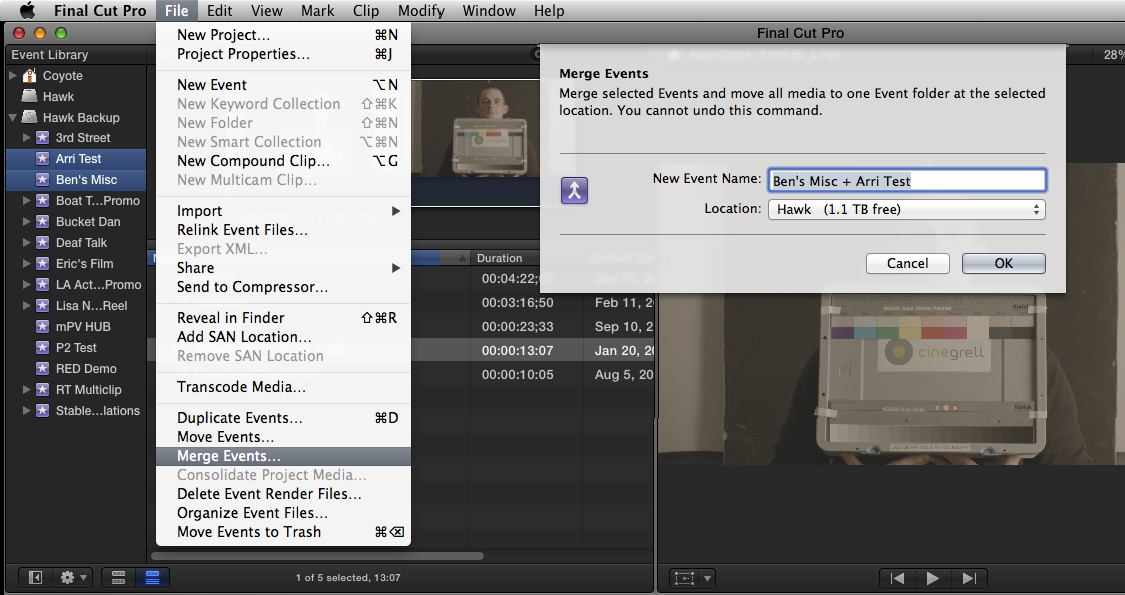
- Highlight 1st Event in the Library.
- Command-click the 2nd Event in the Library to highlight both.
- File > Merge Events
- Specify a new name (if desired) and hard drive location.
- Right away I'd highlight any projects already started, in the Project Library, go to the Inspector, to Modify Event References, and move the new Event in the list to the top.
- Then you can delete the originals.
Last edit: 19 May 2013 02:59 by BenB.
Please Log in to join the conversation.
- jSantella99
-
Topic Author
- Offline
- Junior Member
-
Less
More
- Posts: 23
- Thank you received: 0
19 May 2013 03:14 #25985
by jSantella99
Replied by jSantella99 on topic Please Help !! Need to clean up a event to be able to edit the media - will loose job if i don't
You are absolutely amazing Ben!
Thank you sooo much for the help,
I hate to be the annoying noobie, but my problem is not with merging two events, its with trying to merge two disk images that are used for one large event
Every time I try to duplicate the event, it takes forever, then says my start up disk is full and I need to force quit
The odd thing is, I am not targetting my start up disk for the duplicate event, I am targetting a separate fw 800 drive,
I assume the FW connection, and need for daisy chaining to connect both is the reason for the slow duplication
But It always ends up crashing , despite having enough room on my startup disk and the drive targeted to recieve the duplicate event
My guess is that I have to try and break up the original event into smaller events and then duplicate those
I cant thank you enough for all the tips you give on a regular basis to everyone
but this is something else
your such a great guy man, your always willing to help out people
thank you again, i really appreciate it
Thank you sooo much for the help,
I hate to be the annoying noobie, but my problem is not with merging two events, its with trying to merge two disk images that are used for one large event
Every time I try to duplicate the event, it takes forever, then says my start up disk is full and I need to force quit
The odd thing is, I am not targetting my start up disk for the duplicate event, I am targetting a separate fw 800 drive,
I assume the FW connection, and need for daisy chaining to connect both is the reason for the slow duplication
But It always ends up crashing , despite having enough room on my startup disk and the drive targeted to recieve the duplicate event
My guess is that I have to try and break up the original event into smaller events and then duplicate those
I cant thank you enough for all the tips you give on a regular basis to everyone
but this is something else
your such a great guy man, your always willing to help out people
thank you again, i really appreciate it
Please Log in to join the conversation.
19 May 2013 05:20 - 19 May 2013 05:20 #25986
by BenB
Replied by BenB on topic Please Help !! Need to clean up a event to be able to edit the media - will loose job if i don't
I'd not merge the disk images at all, just the Events, onto a normal hard drive first. Forget the disk images until then, they'll only cause you unnecessary grief. And NEVER do this on your system drive at all.
Then, once merged into one Event, kill the old disk images, trash them.
If you need this new Event in a disk image, only after merging to a normal drive, create a new DMG from scratch and move the new Event in to it.
I've done this on very large Events, and never had any issues.
Then, once merged into one Event, kill the old disk images, trash them.
If you need this new Event in a disk image, only after merging to a normal drive, create a new DMG from scratch and move the new Event in to it.
I've done this on very large Events, and never had any issues.
Last edit: 19 May 2013 05:20 by BenB.
Please Log in to join the conversation.
- jSantella99
-
Topic Author
- Offline
- Junior Member
-
Less
More
- Posts: 23
- Thank you received: 0
19 May 2013 19:51 #26005
by jSantella99
Replied by jSantella99 on topic Please Help !! Need to clean up a event to be able to edit the media - will loose job if i don't
As Always, Just the solution I needed!
Thank you so much man, life savor!
Thank you so much man, life savor!
Please Log in to join the conversation.
