


- Posts: 23
- Thank you received: 0
3 Post Moderation Rule for New Boarders (25 Jan 2021)
New boarders will have their posts moderated - Don't worry if you cannot see your post immediately.
Hard Drives - How fast is a waste?
- Cableaddict
-
 Topic Author
- Offline
- Junior Member
-

Less
More
18 Oct 2012 20:04 - 18 Oct 2012 23:09 #15277
by Cableaddict
Hard Drives - How fast is a waste? was created by Cableaddict
FCP newbie here, trying to figure out hardware requirements.
From what I can see so far, using a 2012 Mac Pro 3.33 GHz six-core, drive speed is the #1 bottleneck when exporting files. However, I'm wondering if you can reach a point where drive speed is no longer the bottleneck. If so, then money is best spent elsewhere. So:
I have one free PCIe slot. I am considering getting an Atto PCIe 6G internal sata card. I could then run 4-8 internal 6G SSD's, each getting around 560 MB/s i-o.
However, I'm also considering getting (instead) a super-fast PCIe ssd array as my main video editing drive, (the source drive) which would give me 780 MB/s (OWC) or possibly even faster with the Revo 3. (hard to say how fast the Revo actually is with non-compressible data such as video.) Man, that's tempting.
BUT WOULD THIS ACTUALLY SAVE ME TIME?
The downside of the PCIe ssd array is that I can only fit ONE. If that speed is a waste, then this is a very bad choice.
So, here are the important questions:
Based on a 3.33 MHz 6-core Mac, and, say, 1920X1080 10 bit files. Never more than, say, 4 source files in the timeline at once. (multicam or multi-file editing.)
1: As your source drive gets faster, at what point (if any) will it be fast enough that cpu speed becomes the bottleneck?
2: If you use the same drive as the destination drive, then yet how much faster before you reach that same point?
3: Is it recommended to also have a SEPARATE drive to receive the exported files? In other words, if my source video files are on that PCIe ssd, capable of 762 Mb/s read-write, would I actually be slowing things down by exporting back to the same drive?
3: If you use a separate destination drive, then how fast must IT be (relative to the source drive) before it cannot possibly be a bottleneck?
In other words, if it's not as fast as the source drive, will the destination drive then become a bottleneck, "wasting" the speed of the source drive?
I'd love to simply export to one of my external backup drives, but they are all 2 TB Black Caviar sata. Not even close to the PCIe ssd. If they become a bottleneck, then I've wasted a lot of $$$ on that source drive.
Or what about exporting to a 3G SSD? Still a bottleneck?
4: OWC sells a PCIe ssd array, as mentioned above. I've read that the Revo 3 array (which won' work on a Mac, anyway) actually gives less than half its claimed speed if you are dealing with sequential, non-compressible files such as video. The Revo's video numbers are about the same as the OWC's CLAIMED numbers. Does anyone know if OWC's numbers are accurate for video?
5: Any idea what software can actually monitor a single drive's throughput while an application is running? In other words, an app that can tell me when any one particular drive is coming close to being a bottleneck? (So I can do my own benchmarks, and help out the next guy.)
My guess is that you'll always benefit from a faster drive, even with a 6G SSD, but does anyone actually know? Are we all just fumbling around in the dark?
From what I can see so far, using a 2012 Mac Pro 3.33 GHz six-core, drive speed is the #1 bottleneck when exporting files. However, I'm wondering if you can reach a point where drive speed is no longer the bottleneck. If so, then money is best spent elsewhere. So:
I have one free PCIe slot. I am considering getting an Atto PCIe 6G internal sata card. I could then run 4-8 internal 6G SSD's, each getting around 560 MB/s i-o.
However, I'm also considering getting (instead) a super-fast PCIe ssd array as my main video editing drive, (the source drive) which would give me 780 MB/s (OWC) or possibly even faster with the Revo 3. (hard to say how fast the Revo actually is with non-compressible data such as video.) Man, that's tempting.
BUT WOULD THIS ACTUALLY SAVE ME TIME?
The downside of the PCIe ssd array is that I can only fit ONE. If that speed is a waste, then this is a very bad choice.
So, here are the important questions:
Based on a 3.33 MHz 6-core Mac, and, say, 1920X1080 10 bit files. Never more than, say, 4 source files in the timeline at once. (multicam or multi-file editing.)
1: As your source drive gets faster, at what point (if any) will it be fast enough that cpu speed becomes the bottleneck?
2: If you use the same drive as the destination drive, then yet how much faster before you reach that same point?
3: Is it recommended to also have a SEPARATE drive to receive the exported files? In other words, if my source video files are on that PCIe ssd, capable of 762 Mb/s read-write, would I actually be slowing things down by exporting back to the same drive?
3: If you use a separate destination drive, then how fast must IT be (relative to the source drive) before it cannot possibly be a bottleneck?
In other words, if it's not as fast as the source drive, will the destination drive then become a bottleneck, "wasting" the speed of the source drive?
I'd love to simply export to one of my external backup drives, but they are all 2 TB Black Caviar sata. Not even close to the PCIe ssd. If they become a bottleneck, then I've wasted a lot of $$$ on that source drive.
Or what about exporting to a 3G SSD? Still a bottleneck?
4: OWC sells a PCIe ssd array, as mentioned above. I've read that the Revo 3 array (which won' work on a Mac, anyway) actually gives less than half its claimed speed if you are dealing with sequential, non-compressible files such as video. The Revo's video numbers are about the same as the OWC's CLAIMED numbers. Does anyone know if OWC's numbers are accurate for video?
5: Any idea what software can actually monitor a single drive's throughput while an application is running? In other words, an app that can tell me when any one particular drive is coming close to being a bottleneck? (So I can do my own benchmarks, and help out the next guy.)
My guess is that you'll always benefit from a faster drive, even with a 6G SSD, but does anyone actually know? Are we all just fumbling around in the dark?
Last edit: 18 Oct 2012 23:09 by Cableaddict.
Please Log in to join the conversation.

19 Oct 2012 13:49 #15300
by BenB
Replied by BenB on topic Re: Hard Drives - How fast is a waste?
When a component's I/O to the CPU reaches the same speed at which the CPU processes data, that's critical mass. That speed is so fast it will be a very, very, very long time before we see drives reach that speed. Also RAM has a ways to go with speed increases to match the CPU. Yes, RAM speed creates some latency, also.
Exporting has nothing to do with NLE playback performance. It simply writes a file, done. That said, a faster drive will give faster write speeds. These can with the right setup be noticeable, without you will not.
SSD's pretty much run up to 1/2 their advertised speed do to compression used in the read/write process. I'm not aware of an SSD that does not use internal compression.
I'm running tests this weekend with a maxed out rMBP with both T'bolt and FW800 using SD, DVCPRO-HD 720, H.264 (7D) 1080, and REDCODE 4K to compare speeds. Not sure what app I'll use to test the playback of RED files, though. Anyone have a suggestion for an app that will play both REDCODE and QT formats?
Exporting has nothing to do with NLE playback performance. It simply writes a file, done. That said, a faster drive will give faster write speeds. These can with the right setup be noticeable, without you will not.
SSD's pretty much run up to 1/2 their advertised speed do to compression used in the read/write process. I'm not aware of an SSD that does not use internal compression.
I'm running tests this weekend with a maxed out rMBP with both T'bolt and FW800 using SD, DVCPRO-HD 720, H.264 (7D) 1080, and REDCODE 4K to compare speeds. Not sure what app I'll use to test the playback of RED files, though. Anyone have a suggestion for an app that will play both REDCODE and QT formats?
Please Log in to join the conversation.
- Cableaddict
-
Topic Author
- Offline
- Junior Member
-
Less
More
- Posts: 23
- Thank you received: 0
19 Oct 2012 20:52 - 19 Oct 2012 20:53 #15316
by Cableaddict
Thanks, that's what I figured, but wasn't sure. I also never considered ram limitations, but I think we simply have to lump that together with "cpu speed" since they interact.
Are you saying then that going from a 560 MB/s SSD to a 780 MB/s PCIe array should theoretically speed up various processes, including exporting and format conversion?
I EAGERLY await your benchmark test. I wish others here would posy some empirical numbers, or at least mention basic real-world results. It's amazing to me that there is so little information to be found on this critical subject.
Regarding data compression: You may be right that all SSD's do it. I had read that only the recent Sandisk controllers do, which is why i-o speeds have gotten so much faster, but then I no longer blindly believe ANYTHING I read online!
So, how do we now what to buy, without the kind of tests you are about to do? Has anyone tested the real-world i-o speed of some current SSD (3G or 6G) to see how far off the reported numbers are when dealing with video files? That would be very good to know.
- Then, in fairness, the same should be done with a WD black caviar drive. The results might be just as low, percentage-wise. DOES ANYONE KNOW?
Replied by Cableaddict on topic Re: Hard Drives - How fast is a waste?
BenB wrote: When a component's I/O to the CPU reaches the same speed at which the CPU processes data, that's critical mass. That speed is so fast it will be a very, very, very long time before we see drives reach that speed. Also RAM has a ways to go with speed increases to match the CPU. Yes, RAM speed creates some latency, also.
Thanks, that's what I figured, but wasn't sure. I also never considered ram limitations, but I think we simply have to lump that together with "cpu speed" since they interact.
Are you saying then that going from a 560 MB/s SSD to a 780 MB/s PCIe array should theoretically speed up various processes, including exporting and format conversion?
I EAGERLY await your benchmark test. I wish others here would posy some empirical numbers, or at least mention basic real-world results. It's amazing to me that there is so little information to be found on this critical subject.
Regarding data compression: You may be right that all SSD's do it. I had read that only the recent Sandisk controllers do, which is why i-o speeds have gotten so much faster, but then I no longer blindly believe ANYTHING I read online!
So, how do we now what to buy, without the kind of tests you are about to do? Has anyone tested the real-world i-o speed of some current SSD (3G or 6G) to see how far off the reported numbers are when dealing with video files? That would be very good to know.
- Then, in fairness, the same should be done with a WD black caviar drive. The results might be just as low, percentage-wise. DOES ANYONE KNOW?
Last edit: 19 Oct 2012 20:53 by Cableaddict.
Please Log in to join the conversation.
19 Oct 2012 21:09 - 19 Oct 2012 21:10 #15317
by BenB
Replied by BenB on topic Re: Hard Drives - How fast is a waste?
Having been an IT engineer for almost 30 years now, I never go by paper specs. Nothing works as fast or as well as it does on paper, ever.
I am using an Elgato bus powered 750GB SSD T'bolt drive with a brand new maxed out rMBP, and it is not nearly as fast as some other T'bolt drives by a long shot. But, it's still much, much faster than my internal SATA drives in my MP.
No, you can't believe everything you read. And real testing has to be done with sophisticated software that times processes. A stop watch simply is not nearly accurate enough. And subjective testing by end users simply doing stuff is subject to all sorts of psychological illusions.
I remember an IT firm I worked for once, I proposed a psychological test on some of our end users. We put in what were "new, and 4x as fast PCs" for a couple of large corporate clients. We asked the users to report to us if they were really any faster, or what. We had a paper with a scale of various performance parameter for them to fill out. If I remember correctly, 90 some odd percent of the users reported the systems were much, much, much, much faster. Truth is, we put the same system they used to have in a new box, that was all. But they really did swear it was going way faster and saving them a lot of time. So you can't trust your own subjective experience, either.
I am using an Elgato bus powered 750GB SSD T'bolt drive with a brand new maxed out rMBP, and it is not nearly as fast as some other T'bolt drives by a long shot. But, it's still much, much faster than my internal SATA drives in my MP.
No, you can't believe everything you read. And real testing has to be done with sophisticated software that times processes. A stop watch simply is not nearly accurate enough. And subjective testing by end users simply doing stuff is subject to all sorts of psychological illusions.
I remember an IT firm I worked for once, I proposed a psychological test on some of our end users. We put in what were "new, and 4x as fast PCs" for a couple of large corporate clients. We asked the users to report to us if they were really any faster, or what. We had a paper with a scale of various performance parameter for them to fill out. If I remember correctly, 90 some odd percent of the users reported the systems were much, much, much, much faster. Truth is, we put the same system they used to have in a new box, that was all. But they really did swear it was going way faster and saving them a lot of time. So you can't trust your own subjective experience, either.
Last edit: 19 Oct 2012 21:10 by BenB.
Please Log in to join the conversation.
- Cableaddict
-
Topic Author
- Offline
- Junior Member
-
Less
More
- Posts: 23
- Thank you received: 0
19 Oct 2012 22:55 - 19 Oct 2012 22:56 #15319
by Cableaddict
Good points.
looking forward to your test and still hoping for reports from others, based an actual empirical evidence. (g)
Replied by Cableaddict on topic Re: Hard Drives - How fast is a waste?
BenB wrote: ....And real testing has to be done with sophisticated software that times processes. A stop watch simply is not nearly accurate enough. And subjective testing by end users simply doing stuff is subject to all sorts of psychological illusions.
Good points.
looking forward to your test and still hoping for reports from others, based an actual empirical evidence. (g)
Last edit: 19 Oct 2012 22:56 by Cableaddict.
Please Log in to join the conversation.


20 Oct 2012 03:34 - 20 Oct 2012 03:35 #15322
by dgwvideo
Creating history....one edit at a time !
Replied by dgwvideo on topic Re: Hard Drives - How fast is a waste?
Here is my psychological 2 cents worth :
Just purchased a 16TB Quad sata 3 6GBPS drive configured for Raid 5 (so effectively 12TB worth of storage). Installed a dual Sata 3 6GBPS PCIe card into my Mac Pro 12 core.
Handles my 1080 60p files instantly and much faster than my internal 4 TB sata 2 Seagates.
Also have 2 internal OWC 500GB M4 SSD's which handle the 1080 60p files well. Can't say for sure whether they seem faster or not than the 12TB sata 3 drive but no editing problems here whatsoever. The SSD's show markedly better read/write times.
Also have 64GB ram, which probably helps.
Here are screenshots of the blackmagic designs disk speed test application (and who knows whether or not this means anything).
Bottom line, if your editing experience is smooth and fast and your happy, you're doing good !
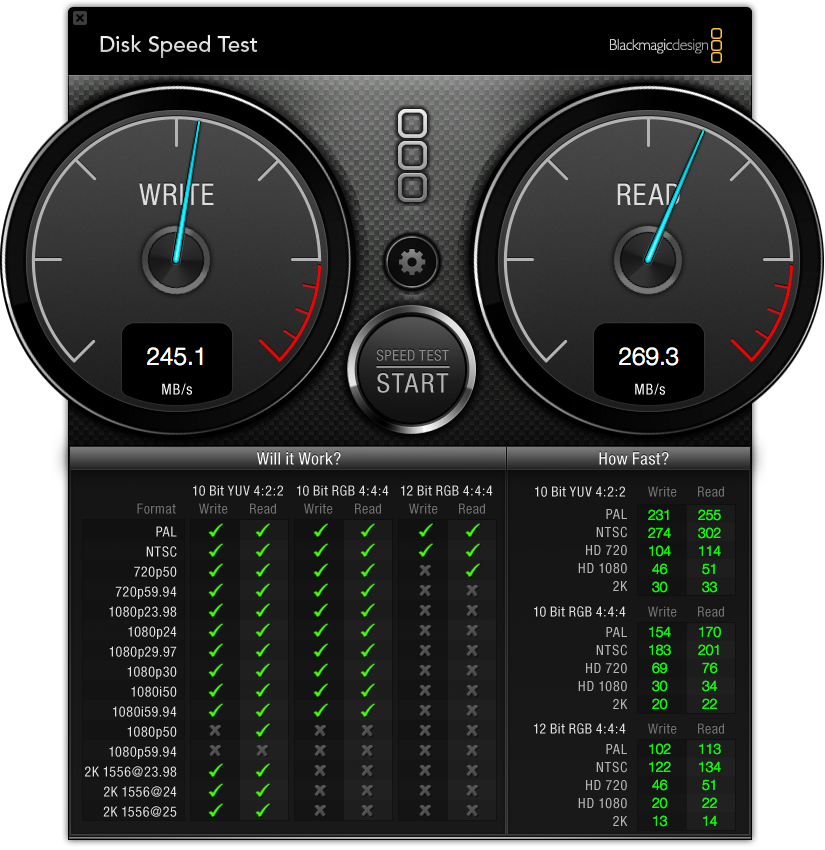
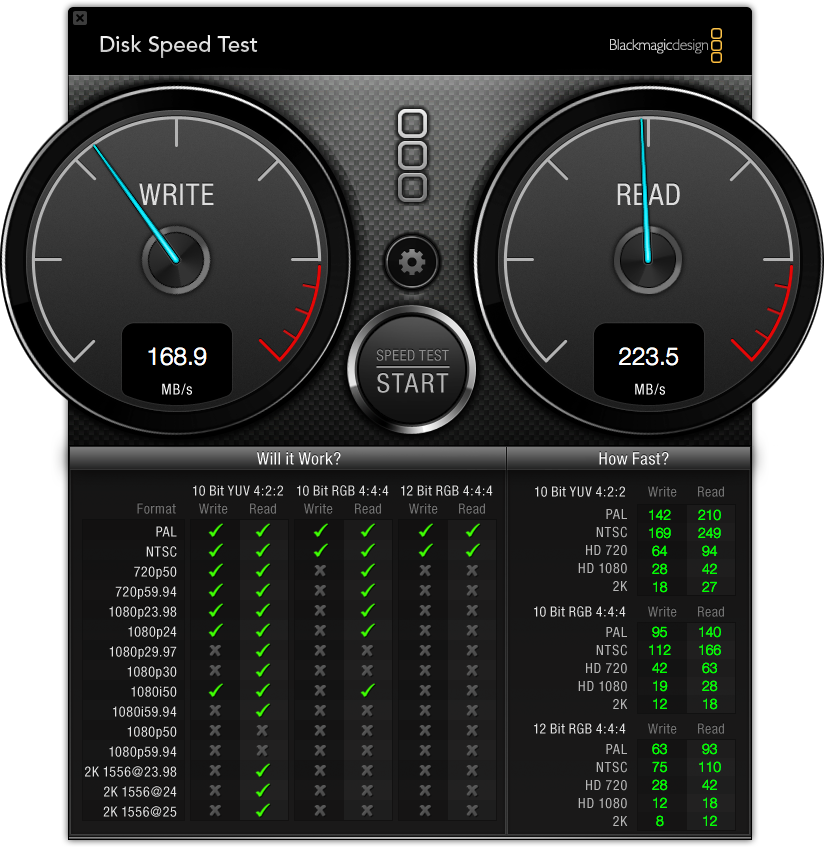
Just purchased a 16TB Quad sata 3 6GBPS drive configured for Raid 5 (so effectively 12TB worth of storage). Installed a dual Sata 3 6GBPS PCIe card into my Mac Pro 12 core.
Handles my 1080 60p files instantly and much faster than my internal 4 TB sata 2 Seagates.
Also have 2 internal OWC 500GB M4 SSD's which handle the 1080 60p files well. Can't say for sure whether they seem faster or not than the 12TB sata 3 drive but no editing problems here whatsoever. The SSD's show markedly better read/write times.
Also have 64GB ram, which probably helps.
Here are screenshots of the blackmagic designs disk speed test application (and who knows whether or not this means anything).
Bottom line, if your editing experience is smooth and fast and your happy, you're doing good !
Creating history....one edit at a time !
Last edit: 20 Oct 2012 03:35 by dgwvideo.
Please Log in to join the conversation.
20 Oct 2012 13:28 #15332
by BenB
Replied by BenB on topic Re: Hard Drives - How fast is a waste?
RAID will of course run faster than single drives, that's not psychological. Don't confuse what I said, please.
Please Log in to join the conversation.
- Cableaddict
-
Topic Author
- Offline
- Junior Member
-
Less
More
- Posts: 23
- Thank you received: 0
20 Oct 2012 20:01 - 20 Oct 2012 20:02 #15339
by Cableaddict
Replied by Cableaddict on topic Re: Hard Drives - How fast is a waste?
DGW, that's interesting.
I'm trying to understand what I'm seeing. High-res files were taking up to five times longer to process than PAL format?
Was this just a transfer, or an export, or some kind of rendering?
Were you using the same drive for source & destination, or 2 separate drives?
I'm trying to understand what I'm seeing. High-res files were taking up to five times longer to process than PAL format?
Was this just a transfer, or an export, or some kind of rendering?
Were you using the same drive for source & destination, or 2 separate drives?
Last edit: 20 Oct 2012 20:02 by Cableaddict.
Please Log in to join the conversation.
22 Oct 2012 13:15 - 22 Oct 2012 13:16 #15372
by dgwvideo
Creating history....one edit at a time !
Replied by dgwvideo on topic Re: Hard Drives - How fast is a waste?
This test simply measures speed writes and reads from any attached drive on your system. There were no open applications like fcpx or anything else running during the test. Its intent is to notify what video rates can efficiently be handled by the drive.
It has a high bar of standards as you will note it shows neither drive efficiently capable of working with 1080 60p (59.94 fps). The last several projects I have completed were in fact 1080 60p, and while the browser was ever so slightly sluggish during editing, they were certainly useable clips (transcoded from H264 AVCHD to Prores 422).
It has a high bar of standards as you will note it shows neither drive efficiently capable of working with 1080 60p (59.94 fps). The last several projects I have completed were in fact 1080 60p, and while the browser was ever so slightly sluggish during editing, they were certainly useable clips (transcoded from H264 AVCHD to Prores 422).
Creating history....one edit at a time !
Last edit: 22 Oct 2012 13:16 by dgwvideo.
Please Log in to join the conversation.
23 Oct 2012 17:06 - 23 Oct 2012 17:07 #15442
by VidGreg
Replied by VidGreg on topic Hard Drives - How fast is a waste?
Barefeats just ran a comparison of various ssd 6G drives speeds including the excelsior PCIe card. May provide some valuable info.
As far as what is the best for thru-put really the question should be best system configuration as it is multiple interactions, software, CPU processors, # of active cores, bus speed, ram, GPU, GPU ram, hard drives, raid configuration, interface i.e. internal, external; thunderbolt, USB3, FW800,etc...
Finally, no matter what system you have, next year will bring something faster, better and cheaper.
For 4K video the best system is sometime in the future....
Having said that you have a very nice system right now.
Here is link to Barefeats... www.barefeats.com/hard157.html
As far as what is the best for thru-put really the question should be best system configuration as it is multiple interactions, software, CPU processors, # of active cores, bus speed, ram, GPU, GPU ram, hard drives, raid configuration, interface i.e. internal, external; thunderbolt, USB3, FW800,etc...
Finally, no matter what system you have, next year will bring something faster, better and cheaper.
For 4K video the best system is sometime in the future....
Having said that you have a very nice system right now.
Here is link to Barefeats... www.barefeats.com/hard157.html
Last edit: 23 Oct 2012 17:07 by VidGreg. Reason: Added link
Please Log in to join the conversation.
23 Oct 2012 19:45 #15479
by BenB
Replied by BenB on topic Hard Drives - How fast is a waste?
My rMBP 15" and 10.0.6 run REDCODE RAW stuff just fine off a T'bolt buss powered drive.
Please Log in to join the conversation.
- Cableaddict
-
Topic Author
- Offline
- Junior Member
-
Less
More
- Posts: 23
- Thank you received: 0
23 Oct 2012 22:22 #15556
by Cableaddict
Replied by Cableaddict on topic Hard Drives - How fast is a waste?
It looks like I'm getting my answer.
I guess I'm seeing my 7200 rpm Sata drives floored, they are probably just barely capable of not holding things back with my current workflow. Evidently a fast eSata drive will be all I need, and the extra speed would simply benefit large file transfers.
Would you all agree? (This saves me a pile of money, btw !)
Would there ever be a situation where you'd need more speed, say, when FCP has to reads 4-5 dense files at once, and write to the same drive? I don't think I'd ever need that, and I assume that the Mac would use ram as a buffer, but I'm just being extra sure before I order my drives.
BTW- Greg, that's a great test at bare feats. THANKS. I love that they tested incompressible data, and even ran an AJA test.
I guess I'm seeing my 7200 rpm Sata drives floored, they are probably just barely capable of not holding things back with my current workflow. Evidently a fast eSata drive will be all I need, and the extra speed would simply benefit large file transfers.
Would you all agree? (This saves me a pile of money, btw !)
Would there ever be a situation where you'd need more speed, say, when FCP has to reads 4-5 dense files at once, and write to the same drive? I don't think I'd ever need that, and I assume that the Mac would use ram as a buffer, but I'm just being extra sure before I order my drives.
BTW- Greg, that's a great test at bare feats. THANKS. I love that they tested incompressible data, and even ran an AJA test.
Please Log in to join the conversation.
23 Oct 2012 22:41 #15560
by BenB
Replied by BenB on topic Hard Drives - How fast is a waste?
I'm testing with REDCODE RAW on my 2008 MP, internal secondary drive, 16 GB RAM, and I'm getting really great playback.
If I do any adjustments, effects, it's choppy, but enough to edit with. Rendering takes care of that. But you are rendering 4K clips, so don't hold your breath.
If I do any adjustments, effects, it's choppy, but enough to edit with. Rendering takes care of that. But you are rendering 4K clips, so don't hold your breath.
Please Log in to join the conversation.
25 Oct 2012 00:38 #15736
by VidGreg
Replied by VidGreg on topic Hard Drives - How fast is a waste?
Can't answer all your questions now, but you do want to use separate drives for OS/programs on one drive and put your media (events/projects) on other/more drives in the case of raid.
Need to tell us what type of media codecs you will be using to figure out system recommendations.
RED 4K files require vastly different system if native than SD mini DV files. You can always transcode to ProRes or Proxy files to make it work.
Also what types of output are you planning? If going to optical disk, then that will be your bottleneck.
New FCPX update allows multiple types of output codecs under sharing.
Really there are only a couple of scenarios that require the absolute baddest box around. Find the workflow that works for your type of editing, then build the system. See my Ram comments on your other thread.
Good luck, enjoy your Mac.
Need to tell us what type of media codecs you will be using to figure out system recommendations.
RED 4K files require vastly different system if native than SD mini DV files. You can always transcode to ProRes or Proxy files to make it work.
Also what types of output are you planning? If going to optical disk, then that will be your bottleneck.
New FCPX update allows multiple types of output codecs under sharing.
Really there are only a couple of scenarios that require the absolute baddest box around. Find the workflow that works for your type of editing, then build the system. See my Ram comments on your other thread.
Good luck, enjoy your Mac.
Please Log in to join the conversation.
- Cableaddict
-
Topic Author
- Offline
- Junior Member
-
Less
More
- Posts: 23
- Thank you received: 0
04 Nov 2012 17:38 - 04 Nov 2012 17:41 #16586
by Cableaddict
Replied by Cableaddict on topic Hard Drives - How fast is a waste?
Sooooo...
Still no really concrete information here, though it seems that massive drive speed only helps with file transfers. Thanks to this thread, I will not be "wasting" my money on that OWC PCIe drive.
However, the question still remains: How fast is a waste?
Assuming that ProRes is your densest format, given a "typical" editing situation, how fast does a media drive or array have to be so that it is never a bottleneck?
And again, does it make a difference if you are exporting to the same drive that holds the source files? - Or if your rendered files are on the same drive as the source?
Still no really concrete information here, though it seems that massive drive speed only helps with file transfers. Thanks to this thread, I will not be "wasting" my money on that OWC PCIe drive.
However, the question still remains: How fast is a waste?
Assuming that ProRes is your densest format, given a "typical" editing situation, how fast does a media drive or array have to be so that it is never a bottleneck?
And again, does it make a difference if you are exporting to the same drive that holds the source files? - Or if your rendered files are on the same drive as the source?
Last edit: 04 Nov 2012 17:41 by Cableaddict.
Please Log in to join the conversation.
04 Nov 2012 18:46 #16592
by BenB
Replied by BenB on topic Hard Drives - How fast is a waste?
Anything faster than the CPU is a waste, and nothing comes remotely close to that at this time.
All render, projects, events should be on a secondary drive from the OS drive. Two drives, that's it. If you have lots of media, spreading it out across several drives is not unheard of, but too many drives and the data bus that manages secondary/external drives will bog down. There's no solid number, as a lot contributes to that and various depending on system specifics.
Exporting helps if you have a faster drive, but a faster CPU is where you'd really notice exports increasing in speed.
All render, projects, events should be on a secondary drive from the OS drive. Two drives, that's it. If you have lots of media, spreading it out across several drives is not unheard of, but too many drives and the data bus that manages secondary/external drives will bog down. There's no solid number, as a lot contributes to that and various depending on system specifics.
Exporting helps if you have a faster drive, but a faster CPU is where you'd really notice exports increasing in speed.
Please Log in to join the conversation.
04 Nov 2012 22:27 #16602
by Julian
Replied by Julian on topic Hard Drives - How fast is a waste?
But if you make FCPX any faster, when will you have time to go refill your coffee?
Please Log in to join the conversation.
- Cableaddict
-
Topic Author
- Offline
- Junior Member
-
Less
More
- Posts: 23
- Thank you received: 0
05 Nov 2012 01:45 #16615
by Cableaddict
Good point!
- but I still have no answer.
Ben you've been very helpful on some other issues / threads, and it's good to know that you think one media drive is enough (much easier to deal with backups, as well) but you aren't addressing my MAIN question.
Other posters, on other forums, say that ANY drive is fast enough, as rendering does not rely on drive speed. Yet other posters say that you must use an array.
Someone has to be wrong.
Again, the question has nothing to do with transfer speed. That means nothing to me.
Maybe my question makes no sense, but I can't see how that could possibly be.
Replied by Cableaddict on topic Hard Drives - How fast is a waste?
Julian wrote: But if you make FCPX any faster, when will you have time to go refill your coffee?
Good point!
- but I still have no answer.
Ben you've been very helpful on some other issues / threads, and it's good to know that you think one media drive is enough (much easier to deal with backups, as well) but you aren't addressing my MAIN question.
Other posters, on other forums, say that ANY drive is fast enough, as rendering does not rely on drive speed. Yet other posters say that you must use an array.
Someone has to be wrong.
Again, the question has nothing to do with transfer speed. That means nothing to me.
Maybe my question makes no sense, but I can't see how that could possibly be.
Please Log in to join the conversation.

05 Nov 2012 12:33 - 05 Nov 2012 12:37 #16630
by Wildgiles
Replied by Wildgiles on topic Hard Drives - How fast is a waste?
Hmm you didn't specify what color space or codec the 4 streams of 1080P will be.
This is my theoretical guess:
To be safe 1gigabyte/sec read write would suffice for 4 streams roughly 200mb/sec per stream for 1080P 30fps in a 422 pro res. 250mb/sec if it's 4444. That requires a really nice array of drives 7-8 HD in RAID 0 or a couple of 6G SSD in RAiD 0 or a couple of those OWC PCIe cards in a RAID setup. With the new macs it looks like you could push a maximium of 2gb/sec through a
a raid on two thunderbolt ports at the same time. I haven't heard a word on the speed of the flash interface of the rmbp.
Good luck,
This is my theoretical guess:
To be safe 1gigabyte/sec read write would suffice for 4 streams roughly 200mb/sec per stream for 1080P 30fps in a 422 pro res. 250mb/sec if it's 4444. That requires a really nice array of drives 7-8 HD in RAID 0 or a couple of 6G SSD in RAiD 0 or a couple of those OWC PCIe cards in a RAID setup. With the new macs it looks like you could push a maximium of 2gb/sec through a
a raid on two thunderbolt ports at the same time. I haven't heard a word on the speed of the flash interface of the rmbp.
Good luck,
Last edit: 05 Nov 2012 12:37 by Wildgiles.
Please Log in to join the conversation.
05 Nov 2012 13:48 #16634
by BenB
Replied by BenB on topic Hard Drives - How fast is a waste?
I have answered your MAIN question, when will a drive get so fast it will be overkill. The answer is no drives today will get to that point, are so far from it its not funny. Get the fastest XSAN or T'bot RAID you want, your CPU and data pipe internally is still much, much faster. There is no realistic solution today that is "too fast".
I'm not sure what answer you're looking for, but that's the answer to your MAIN question.
I'm not sure what answer you're looking for, but that's the answer to your MAIN question.
Please Log in to join the conversation.
