


- Posts: 8
- Thank you received: 0
3 Post Moderation Rule for New Boarders (25 Jan 2021)
New boarders will have their posts moderated - Don't worry if you cannot see your post immediately.
FCPx replaced media with Gaps
27 Sep 2012 19:00 #14549
by gregUW
FCPx replaced media with Gaps was created by gregUW
Hello,
This is my first post at fcp.co. I hope someone can help me out. I am testing the trial version of FCPx by editing a training video. It seems to me that most of the media in the timeline has been turned in to "Gaps". I say Gaps because in the timeline index it is indicating that all the clips that I have been using are now Gaps, minus some compound clips that I created today. My edits are intact but the media is blacked out, just like a gap would be. it does not matter if the clip is a title, audio, video or a compound clip. Does anyone have any ideas as to why all my video clips are no "Gaps"?
Thank you for any suggestions,
Greg
This is my first post at fcp.co. I hope someone can help me out. I am testing the trial version of FCPx by editing a training video. It seems to me that most of the media in the timeline has been turned in to "Gaps". I say Gaps because in the timeline index it is indicating that all the clips that I have been using are now Gaps, minus some compound clips that I created today. My edits are intact but the media is blacked out, just like a gap would be. it does not matter if the clip is a title, audio, video or a compound clip. Does anyone have any ideas as to why all my video clips are no "Gaps"?
Thank you for any suggestions,
Greg
Please Log in to join the conversation.

27 Sep 2012 19:36 #14551
by dgwvideo
Creating history....one edit at a time !
Replied by dgwvideo on topic Re: FCPx replaced media with Gaps
Really going to need a screenshot of your timeline to help out on this one.
Creating history....one edit at a time !
Please Log in to join the conversation.
27 Sep 2012 19:57 #14554
by gregUW
Replied by gregUW on topic Re: FCPx replaced media with Gaps
Thanks for responding,
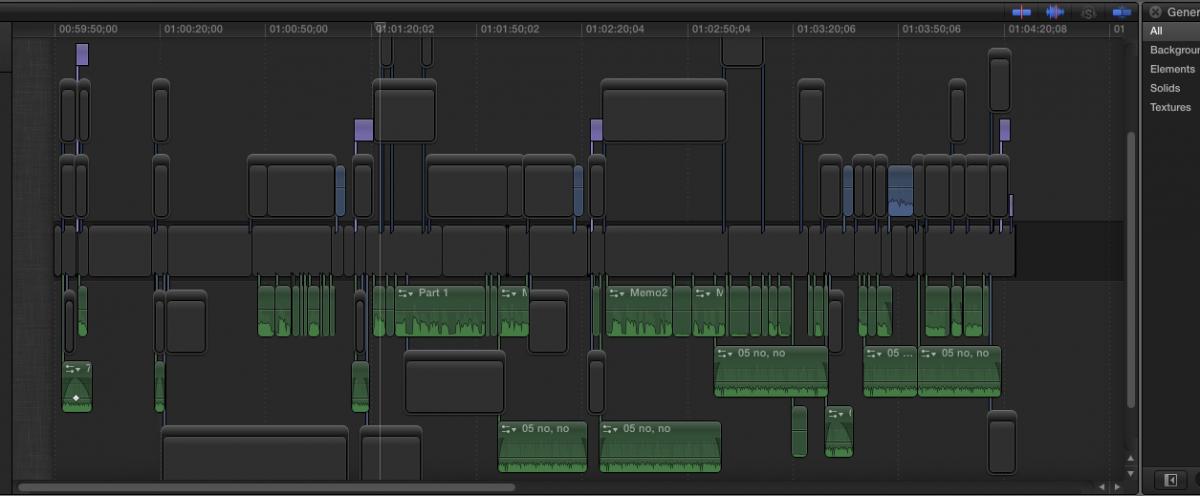
Here is a screen shot of what my timeline looks like now. I think that I may have mistakenly selected all (CMD+A) and replaced all my clips with a gap (somehow) before I exported it to QT.
Here is a screen shot of what my timeline looks like now. I think that I may have mistakenly selected all (CMD+A) and replaced all my clips with a gap (somehow) before I exported it to QT.
Please Log in to join the conversation.
- Tom Wolsky
-

- Offline
- Moderator
-

27 Sep 2012 20:20 #14557
by Tom Wolsky
Replied by Tom Wolsky on topic Re: FCPx replaced media with Gaps
It sure looks like you had all the video in the timeline index selected and pressed Shift-Delete.
Please Log in to join the conversation.
27 Sep 2012 20:37 #14560
by gregUW
Replied by gregUW on topic Re: FCPx replaced media with Gaps
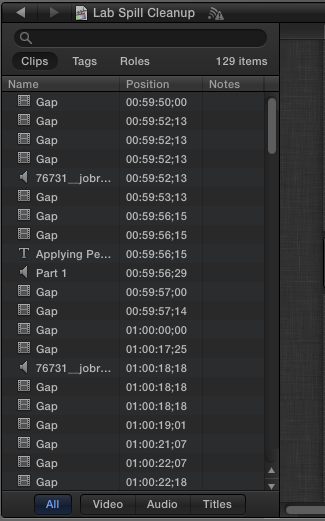
Would Shift + delete cause media clips to turn into gaps? The strange thing is, I created a compound clip and inserted it before certain segments. That compound clip is the last change I made to the timeline and they remained unaffected. Here is screenshot of my timeline index:
Thanks for the interest in my problem.
Thanks for the interest in my problem.
Please Log in to join the conversation.
- Tom Wolsky
-
- Offline
- Moderator
-
27 Sep 2012 20:51 #14561
by Tom Wolsky
Replied by Tom Wolsky on topic Re: FCPx replaced media with Gaps
Shift-Delete is replace with gap.
Please Log in to join the conversation.
27 Sep 2012 23:03 #14566
by gregUW
Replied by gregUW on topic Re: FCPx replaced media with Gaps
Thanks for your help. So much to learn about this new FCP. Just glad it was not an important project. The file management in FCPX is still quite daunting to me. Over all I like the new version. I sure have been testing FCP but now it seems to be testing me...
Please Log in to join the conversation.
27 Sep 2012 23:36 #14571
by dgwvideo
Creating history....one edit at a time !
Replied by dgwvideo on topic Re: FCPx replaced media with Gaps
Keyboard shortcuts are great...but if you're not paying attention it's not hard to accidentally delete, activate or change something you don't intend to.
Creating history....one edit at a time !
Please Log in to join the conversation.

28 Sep 2012 01:55 - 28 Sep 2012 02:00 #14574
by canelson
--
Matias Canelson
www.canelson.us
Replied by canelson on topic Re: FCPx replaced media with Gaps
Just in case, did you try to open a backup to recover your editing?
You can locate your backup files in the drive where your project is, there is a "Final Cut Projects" folder, inside there should be a folder with the project name and inside that folder a "Backups" and an "Older Versions", check if any of the files inside those folders opens a working project. Should be something like this:
"DRIVE>Final Cut Projects>Project name>Backups or Older Versions folders"
PS: DAMN! I hate the new terminology, timeline is a much better word than project.
You can locate your backup files in the drive where your project is, there is a "Final Cut Projects" folder, inside there should be a folder with the project name and inside that folder a "Backups" and an "Older Versions", check if any of the files inside those folders opens a working project. Should be something like this:
"DRIVE>Final Cut Projects>Project name>Backups or Older Versions folders"
PS: DAMN! I hate the new terminology, timeline is a much better word than project.
--
Matias Canelson
www.canelson.us
Last edit: 28 Sep 2012 02:00 by canelson.
Please Log in to join the conversation.
- Tom Wolsky
-
- Offline
- Moderator
-
28 Sep 2012 02:16 #14576
by Tom Wolsky
Replied by Tom Wolsky on topic Re: FCPx replaced media with Gaps
You want Backups. Older Versions are projects that were saved after a software update.
Please Log in to join the conversation.
28 Sep 2012 02:49 #14578
by canelson
--
Matias Canelson
www.canelson.us
Replied by canelson on topic Re: FCPx replaced media with Gaps
Thanks Tom, I didn´t know the difference!
--
Matias Canelson
www.canelson.us
Please Log in to join the conversation.
28 Sep 2012 13:38 #14580
by gregUW
Replied by gregUW on topic Re: FCPx replaced media with Gaps
Thanks for the information. I seems that FCP auto-saves every 15 minutes and I spent way more time trying to figure out what went wrong. So the backup file available is not pre-accident. I'm trying to figure out a way to keep a backup of the project (timeline). I think from now on I will have to duplicate my last project and work on that. What do you do to back up your project?
Please Log in to join the conversation.
- Tom Wolsky
-
- Offline
- Moderator
-
28 Sep 2012 13:41 #14581
by Tom Wolsky
Replied by Tom Wolsky on topic Re: FCPx replaced media with Gaps
Take a look at Pro Versioner from Digital Rebellion.
Please Log in to join the conversation.
28 Sep 2012 14:44 #14582
by canelson
--
Matias Canelson
www.canelson.us
Replied by canelson on topic Re: FCPx replaced media with Gaps
¿Don't you have a Time Machine backup? Maybe it's there!
--
Matias Canelson
www.canelson.us
Please Log in to join the conversation.
28 Sep 2012 17:10 #14583
by gregUW
Replied by gregUW on topic Re: FCPx replaced media with Gaps
No other Backups in place at this time. I am relatively new to this job I am doing and have to work with what they have to offer for now. But this would be a great point to bring up for a backup system! I am going to just let this go as lost, my lessons learned...
Thanks again!
Thanks again!
Please Log in to join the conversation.
28 Sep 2012 17:12 #14584
by gregUW
Replied by gregUW on topic Re: FCPx replaced media with Gaps
Pro Versioner is exactly what I would need to work the way I do! Great advice.
Please Log in to join the conversation.
- TrixTrax9000
-

- Offline
- Platinum Member
-

Less
More
- Posts: 1213
- Thank you received: 142
29 Sep 2012 01:25 #14587
by TrixTrax9000
Replied by TrixTrax9000 on topic Re: FCPx replaced media with Gaps
Pro Versioner sounds great, but it says "Projects are automatically backed up whenever you save." But FCPX doesn't have the classic CMD S for save, so... when exactly does Pro Versioner make these backups? & will it be frequently enough to override the problem our friend had in this thread? Or, can you override FCPX's dislike for CMD S saving, & just hit those keys anyway, prompting Pro Versioner to do its thing? Thanks
Please Log in to join the conversation.
29 Sep 2012 01:34 #14588
by dgwvideo
Creating history....one edit at a time !
Replied by dgwvideo on topic Re: FCPx replaced media with Gaps
Pro Versioner allows you to make a backup at any point you initiate. And then it stores that backup like time machine would along with a screenshot of your timeline. You can initiate a backup whenever you feel you have done enough work to make it worthwhile. To restore a backup you can browse through the various times and screenshots and select the restore point you want.
FCPX, on the other hand, makes a backup that overwrites the previous backup which doesn't really help if your project got corrupted and the backup contains the corrupted project.
FCPX, on the other hand, makes a backup that overwrites the previous backup which doesn't really help if your project got corrupted and the backup contains the corrupted project.
Creating history....one edit at a time !
Please Log in to join the conversation.
29 Sep 2012 04:35 #14593
by marchyman
Replied by marchyman on topic Re: FCPx replaced media with Gaps
FCPX may not have ⌘S but it does have ⌘D. Duplicate early and often. Duplicate the project only and uncheck the box that will include render files. You get a snapshot of your project at a point of time. You can delete the snapshots later. They don't take up much disk space.
My only complaint is that I have to return to the project library to enable ⌘D, you can't do it from an open project.
My only complaint is that I have to return to the project library to enable ⌘D, you can't do it from an open project.
Please Log in to join the conversation.
29 Sep 2012 13:58 #14606
by gregUW
Replied by gregUW on topic Re: FCPx replaced media with Gaps
I have using the duplicated project model. I have been mainly been using duplicate project for major changes, experimenting with different music, additional clips. Pro Versioner has similar functionality that I am used to with ProTools. It is a great way to have immediate access to a previous version.
This being my first initiated thread, I have to say that everyone is so helpful. This thread has helped me to re-think my editing habits. It has also go me looking at third party software to replace what FCP7 used to have.
Thank you Everyone
This being my first initiated thread, I have to say that everyone is so helpful. This thread has helped me to re-think my editing habits. It has also go me looking at third party software to replace what FCP7 used to have.
Thank you Everyone
Please Log in to join the conversation.
