


- Posts: 87
- Thank you received: 3
3 Post Moderation Rule for New Boarders (25 Jan 2021)
New boarders will have their posts moderated - Don't worry if you cannot see your post immediately.
FCPX won't create full duplicate Event on separate drive
31 Aug 2012 17:05 #13614
by BobKrist
FCPX won't create full duplicate Event on separate drive was created by BobKrist
I just upgraded from Snow Leopard to Lion and have already had a bit of a Keynote issue, but now FCPX is behaving strangely too.
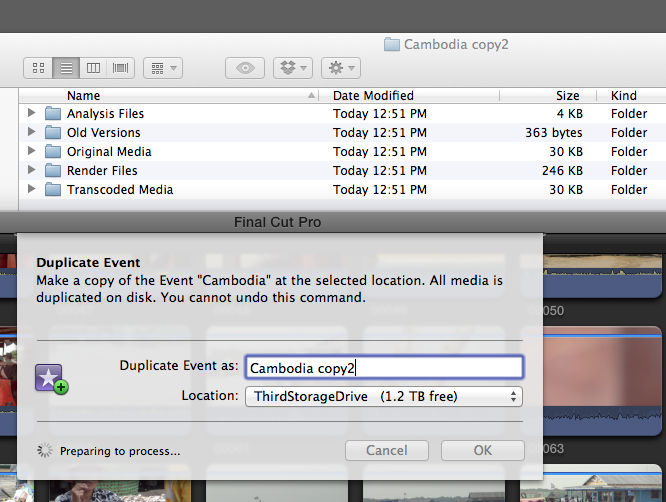
I am trying to duplicate an event (through FCPX as prescribed) from an external drive to one of my internal storage drives. It never gets past the "preparing to process" mode, and seems to create the folder and structures on the drive, but then doesn't do anything else.
Attached is a screen shot (I hope) of the windows. The activity window is idle, the little progress monitor thing next to the "Preparing to process" notification in the Duplicate Event window just keeps spinning.
I am trying to duplicate an event (through FCPX as prescribed) from an external drive to one of my internal storage drives. It never gets past the "preparing to process" mode, and seems to create the folder and structures on the drive, but then doesn't do anything else.
Attached is a screen shot (I hope) of the windows. The activity window is idle, the little progress monitor thing next to the "Preparing to process" notification in the Duplicate Event window just keeps spinning.
Please Log in to join the conversation.


03 Sep 2012 16:15 - 03 Sep 2012 16:16 #13691
by dgwvideo
Creating history....one edit at a time !
Replied by dgwvideo on topic Re: FCPX won't create full duplicate Event on separate drive
Try this, in this order.
1. Select your project in the project library.....from the menu above, select "delete project render files". Choose to delete "unused" files at this point. If, at the end of this your problem still exists, you can try to choose "delete ALL render files" but see if this works first.)
2. Select the event in the event library to highlight it in blue. From the menu, select "delete event render files (and as per step 1 start with "unused" render files first.
3. Trash your FCPX preference files by using the free program from "Digital Rebellion" called preference manager.
4. Reboot your computer, start up FCPX, set your FCPX preferences and then open your project. Now try to move the project to your desired location through FCPX.
See if that helps !
1. Select your project in the project library.....from the menu above, select "delete project render files". Choose to delete "unused" files at this point. If, at the end of this your problem still exists, you can try to choose "delete ALL render files" but see if this works first.)
2. Select the event in the event library to highlight it in blue. From the menu, select "delete event render files (and as per step 1 start with "unused" render files first.
3. Trash your FCPX preference files by using the free program from "Digital Rebellion" called preference manager.
4. Reboot your computer, start up FCPX, set your FCPX preferences and then open your project. Now try to move the project to your desired location through FCPX.
See if that helps !
Creating history....one edit at a time !
Last edit: 03 Sep 2012 16:16 by dgwvideo.
Please Log in to join the conversation.
03 Sep 2012 16:18 #13692
by BobKrist
Replied by BobKrist on topic Re: FCPX won't create full duplicate Event on separate drive
Thanks DGW, I will give that a try. Appreciate the help! BK
Please Log in to join the conversation.
