


- Posts: 379
- Thank you received: 6
3 Post Moderation Rule for New Boarders (25 Jan 2021)
New boarders will have their posts moderated - Don't worry if you cannot see your post immediately.
Multicam & CC's
- Marc Lucas
-
 Topic Author
- Offline
- Platinum Member
-

Less
More
08 Jul 2012 22:32 #11139
by Marc Lucas
Multicam & CC's was created by Marc Lucas
Multicam edit (only two cameras) edited the MC into the timeline and edited/selected camera angle etc I cut the MC up into four small interview sections (on the one timeline)
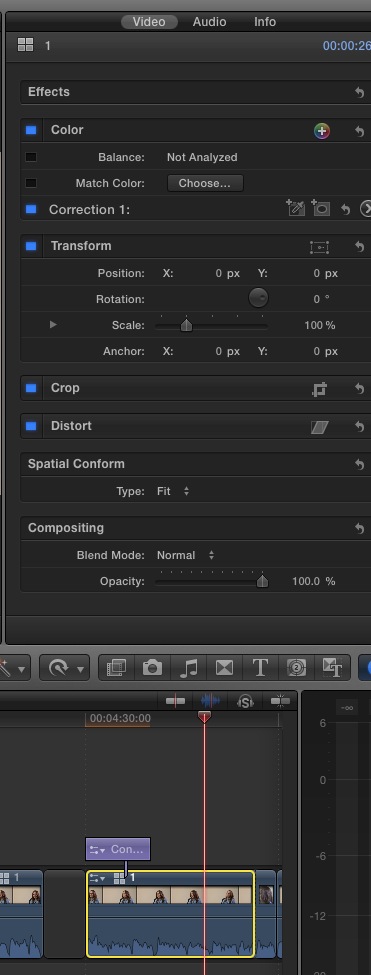
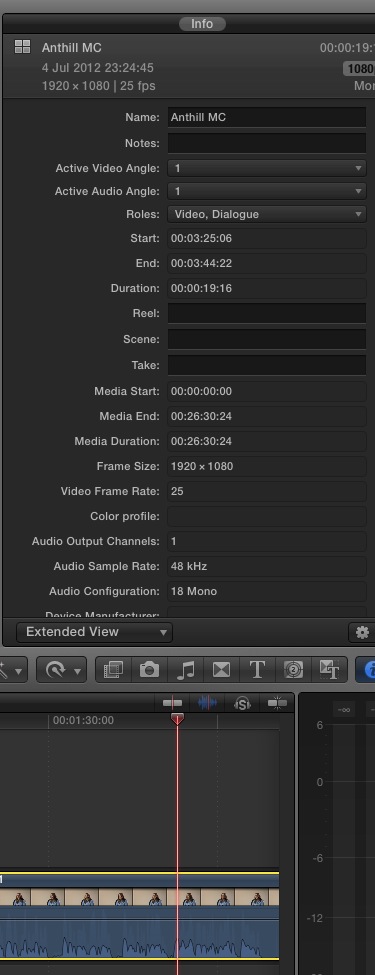
If I select any of the clips in the timeline I can see the parameters in the Inspector OK (audio/video/info) so I can scale up the etc. I wanted to export the four separate interviews so copied one of the interview sections then pasted into a CC so that it was self contained and I could easily export just that section. What I noticed is that if I was to select a single clip now the only parameters I could see in the Inspector was the 'info' panel. Why has the 'Audio & Video tabs gone don't understand it. So this really limits further editing whilst in the CC?
If I select any of the clips in the timeline I can see the parameters in the Inspector OK (audio/video/info) so I can scale up the etc. I wanted to export the four separate interviews so copied one of the interview sections then pasted into a CC so that it was self contained and I could easily export just that section. What I noticed is that if I was to select a single clip now the only parameters I could see in the Inspector was the 'info' panel. Why has the 'Audio & Video tabs gone don't understand it. So this really limits further editing whilst in the CC?
Please Log in to join the conversation.


09 Jul 2012 00:41 #11143
by BenB
Replied by BenB on topic Re: Multicam & CC's
Sounds like a screen update glitch. I see this on rare occasion. Select something else in the Browser or something, then come back to the Compound Clip. You should see tabs for the media in that CC (video and/or audio), as well as info.
Please Log in to join the conversation.
- Marc Lucas
-
Topic Author
- Offline
- Platinum Member
-
Less
More
- Posts: 379
- Thank you received: 6
09 Jul 2012 09:47 #11150
by Marc Lucas
Replied by Marc Lucas on topic Re: Multicam & CC's
Hi Ben
No I don't think it is I've had that before but this time its different. I have selected different things in the browser etc and still no different.
I've attached two screen grabs of the same clip first clip selected in Timeline as part of the MC edit second is the individual section inside the CC
No I don't think it is I've had that before but this time its different. I have selected different things in the browser etc and still no different.
I've attached two screen grabs of the same clip first clip selected in Timeline as part of the MC edit second is the individual section inside the CC
Please Log in to join the conversation.
09 Jul 2012 10:13 #11153
by BenB
Replied by BenB on topic Re: Multicam & CC's
That's not right. In fact, I can't duplicate it here. You should be seeing all three, or at least two tabs. If you simply can not get the correct tabs to show, fill in the feedback form, send the screen shot, give the details. This is a bug.
Please Log in to join the conversation.
- Marc Lucas
-
Topic Author
- Offline
- Platinum Member
-
Less
More
- Posts: 379
- Thank you received: 6
09 Jul 2012 10:39 #11158
by Marc Lucas
Replied by Marc Lucas on topic Re: Multicam & CC's
Yeah I thought it was strange. I've had it both on 10.0.4 & 10.0.5
Thanks Ben
Thanks Ben
Please Log in to join the conversation.
- Marc Lucas
-
Topic Author
- Offline
- Platinum Member
-
Less
More
- Posts: 379
- Thank you received: 6
09 Jul 2012 13:07 #11171
by Marc Lucas
Replied by Marc Lucas on topic Re: Multicam & CC's
There isn't the option to send a screen shot on the feedback form. Just sent one with just the problem info
Please Log in to join the conversation.
- Marc Lucas
-
Topic Author
- Offline
- Platinum Member
-
Less
More
- Posts: 379
- Thank you received: 6
09 Jul 2012 13:15 #11172
by Marc Lucas
Replied by Marc Lucas on topic Re: Multicam & CC's
I made another CC and copy/pasted the same section of clips into and still the same problem occurred. I then tried created a new project and editing in the CC all three parameters were visible in the Inspector I double clicked the CC to go inside to select the individual clips, selected one and all three parameters Audio/Video/Info were there. So must be a corrupt project file?
Please Log in to join the conversation.
09 Jul 2012 15:42 #11177
by BenB
Replied by BenB on topic Re: Multicam & CC's
Possible. Try this. The Project that it's doing it with, go into it's Project folder on the hard drive. Move the "CurrentEvent.fcpproject" file to your desktop. Then move the backup copy from the "Backups" sub-folder to take the original's place. Double-click that backup copy now. It'll tell you it can't read the file, which is just weirdness I know, but it will rebuild the project file from that backup and open it. See if that does anything different. It may not. But I'm curious.
Please Log in to join the conversation.
- Marc Lucas
-
Topic Author
- Offline
- Platinum Member
-
Less
More
- Posts: 379
- Thank you received: 6
09 Jul 2012 21:06 #11197
by Marc Lucas
Replied by Marc Lucas on topic Re: Multicam & CC's
covered the steps, when I dragged the backup project file to the older project files location and doubled click it just opened the project without any warning messages:-) The same problem was still there though. I'm just going to copy all the CC & MC clip to a new project, job done.
Please Log in to join the conversation.
