


- Posts: 38
- Thank you received: 0
3 Post Moderation Rule for New Boarders (25 Jan 2021)
New boarders will have their posts moderated - Don't worry if you cannot see your post immediately.
freeze during export
- keithwhite
-
 Topic Author
- Offline
- Junior Member
-

Less
More
08 Jul 2012 01:33 #11076
by keithwhite
freeze during export was created by keithwhite
Been working on 60-minuto doco for last 6 months with no real problems. Until last week when the freeze-up occurred.@ 76 % into the Share (export) process everything grinds to a halt and I have to manually shut down.
Prior to that response in FCPX had seemed to be slowing a bit. I was running the project (as generally recommended) from the LaCie when problem occurred first. I then transferred FCPX Project and Event to system drive. Same thing happened.
Took FCPX Project and Event to another more powerful iMac . Same result
Steps taken:
Trashed FCPX 10. 4 and installed 10.5
Trashed FCPX prefs
Ran Corrupt Clip Finder which alerted me to 50+ image file over the 4Kpixel limit ( even though I'd been working with them for 6 months without a hitch on earlier project versions up to 75 minutes). Reduced sizes below 4K
Deleted unused Project and Event files.
Ran housekeeping software to clean out caches etc.
Thought it might be a titling problem so I disabled titles in timeline
Cleaned up duplicate fonts in FontBook
Ran complete system check with Tech Tool Deluxe - AOK
Zapped PRAM
Repaired permissions
Safe Boot
Removed incompatible files ( and the yellow triangle)
After each step I ran the Share( export) process - same result exactly. @ 76 % into the process everything grinds to a halt and I have to manually shut down
Tried Share with another (shorter) project - no problems.
Deleted all render files as advised on the Support site and started rendering. After 3.5 hours ( 82%) same old system freeze-
Had been sharing to iPad format so changed to Export Media ( H. 264) now freezes consistently at 84%
the only major change in my setup has been moving from MobileMe to iCloud around this time
the current version of the project has 957 Event render files and 6245 Project render files
OS 10.7.4

any advice greatly appreciated
Prior to that response in FCPX had seemed to be slowing a bit. I was running the project (as generally recommended) from the LaCie when problem occurred first. I then transferred FCPX Project and Event to system drive. Same thing happened.
Took FCPX Project and Event to another more powerful iMac . Same result
Steps taken:
Trashed FCPX 10. 4 and installed 10.5
Trashed FCPX prefs
Ran Corrupt Clip Finder which alerted me to 50+ image file over the 4Kpixel limit ( even though I'd been working with them for 6 months without a hitch on earlier project versions up to 75 minutes). Reduced sizes below 4K
Deleted unused Project and Event files.
Ran housekeeping software to clean out caches etc.
Thought it might be a titling problem so I disabled titles in timeline
Cleaned up duplicate fonts in FontBook
Ran complete system check with Tech Tool Deluxe - AOK
Zapped PRAM
Repaired permissions
Safe Boot
Removed incompatible files ( and the yellow triangle)
After each step I ran the Share( export) process - same result exactly. @ 76 % into the process everything grinds to a halt and I have to manually shut down
Tried Share with another (shorter) project - no problems.
Deleted all render files as advised on the Support site and started rendering. After 3.5 hours ( 82%) same old system freeze-
Had been sharing to iPad format so changed to Export Media ( H. 264) now freezes consistently at 84%
the only major change in my setup has been moving from MobileMe to iCloud around this time
the current version of the project has 957 Event render files and 6245 Project render files
OS 10.7.4
any advice greatly appreciated
Please Log in to join the conversation.

08 Jul 2012 04:22 - 08 Jul 2012 04:23 #11078
by Seanus
Sean Lander - Editing since 1982 - AVID 1991 - FCP 1999 - FCPX 2011
Replied by Seanus on topic Re: freeze during export
Best thing to do is duplicate the project and start cutting bits off the end and retry exporting. Keep doing it until you don't crash then work out what the offending shot is.
I've had this issue caused by shots still linking to open camera archives. Look for clips that have the camera icon still on them. If you see these reimport from Camera Archive.
I've had this issue caused by shots still linking to open camera archives. Look for clips that have the camera icon still on them. If you see these reimport from Camera Archive.
Sean Lander - Editing since 1982 - AVID 1991 - FCP 1999 - FCPX 2011
Last edit: 08 Jul 2012 04:23 by Seanus.
Please Log in to join the conversation.

08 Jul 2012 05:15 #11079
by BenB
Replied by BenB on topic Re: freeze during export
1- Be sure all drives have at least 10-15% of total capacity as free space.
2- From the File menu delete all render files from the Events and Projects.
3- Turn background rendering off.
Disk Warrior should be run monthly, no need to run anything else.
Zapping PRAM, Disk Utility, etc, most of that doesn't do much of anything to help with these problems.
AND what Seanus said!
2- From the File menu delete all render files from the Events and Projects.
3- Turn background rendering off.
Disk Warrior should be run monthly, no need to run anything else.
Zapping PRAM, Disk Utility, etc, most of that doesn't do much of anything to help with these problems.
AND what Seanus said!
Please Log in to join the conversation.
- keithwhite
-
Topic Author
- Offline
- Junior Member
-
Less
More
- Posts: 38
- Thank you received: 0
08 Jul 2012 12:03 #11094
by keithwhite
Replied by keithwhite on topic Re: freeze during export
Many thanks guys,
will run through these suggestions tomorrow.
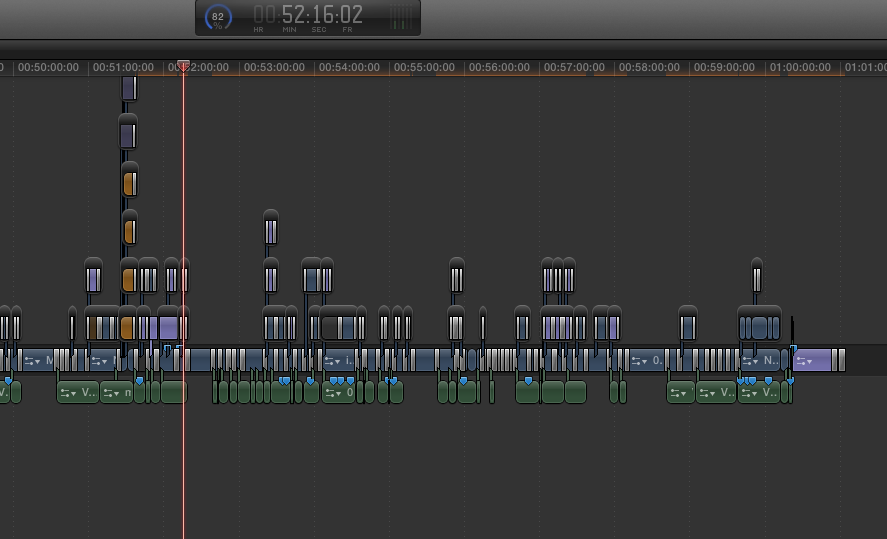
I've got a screenshot of the timeline where the system froze (almost) so that should lead me to the culprit.
I got this message when I force quitted FCPX
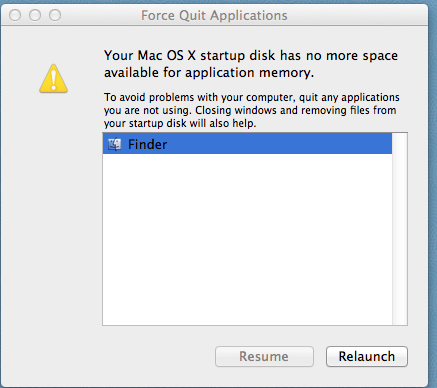
even though I have 158 gig( out of 1TB) free on the system drive and 1TB out of 1.5TB on the RAID partition where the project files are.
????
will run through these suggestions tomorrow.
I've got a screenshot of the timeline where the system froze (almost) so that should lead me to the culprit.
I got this message when I force quitted FCPX
even though I have 158 gig( out of 1TB) free on the system drive and 1TB out of 1.5TB on the RAID partition where the project files are.
????
Please Log in to join the conversation.
08 Jul 2012 14:54 #11101
by Seanus
Sean Lander - Editing since 1982 - AVID 1991 - FCP 1999 - FCPX 2011
Replied by Seanus on topic Re: freeze during export
I get the impression that you need to explore Compound Clips in FCP X. Don't be afraid. It actually works.
Sean Lander - Editing since 1982 - AVID 1991 - FCP 1999 - FCPX 2011
Please Log in to join the conversation.
08 Jul 2012 15:25 #11102
by BenB
Replied by BenB on topic Re: freeze during export
You are actually at the limit (boarderline) for your OS X system drive. You simply need to clean stuff off of it, or upgrade it to a 2TB drive (Carbon Copy Cloner makes this super easy). I did about a year go.
Please Log in to join the conversation.
08 Jul 2012 15:35 - 08 Jul 2012 15:38 #11105
by BenB
Replied by BenB on topic Re: freeze during export
Agreed, Compound Clips rock!
Also chunk your really long project down into scenes. Make a Compound Clip for each Scene. Then when each is done, drop them all into a Project for final assembly for output.
Also chunk your really long project down into scenes. Make a Compound Clip for each Scene. Then when each is done, drop them all into a Project for final assembly for output.
Last edit: 08 Jul 2012 15:38 by BenB.
Please Log in to join the conversation.
- keithwhite
-
Topic Author
- Offline
- Junior Member
-
Less
More
- Posts: 38
- Thank you received: 0
09 Jul 2012 00:08 #11141
by keithwhite
Replied by keithwhite on topic Re: freeze during export
Many thanks again guys.
Plenty to think about.
I'm a bit intrigued by running out of system drive space when earlier versions of the project were much larger and I had less available hard drive space.
And I think I got an alert once when I didn't have enough.
Anyhow it's back to school on scenes/compound clips.
I'll keep you posted
Plenty to think about.
I'm a bit intrigued by running out of system drive space when earlier versions of the project were much larger and I had less available hard drive space.
And I think I got an alert once when I didn't have enough.
Anyhow it's back to school on scenes/compound clips.
I'll keep you posted
Please Log in to join the conversation.
09 Jul 2012 00:35 #11142
by BenB
Replied by BenB on topic Re: freeze during export
You'll find better overall system performance if you don't put events and projects on the system drive.
You can create new, empty compound clips inside the Event Browser, name one for each Scene. Create a Smart Collection based on Clip Type is Compound, so you have quick access to them.
I'd go over that system drive and evaluate what else is on there, too. But start with deleting all render files (via FCP X's file menu) in all Events and Projects. Just clear that all out. You've probably got a lot of old renders in there.
You can create new, empty compound clips inside the Event Browser, name one for each Scene. Create a Smart Collection based on Clip Type is Compound, so you have quick access to them.
I'd go over that system drive and evaluate what else is on there, too. But start with deleting all render files (via FCP X's file menu) in all Events and Projects. Just clear that all out. You've probably got a lot of old renders in there.
Please Log in to join the conversation.
- keithwhite
-
Topic Author
- Offline
- Junior Member
-
Less
More
- Posts: 38
- Thank you received: 0
09 Jul 2012 02:51 #11145
by keithwhite
Replied by keithwhite on topic Re: freeze during export
Steps just taken:
Cleared system drive to release 500gig free space.
Trashed remaining FCPX render files as advised
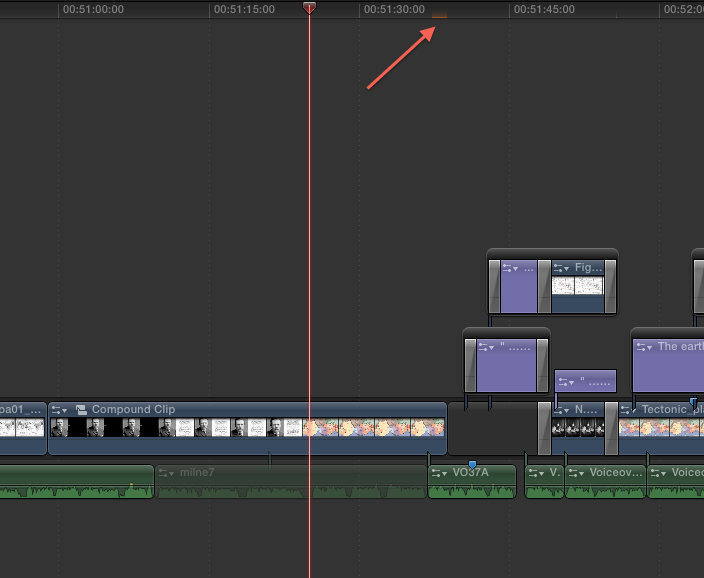
created compound clip ( thanks!) of sequence where suspected problem occurs and attempted to render from there.
see pic below
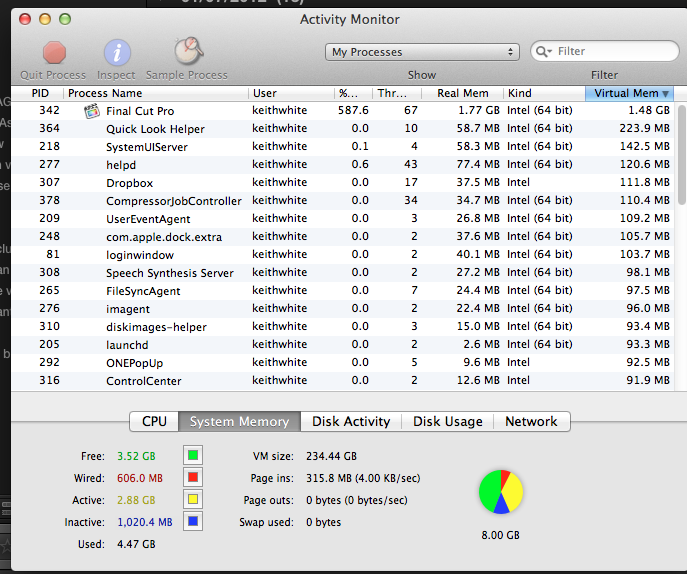
system froze with Activity Monitor showing as follows
rebooted - disabled compound clip and rendered small section after corruption point.
took about 5 mins to render 40 secs of audio, stills and titles. with Activity Monitor 400-500%. But it survived. Until I re-enabled the compound clip when it all froze again.
At the corruption point I have a map image on screen with four small shapes and 4 short titles.
Narration running below and Earthquake effect on map.
I've come across "memory leak" on the forums. Could this be the case?
any advice appreciated
Cleared system drive to release 500gig free space.
Trashed remaining FCPX render files as advised
created compound clip ( thanks!) of sequence where suspected problem occurs and attempted to render from there.
see pic below
system froze with Activity Monitor showing as follows
rebooted - disabled compound clip and rendered small section after corruption point.
took about 5 mins to render 40 secs of audio, stills and titles. with Activity Monitor 400-500%. But it survived. Until I re-enabled the compound clip when it all froze again.
At the corruption point I have a map image on screen with four small shapes and 4 short titles.
Narration running below and Earthquake effect on map.
I've come across "memory leak" on the forums. Could this be the case?
any advice appreciated
Please Log in to join the conversation.
09 Jul 2012 03:16 - 09 Jul 2012 03:17 #11146
by BenB
Replied by BenB on topic Re: freeze during export
Mem leaks fixed, shouldn't be an issue. I wonder if you have a corrupted media file. Remove that audio clip see what happens. 400-500% only means you have 4-5 cores working, not an issue. Something sitting in that Timeline is corrupt or has some odd encoding issue.
What are the specs of how that audio clip is encoded?
Also, go to the Final Cut Pro menu, to the Feedback page, and tell Apple about this. I think they're going to want to know about this, may ask you for screen shots, etc. Cause that's just odd.
What are the specs of how that audio clip is encoded?
Also, go to the Final Cut Pro menu, to the Feedback page, and tell Apple about this. I think they're going to want to know about this, may ask you for screen shots, etc. Cause that's just odd.
Last edit: 09 Jul 2012 03:17 by BenB.
Please Log in to join the conversation.
09 Jul 2012 12:08 #11168
by Seanus
Sean Lander - Editing since 1982 - AVID 1991 - FCP 1999 - FCPX 2011
Replied by Seanus on topic Re: freeze during export
Looks like FCP is hanging where there is no video. Try replacing it with a black slug. See if that helps.
Sean Lander - Editing since 1982 - AVID 1991 - FCP 1999 - FCPX 2011
Please Log in to join the conversation.
- keithwhite
-
Topic Author
- Offline
- Junior Member
-
Less
More
- Posts: 38
- Thank you received: 0
09 Jul 2012 22:55 #11211
by keithwhite
Replied by keithwhite on topic Re: freeze during export
Thanks again Seanus
will try, and report back.
I did FCPX Feedback to Apple as advised.
Their first response was that I should have at least 20GB free on system drive ( I have 500GB free) and should store files on an external drive ( which I do on a 9TB LaCie RAID)
will try, and report back.
I did FCPX Feedback to Apple as advised.
Their first response was that I should have at least 20GB free on system drive ( I have 500GB free) and should store files on an external drive ( which I do on a 9TB LaCie RAID)
Please Log in to join the conversation.
09 Jul 2012 23:00 #11212
by BenB
Replied by BenB on topic Re: freeze during export
Respond with lots of detailed information, details, details, details. And give a link to this thread.
Please Log in to join the conversation.
- keithwhite
-
Topic Author
- Offline
- Junior Member
-
Less
More
- Posts: 38
- Thank you received: 0
09 Jul 2012 23:23 #11214
by keithwhite
Replied by keithwhite on topic Re: freeze during export
Thanks BenB
I did link to this thread
Apple have asked for Crash Log - not sure if you get one when the system freezes and you either Force Quit or more usually turn the Mac off manually
I did link to this thread
Apple have asked for Crash Log - not sure if you get one when the system freezes and you either Force Quit or more usually turn the Mac off manually
Please Log in to join the conversation.
09 Jul 2012 23:49 - 09 Jul 2012 23:50 #11216
by BenB
Replied by BenB on topic Re: freeze during export
They should have sent info on how to get the crash log file and send it to them. But here's some info that may or may not help. Feel free to respond with "How the heck do I find the crash report after the fact?"
Mac OSX 10.6
If you are running 10.6.4 your crashes will be written as one crash per file which will contain the name of the application that crashed, the date and time of the crash and the name of the computer just as in 10.5.8 except that they are located here:
~/ Library / Logs / DiagnosticReports
e.g. ~Library/Logs/CrashReporter/Scratch Live_10-10-101745_Sam Stokess_MBP.
It will also put an alias of this in this location:
~/ Library / Logs / CrashReporter
Mac OSX 10.7
In Mac OS X 10.7, crash logs are saved in the same location as in Mac OS X Leopard (10.5.x) and Mac OS X Snow Leopard (10.6.x) except the ‘Library’ folder is hidden by default. To locate the Library folder, choose 'Go to Folder' from Finder’s 'Go' menu and type:
~/Library/Logs/DiagnosticReports/
e.g.~/ Library / Logs / DiagnosticReports/Scratch Live_10-10-101745_Sam Stokess_MBP.
TIP: To make the Library folder permanently visible in Mac OSX Lion, type the following command in Terminal:
chflags nohidden ~/Library
Mac OSX 10.6
If you are running 10.6.4 your crashes will be written as one crash per file which will contain the name of the application that crashed, the date and time of the crash and the name of the computer just as in 10.5.8 except that they are located here:
~/ Library / Logs / DiagnosticReports
e.g. ~Library/Logs/CrashReporter/Scratch Live_10-10-101745_Sam Stokess_MBP.
It will also put an alias of this in this location:
~/ Library / Logs / CrashReporter
Mac OSX 10.7
In Mac OS X 10.7, crash logs are saved in the same location as in Mac OS X Leopard (10.5.x) and Mac OS X Snow Leopard (10.6.x) except the ‘Library’ folder is hidden by default. To locate the Library folder, choose 'Go to Folder' from Finder’s 'Go' menu and type:
~/Library/Logs/DiagnosticReports/
e.g.~/ Library / Logs / DiagnosticReports/Scratch Live_10-10-101745_Sam Stokess_MBP.
TIP: To make the Library folder permanently visible in Mac OSX Lion, type the following command in Terminal:
chflags nohidden ~/Library
Last edit: 09 Jul 2012 23:50 by BenB.
Please Log in to join the conversation.
- keithwhite
-
Topic Author
- Offline
- Junior Member
-
Less
More
- Posts: 38
- Thank you received: 0
10 Jul 2012 04:53 #11226
by keithwhite
Replied by keithwhite on topic Re: freeze during export
many thanks.
found three FCPX crash logs and two Videomemory tool crash logs within the same period which I sent to Apple.
found three FCPX crash logs and two Videomemory tool crash logs within the same period which I sent to Apple.
Please Log in to join the conversation.
- keithwhite
-
Topic Author
- Offline
- Junior Member
-
Less
More
- Posts: 38
- Thank you received: 0
12 Jul 2012 01:10 - 12 Jul 2012 01:38 #11355
by keithwhite
Replied by keithwhite on topic Re: freeze during export
Latest report.
I went back to a previous version of the project. Noticed FCPX seemed more responsive.
I relinked the files that I had reduced below the recommended 4K pixel limit.
One of the suspect files could not be found in Original Media so I reimported it.
Moved to suspect area (Map image, 4 short titles, 4 small coloured shapes, voice over) and began to Render the section all went fine until exactly at the start of transitions to next image
I then tried to remove the transitions from TITLES in case doing 9 cross dissolves at once was too much. Selecting the first tranny locked up the system.
Rebooted - managed to remove three trannies from the SHAPES before the stye locked up.
So I can't get rid of the suspect files - doing anything in that area locks the system up.
Corrupt Clip Finder is not showing anything incompatible. I've opened the suspect files in Photoshop/ Sound edit and couldn't find anything unusual
Apple are on the case now and I am sending Crash Logs and Activity reports.
I've been advised to log in with a different user. I ran the project on another computer with the same results so I presumed it wasn't a User issue but hey - I'll give anything a go.
FCPX now virtually freezes at startup so I'm not sure what I can do next.
I worked on another project on another machine yesterday - I'd forgotten how quick and amazing FCPX is when it behaves normally.
any suggestions appreciated
I went back to a previous version of the project. Noticed FCPX seemed more responsive.
I relinked the files that I had reduced below the recommended 4K pixel limit.
One of the suspect files could not be found in Original Media so I reimported it.
Moved to suspect area (Map image, 4 short titles, 4 small coloured shapes, voice over) and began to Render the section all went fine until exactly at the start of transitions to next image
I then tried to remove the transitions from TITLES in case doing 9 cross dissolves at once was too much. Selecting the first tranny locked up the system.
Rebooted - managed to remove three trannies from the SHAPES before the stye locked up.
So I can't get rid of the suspect files - doing anything in that area locks the system up.
Corrupt Clip Finder is not showing anything incompatible. I've opened the suspect files in Photoshop/ Sound edit and couldn't find anything unusual
Apple are on the case now and I am sending Crash Logs and Activity reports.
I've been advised to log in with a different user. I ran the project on another computer with the same results so I presumed it wasn't a User issue but hey - I'll give anything a go.
FCPX now virtually freezes at startup so I'm not sure what I can do next.
I worked on another project on another machine yesterday - I'd forgotten how quick and amazing FCPX is when it behaves normally.
any suggestions appreciated
Last edit: 12 Jul 2012 01:38 by keithwhite.
Please Log in to join the conversation.
12 Jul 2012 01:14 #11356
by BenB
Replied by BenB on topic Re: freeze during export
This may have been tried already, but I'll just suggest it anyway. Select and copy everything right up to and just before that batch of transitions. Create a new Project and paste. This is a very strange problem.
Please Log in to join the conversation.
- keithwhite
-
Topic Author
- Offline
- Junior Member
-
Less
More
- Posts: 38
- Thank you received: 0
12 Jul 2012 01:54 #11358
by keithwhite
Replied by keithwhite on topic Re: freeze during export
Thanks BenB I'll give it a go.
BTW just ran Corrupt Clip Finder again, just in case.
CCF turned up a few more images over 4K pix
and then . . . the major suspect. Problem reported as "Failed Loading Check"
does anyone know what this means and how to fix it?
BTW just ran Corrupt Clip Finder again, just in case.
CCF turned up a few more images over 4K pix
and then . . . the major suspect. Problem reported as "Failed Loading Check"
does anyone know what this means and how to fix it?
Please Log in to join the conversation.
