


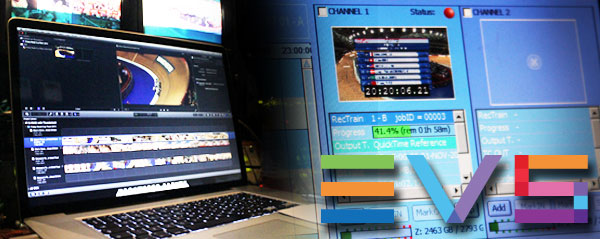
Inspired by the possibility of Thunderbolt Bridging and the accidental discovery of Mavericks and FCPX 10.0.9 accepting growing EVS streams, we put the combination to the test. Did it work?
Love them or hate them, EVS LSMs are probably going to be your main source for media if you work in the quick turnaround sports or news sectors of broadcast television. Born as a low quality RAM replay to analyse golf swings, EVS and its servers has grown to providing the video backbone for major sporting events and newsrooms around the world.
They did get a shock when Picture Ready from The Gallery made the availability of a growing QuickTime file possible within Final Cut Pro 7. EVS answered by providing the ability to write IMX, DVCPRO and ProRes 422 files from the machine on to storage attached to an NLE.
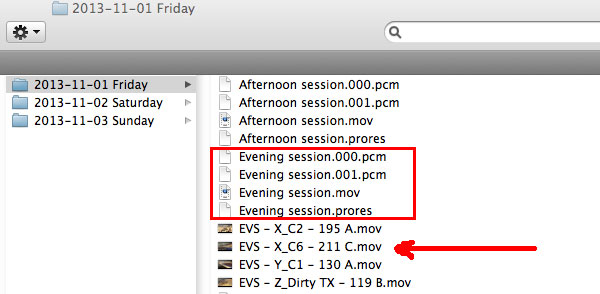
There are two different types of media that can be sent from an EVS to an NLE. An archived clip is a closed Quicktime file that an LSM operator marks the in and out of and then initiates the send. These work fine as they are plain QuickTime files and one is shown on the screengrab below next to the arrow.
The second type are streams, a long duration 'placeholder' is made and then the EVS fills up the media as it is recorded. This means that you can start editing with a growing file immediately, or in other words, start editing a football match without having to wait until half time!
EVS writes four files per stream. A QuickTime reference file and then two audio PCMs and a video component. You can see the four components for one stream in the rectangle.
The problem with the HD ProRes 422 streams is they don't 100% conform to the Apple specification. An example of this is the inability to use Quick Look to view the files. (This works fine on other software that splits video up into components.)
With FCP7, the streams are perfectly suitable for editing, even though early combinations of the software and streams caused massive beach balling problems if you had a large number of them loaded at once. Thankfully that was sorted and you can even do multi camera cuts with multiple streams.
Final Cut Pro X is a different matter. The support with streams inside the new NLE has been patchy. EVS say that there is no demand from customers to support FCPX. We beg to differ and are more than welcome to get into a conversation with EVS to get this fixed.
Then a job came up that required clips to be uploaded from an OB truck at an event to YouTube in the quickest possible time. It seemed that FCPX was the ideal candidate. A bit of accidental experimenting proved that the combination of 10.0.9 and Mavericks would support growing EVS streams. Big cheers all round. Couple that with Thunderbolt Bridging so that one laptop could act as a server and the other for editing/uploading and it seemed we had a clever and inexpensive solution on our hands.
So we tried it. Two MacBook Pros connected together with Ethernet with one MacBook Pro sharing out a Thunderbolt GRAID that the EVS was writing the streams on. (If that worked then we would try Thunderbolt Bridging)
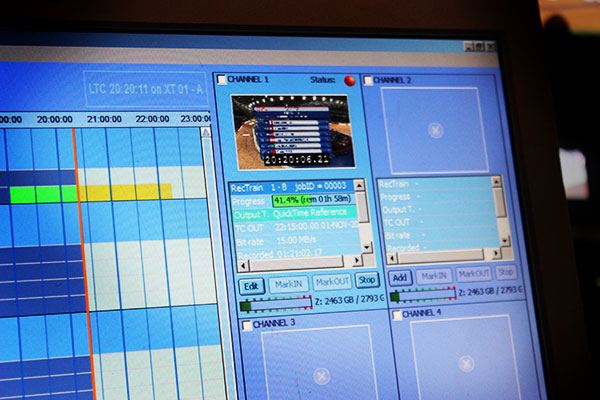
And it worked. For a while. It worked until we ran out of disk space. The EVS was allocating 100GB of space per second to the GRAID for the QuickTime file. Considering HD ProRes 422 has a file size of about 1 Gig per minute, something was up!
Our conclusion was a mismatch between the EVS and the new SMB2 protocol in Mavericks. There are hacks available, but we did the easiest and quickest thing we could, which was change the server to a Mac Pro running Mountain Lion. That worked correctly at the right file sizes!
Note to self: Mavericks and EVS do not play nicely together.
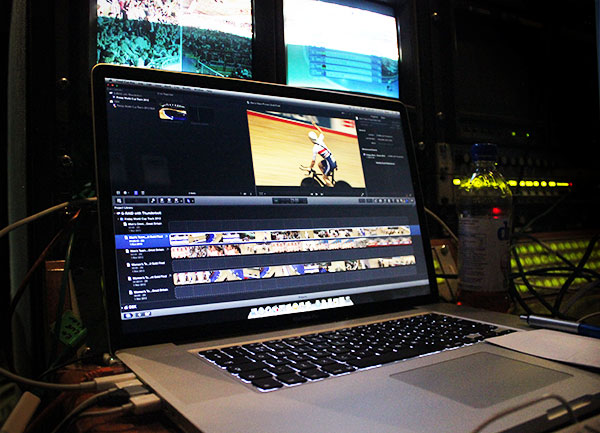
So on to the editing and the growing streams in FCPX worked like a charm until refusing to advance past an arbitrary point in time. The file would grow, then stop growing. What was going on?
A few fixes from a lot of clicking and a lot of swearing!
1) Deselect and reselect the stream in the Event Browser.
2) Skim up and down the stream from the beginning to the end and back multiple times.
3) Delete the clip and reimport. Everything should link back up together. (The actual media not being imported or optimised in the project.)
4) As a last resort, restart FCPX and the clip should be updated.
How well did it work out in the end? Editing in FCPX and exporting directly off the timeline has to be one of the quickest ways to get material on to YouTube. A two minute clip took four and half minutes to get published via a 25Mb internet connection. Then YouTube took a few seconds to do its internal processing.
Getting the media into FCPX is a different matter and the setup used is not something we would use in a mission critical situation. EVS need to address their file compatibility problem and we need to test out the Mavericks Samba fix. If you do need to edit a growing file in FCPX today, be sure to check out Movie Recorder from Softron which we have seen in action and tested on Xsan.
It also struck us whilst sat in the OB truck that the new Mac Pro would make a cracking machine to have on a live event. The Mac Pro is qualified to run on its side, so a third party 19 inch rack not too far off some thing like this would make a very small but powerful 'cluster' if Thunderbolt Bridging allowed file sharing and/or distributed processing.
Hook a few up together, add some Promise Pegasus RAIDS, a few Blackmagic UltraStudios and you have a video server and NLE that will cut 4K with ease. If I worked at EVS, I'd be looking at the new Mac Pro very closely.
I am the Editor-in-Chief of FCP.co and have run the website since its inception ten years ago.
I have also worked as a broadcast and corporate editor for over 30 years, starting on one inch tape, working through many formats, right up to today's NLEs.
Under the name Idustrial Revolution, I have written and sold plugins for Final Cut Pro for 13 years.
I was made a Freeman of Lichfield through The Worshipful Company of Smiths (established 1601). Though I haven't yet tried to herd a flock of sheep through the city centre!
Current Editing

2020 has been busy, the beginning of the year was finishing off a new property series (cut on FCP) for Channel 4 called The Great House Giveaway. I also designed and built the majority of the graphics as Motion templates. It has been a great success and the shows grabbed more viewers in the 4pm weekday slot than any previous strand. It has been recommissioned by C4 for 60 episodes, including prime-time versions and five themed programmes. The shows have also been nominated for a 2021 BAFTA.

Although both were postponed to later in the year, I worked again on ITV's coverage of the Tour de France and La Vuelta. 2020 was my 25th year of editing the TdF and my 20th year as lead editor. The Tour was the first broadcast show to adopt FCPX working for multiple editors on shared storage.

BBC's Snooker has played a big part in my life, I've been editing tournament coverage since 1997. I'm proud to be part of a very creative team that has pioneered many new ideas and workflows that are now industry standard in sports' production. This is currently an Adobe Premiere edit.

Covid cancelled some of the regular corporate events that I edit such as trade shows & events. I was lucky however to edit, from home, on projects for Amazon Kindle, Amazon Black Friday, Mastercard and very proud to have helped local charitable trust Kendall & Wall secure lottery funding.
As for software, my weapon of choice is Final Cut Pro and Motion, but I also have a good knowledge and broadcast credits with Adobe Premiere Pro, MOGRT design and Photoshop.
Plugin Design & Development
I'm the creative force behind Idustrial Revolution, one of the oldest Final Cut Pro plugin developers. It hosts a range of commercial and free plugins on the site. One free plugin was downloaded over a thousand times within 24 hours of release.
I also take on custom work, whether it is adapting an existing plugin for a special use or designing new plugins for clients from scratch. Having a good knowledge of editing allows me to build-in flexibility and more importantly, usability.
FCP.co
Now in its 10th year and 4th redesign, running FCP.co has given me knowledge on how to run a large CMS- you are currently reading my bio from the database! Although it sounds corny, I am pretty well up on social media trends & techniques, especially in the video sector. The recent Covid restrictions has enabled live FCP.co shows online. This involves managing a Zoom Webinar through Restream.io to YouTube and Facebook.
The Future
I'm always open to new ideas and opportunities, so please get in touch at editor (at) fcp.co. I've judged film competitions, presented workflow techniques to international audiences and come up with ideas for TV shows and software programs!
