


- Posts: 21
- Thank you received: 2
3 Post Moderation Rule for New Boarders (25 Jan 2021)
New boarders will have their posts moderated - Don't worry if you cannot see your post immediately.
Why is Interlaced footage Broadcast Standard?
25 Mar 2022 12:42 #119630
by P_H_L_L_L
Why is Interlaced footage Broadcast Standard? was created by P_H_L_L_L
Can someone help me understand why in today's age of digital streaming, 4K video, monitor's and TVs with high refresh rates that interlaced video is still a thing, let alone being Broadcast standard?
The other thing is, I've found a way to 'cheat' a progressive output into identifying as interlaced. In FCP I take an interlaced edit, make a compound clip of it and put it into a new progressive project. I then export through Compressor to a broadcast standard, Pro res 422HQ field order top field first etc. The output file identifies as interlaced when I check it using Switch, but it doesn't have the nasty interlacing that you see on fast moving objects or graphics.
I'm wondering if I'm doing the right thing as modern TVs have deinterlacing built in. Would it in effect, make my video appear interlaced?
The other thing is, I've found a way to 'cheat' a progressive output into identifying as interlaced. In FCP I take an interlaced edit, make a compound clip of it and put it into a new progressive project. I then export through Compressor to a broadcast standard, Pro res 422HQ field order top field first etc. The output file identifies as interlaced when I check it using Switch, but it doesn't have the nasty interlacing that you see on fast moving objects or graphics.
I'm wondering if I'm doing the right thing as modern TVs have deinterlacing built in. Would it in effect, make my video appear interlaced?
Please Log in to join the conversation.

25 Mar 2022 16:43 #119632
by joema
In the US, TV broadcasters use one of two standards: 720p at 59.94 frames/sec or 1080i at 29.97 frames/sec. ABC, Fox, ESPN and Disney properties broadcast live material in 720p, the others use 1080i.
In the US (and likely other places) the transition from NTSC to digital ATSC HD TV was extremely expensive. In the US there were about 1,700 broadcast stations in the network, each having antennas, switching equipment, etc. The cost to *each* of those stations to upgrade their equipment to HD was about $20 million in current dollars, or about $34 billion total.
At the time the ATSC standards were made, the technology did not permit 1080p, and there were pros and cons about 720p vs 1080i. The equipment in those days only permitted one standard or the other -- it wasn't like a modern camera that can switch back and forth.
I think the original ATSC compression standard was MPEG-2. All the hardware at all 1,700 broadcast stations purchased equipment to decode, switch and encode using that standard. Of course today we have MPEG-4, HEVC, etc. Even if all stations could afford the new equipment, it would not be backward-compatible with much of the audience. Lots of people still have older HD TVs which only understand MPEG-2.
Nowadays using cloud-based streaming IPTV, the provider can encode multiple resolutions in multiple codecs and modern smart devices, set-top boxes or smart TVs (if provided adequate internet bandwidth) can decode those. IOW in that distribution scheme there is no broadcast infrastructure, there is only the internet.
But a significant % of people still use Over The Air broadcast TV. That means the entire nationwide distribution infrastructure -- all 1,700 stations -- must be maintained. That includes the aggregate $34 billion investment to make that work. Upgrading the entire thing would be extremely costly, and since OTA viewers are diminishing each year, there is likely limited economic incentive. There is also the switchover problem of not cutting off whatever % of the viewing audience that watches TV using the original standard.
Replied by joema on topic Why is Interlaced footage Broadcast Standard?
Can someone help me understand why in today's age of digital streaming, 4K video, monitor's and TVs with high refresh rates that interlaced video is still a thing, let alone being Broadcast standard?...
In the US, TV broadcasters use one of two standards: 720p at 59.94 frames/sec or 1080i at 29.97 frames/sec. ABC, Fox, ESPN and Disney properties broadcast live material in 720p, the others use 1080i.
In the US (and likely other places) the transition from NTSC to digital ATSC HD TV was extremely expensive. In the US there were about 1,700 broadcast stations in the network, each having antennas, switching equipment, etc. The cost to *each* of those stations to upgrade their equipment to HD was about $20 million in current dollars, or about $34 billion total.
At the time the ATSC standards were made, the technology did not permit 1080p, and there were pros and cons about 720p vs 1080i. The equipment in those days only permitted one standard or the other -- it wasn't like a modern camera that can switch back and forth.
I think the original ATSC compression standard was MPEG-2. All the hardware at all 1,700 broadcast stations purchased equipment to decode, switch and encode using that standard. Of course today we have MPEG-4, HEVC, etc. Even if all stations could afford the new equipment, it would not be backward-compatible with much of the audience. Lots of people still have older HD TVs which only understand MPEG-2.
Nowadays using cloud-based streaming IPTV, the provider can encode multiple resolutions in multiple codecs and modern smart devices, set-top boxes or smart TVs (if provided adequate internet bandwidth) can decode those. IOW in that distribution scheme there is no broadcast infrastructure, there is only the internet.
But a significant % of people still use Over The Air broadcast TV. That means the entire nationwide distribution infrastructure -- all 1,700 stations -- must be maintained. That includes the aggregate $34 billion investment to make that work. Upgrading the entire thing would be extremely costly, and since OTA viewers are diminishing each year, there is likely limited economic incentive. There is also the switchover problem of not cutting off whatever % of the viewing audience that watches TV using the original standard.
Please Log in to join the conversation.
25 Mar 2022 17:12 #119635
by P_H_L_L_L
Replied by P_H_L_L_L on topic Why is Interlaced footage Broadcast Standard?
I get what you're saying but TV stations all over the world must surely have updated hardware since the 50s. In the UK all TV broadcast switched over to digital 10 years ago. It just boggles the mind how I still have to supply ads interlaced when that was designed for technology over 70 years ago. The other point, is it is noticeable! People are concerned over picture quality but interlaced looks bad, especially on moving graphics.
Please Log in to join the conversation.

25 Mar 2022 20:14 #119637
by VTC
Replied by VTC on topic Why is Interlaced footage Broadcast Standard?
...since OTA viewers are diminishing each year...
I'm soooo dinosauric in that regard. Strictly OTA for 15+ years and no online streaming. Too busy shooting it, creating it, or editing it to be 'watching' it. Won't catch me on the deathbed lamenting just another hour, please, to watch more TV.
Please Log in to join the conversation.
- Oliver Peters
-

- Offline
- Platinum Member
-

Less
More
- Posts: 335
- Thank you received: 62
26 Mar 2022 13:52 - 26 Mar 2022 13:54 #119644
by Oliver Peters
Replied by Oliver Peters on topic Why is Interlaced footage Broadcast Standard?
Just to be clear, interlaced is a transmission standard, not necessarily a production standard. Depending on the gear and servers at a station, you can usually provide 1080p/29.97 (progressive) just fine (or 1080p/25 in PAL countries).
Interlaced only looks bad on a display that is not designed to fully display both field, like some computer screens. Transmitted OTA, the graphics will look just fine.
Interlaced only looks bad on a display that is not designed to fully display both field, like some computer screens. Transmitted OTA, the graphics will look just fine.
Last edit: 26 Mar 2022 13:54 by Oliver Peters.
Please Log in to join the conversation.
28 Mar 2022 16:31 #119689
by P_H_L_L_L
Replied by P_H_L_L_L on topic Why is Interlaced footage Broadcast Standard?
In the UK, everything broadcast has to go through 'Clearcast' they check everything from a legal point of view regarding content, and a technical point of view, the resolution, frame rate, colour space, colour range, audio levels etc. They won't even permit a progressive file to be processed, it would instantly get rejected.
I have certainly seen ads on TV where I have noticed the interlacing. This YouTuber explains about interlaced footage and you can see on TV footage how the interlacing looks bad.
I'm slightly concerned that the 'trick' I've done that allows a progressive output to register as interlaced, what would that look like broadcast? Could it actually have a negative effect and look interlaced if the broadcaster uses some kind of deinterlacing on it?
I have certainly seen ads on TV where I have noticed the interlacing. This YouTuber explains about interlaced footage and you can see on TV footage how the interlacing looks bad.
I'm slightly concerned that the 'trick' I've done that allows a progressive output to register as interlaced, what would that look like broadcast? Could it actually have a negative effect and look interlaced if the broadcaster uses some kind of deinterlacing on it?
Please Log in to join the conversation.
- Oliver Peters
-
- Offline
- Platinum Member
-
Less
More
- Posts: 335
- Thank you received: 62
28 Mar 2022 16:52 #119690
by Oliver Peters
Replied by Oliver Peters on topic Why is Interlaced footage Broadcast Standard?
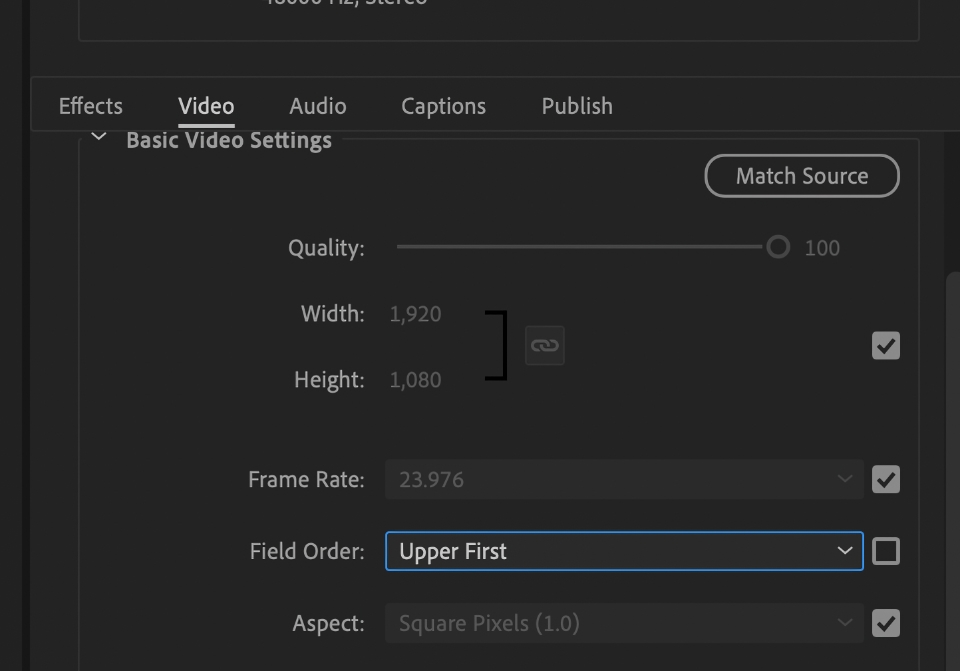
The simplest solution is to encode a version of the file that is interlaced. I'm not sure of the settings in Compressor, but in Adobe Media Encoder, I would do the following. Export a ProRes "master file" from FCP (I presume 1080p/25 for the UK). I would then import and encode another ProRes in AME or Compressor (or whatever format you need to deliver in) and set the Field Order setting from Progressive to Upper First. Export. Now you have an interlaced file.
Please Log in to join the conversation.
- Oliver Peters
-
- Offline
- Platinum Member
-
Less
More
- Posts: 335
- Thank you received: 62
28 Mar 2022 17:46 #119693
by Oliver Peters
Replied by Oliver Peters on topic Why is Interlaced footage Broadcast Standard?
PS: Of course, if you know the project is always and only going to be delivered as interlaced, then start the FCP project setting as 1080i HD and the rest will take care of itself.
Please Log in to join the conversation.
28 Mar 2022 18:16 #119694
by joema
IMO the above Youtube explanation is misleading. He depicts the comb-type artifacts on a Youtube screen as an inherent characteristic of interlaced video. Then he gets bogged down explaining the minutiae of interlaced video without explaining why his specific example looked bad.
It's not interlaced footage that looks bad, it's mis-handled interlaced footage that looks bad. Youtube should normally de-interlace uploaded file-based material that is interlaced -- IF it's flagged as interlaced in the file metadata. You won't see any comb-type interlace artifacts in that case.
But what often happens is somebody improperly exports interlaced footage as progressive, so the interlacing is "baked in". Then the downstream utilities or devices cannot tell it's interlaced and they don't deinterlace it.
In FCP, the project by default assumes the characteristics of the 1st clip added. If that clip is progressive, so the timeline will be. Then if the editor adds an interlaced clip and exports the timeline, you'll have an interlaced clip amid progressive clips in file flagged with progressive metadata. That is why you often see on Youtube re-edited videos where some clips show interlacing artifacts. With FCP you can just select the interlaced clip in a progressive timeline and apply the deinterlacing filter.
In Compressor if you add a progressive video then select the ProRes 422 preset, and in the Inspector video properties set Field Order to "Bottom First" it will encode it as interlaced. That is the only one I've ever tested, I don't know any other possible issues.
It's conceivable the above-mentioned Youtube was not an uploaded file but rather a live streaming feed which originated with an interlaced broadcast camera. In that case it should be live deinterlaced and converted to progressive before injecting into a cloud provider where the distribution standard is almost always progressive.
That need not require additional outboard hardware. I think a camera like the Sony FX9 can shoot 1080i, output 1080i on one SDI port (for live feed to the network) and simultaneously output deinterlaced 1080p on the 2nd SDI port (for live streaming to web services).
Replied by joema on topic Why is Interlaced footage Broadcast Standard?
...This YouTuber explains about interlaced footage and you can see on TV footage how the interlacing looks bad....
IMO the above Youtube explanation is misleading. He depicts the comb-type artifacts on a Youtube screen as an inherent characteristic of interlaced video. Then he gets bogged down explaining the minutiae of interlaced video without explaining why his specific example looked bad.
It's not interlaced footage that looks bad, it's mis-handled interlaced footage that looks bad. Youtube should normally de-interlace uploaded file-based material that is interlaced -- IF it's flagged as interlaced in the file metadata. You won't see any comb-type interlace artifacts in that case.
But what often happens is somebody improperly exports interlaced footage as progressive, so the interlacing is "baked in". Then the downstream utilities or devices cannot tell it's interlaced and they don't deinterlace it.
In FCP, the project by default assumes the characteristics of the 1st clip added. If that clip is progressive, so the timeline will be. Then if the editor adds an interlaced clip and exports the timeline, you'll have an interlaced clip amid progressive clips in file flagged with progressive metadata. That is why you often see on Youtube re-edited videos where some clips show interlacing artifacts. With FCP you can just select the interlaced clip in a progressive timeline and apply the deinterlacing filter.
In Compressor if you add a progressive video then select the ProRes 422 preset, and in the Inspector video properties set Field Order to "Bottom First" it will encode it as interlaced. That is the only one I've ever tested, I don't know any other possible issues.
It's conceivable the above-mentioned Youtube was not an uploaded file but rather a live streaming feed which originated with an interlaced broadcast camera. In that case it should be live deinterlaced and converted to progressive before injecting into a cloud provider where the distribution standard is almost always progressive.
That need not require additional outboard hardware. I think a camera like the Sony FX9 can shoot 1080i, output 1080i on one SDI port (for live feed to the network) and simultaneously output deinterlaced 1080p on the 2nd SDI port (for live streaming to web services).
Please Log in to join the conversation.
28 Mar 2022 18:27 - 28 Mar 2022 18:41 #119695
by P_H_L_L_L
Replied by P_H_L_L_L on topic Why is Interlaced footage Broadcast Standard?
Sorry Oliver, I'm not making myself clear. I don't have any issue with creating an interlaced project, its just I don't like the way it looks and as I have seen them bad on TV before, I just wondered why after the cathode Ray Tube TV is long since in the grave do we still have to provide interlaced. I seem to have discovered a 'cheat' where I can provide a file that reports as interlaced but looks progressive. These screen grabs are from an ad for UK TV, both report as interlaced and will go through all the quality checks. But at the end of the ad, there is a fairly fast horizontal pan and some graphic that animates onto screen. In the true interlaced version you can clearly see it looks worse.
After everything I've been learning, I have a concern that my preferred version that doesn't look interlaced would become interlaced if put through a process that would 'deinterlace' Sorry if that sounds confusing.
After everything I've been learning, I have a concern that my preferred version that doesn't look interlaced would become interlaced if put through a process that would 'deinterlace' Sorry if that sounds confusing.


Last edit: 28 Mar 2022 18:41 by P_H_L_L_L.
Please Log in to join the conversation.
28 Mar 2022 18:34 - 28 Mar 2022 19:03 #119696
by P_H_L_L_L
Replied by P_H_L_L_L on topic Why is Interlaced footage Broadcast Standard?
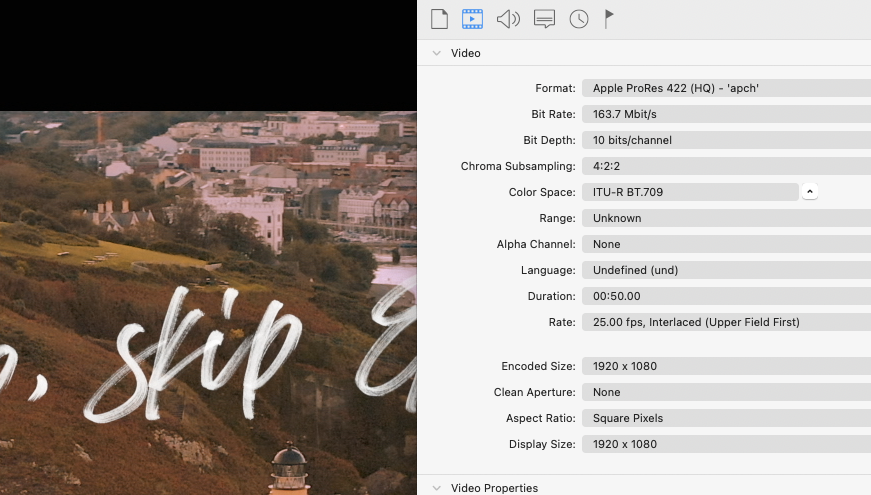
There's a little app called Switch that can display data about video and I use it to check whether the file is interlaced or not. These two screen grabs relate to the previous images. As you can see both report the video as being interlaced, upperfield first. So, it goes through the UK ad checking process fine. But there is an obvious difference.
The way I do it is create the video to the correct specifications on an interlaced timeline, make a compound clip of it and drop it into a progressive timeline. I output to the Clearcast broadcast standard settings via Compressor.
The way I do it is create the video to the correct specifications on an interlaced timeline, make a compound clip of it and drop it into a progressive timeline. I output to the Clearcast broadcast standard settings via Compressor.

Last edit: 28 Mar 2022 19:03 by P_H_L_L_L. Reason: additional information
Please Log in to join the conversation.
- Oliver Peters
-
- Offline
- Platinum Member
-
Less
More
- Posts: 335
- Thank you received: 62
28 Mar 2022 19:19 - 28 Mar 2022 19:25 #119697
by Oliver Peters
Replied by Oliver Peters on topic Why is Interlaced footage Broadcast Standard?
I use Switch all the time. Great app. In the two screen grabs, I see an interlaced background in one, but not the other. What are the two different processes these files went through? Why does one look different and what is the original source of the background? Did it start progressive or interlaced?
"The way I do it is create the video to the correct specifications on an interlaced timeline, make a compound clip of it and drop it into a progressive timeline. I output to the Clearcast broadcast standard settings via Compressor."
I have no idea why you would want to do that. The steps are unnecessarily and you are effective blending the two fields to create a blended whole frame in your progressive timeline. Fine if you want a progressive master, but not fine if you want a correct interlaced master. The reason is that you are effectively adding motion blur and some stutter when this material is properly viewed on OTA displays. It may well pass QC, but the one you don't like the look of will actually appear superior to the viewer.
"The way I do it is create the video to the correct specifications on an interlaced timeline, make a compound clip of it and drop it into a progressive timeline. I output to the Clearcast broadcast standard settings via Compressor."
I have no idea why you would want to do that. The steps are unnecessarily and you are effective blending the two fields to create a blended whole frame in your progressive timeline. Fine if you want a progressive master, but not fine if you want a correct interlaced master. The reason is that you are effectively adding motion blur and some stutter when this material is properly viewed on OTA displays. It may well pass QC, but the one you don't like the look of will actually appear superior to the viewer.
Last edit: 28 Mar 2022 19:25 by Oliver Peters.
Please Log in to join the conversation.
- Oliver Peters
-
- Offline
- Platinum Member
-
Less
More
- Posts: 335
- Thank you received: 62
28 Mar 2022 19:30 - 28 Mar 2022 19:31 #119698
by Oliver Peters
Replied by Oliver Peters on topic Why is Interlaced footage Broadcast Standard?
"In Compressor if you add a progressive video then select the ProRes 422 preset, and in the Inspector video properties set Field Order to "Bottom First" it will encode it as interlaced. That is the only one I've ever tested, I don't know any other possible issues."
Shouldn't it be "Top First"? That's the correct 1080i HD standard in both NTSC and PAL countries. If you get it reversed, then the field order is swapped and everything looks awful in both broadcast and streaming.
Shouldn't it be "Top First"? That's the correct 1080i HD standard in both NTSC and PAL countries. If you get it reversed, then the field order is swapped and everything looks awful in both broadcast and streaming.
Last edit: 28 Mar 2022 19:31 by Oliver Peters.
Please Log in to join the conversation.
28 Mar 2022 21:16 #119703
by joema
Yes, thanks for the correction.
Replied by joema on topic Why is Interlaced footage Broadcast Standard?
...Shouldn't it be "Top First"? That's the correct 1080i HD standard in both NTSC and PAL countries....
Yes, thanks for the correction.
Please Log in to join the conversation.
28 Mar 2022 22:14 - 28 Mar 2022 22:17 #119706
by joema
Interlaced does not necessarily look bad, if it is properly deinterlaced as intended. However if you take an interlaced file and play it without deinterlacing or if somebody messed up the file so it cannot be deinterlaced, then it may look bad.
Re why we have to provide interlaced material, that varies based on the distributor. In general "New Media" or
Over The Top" digital providers like Netflix, Hulu, Amazon Prime, etc, do not require interlaced. I don't think Netflix will accept interlaced.
ABC/Disney/Fox I believe will only accept 720p/59.94, and Viacom CBS will only accept 1080i. See below documents, some of which might be out of date.
Media distributors and broadcasters all have specific reasons for the technical submission criteria. In the case of Viacom/CBS they likely have a gigantic investment in terrestrial network stations that are required to distribute the over-the-air content nationwide. That equipment includes many hundreds of local broadcasting stations, switching equipment, control rooms, etc that was originally set up for 1080i.
There are obviously now hardware format converters that can handle almost any format conversion at high quality, so in theory it should be no problem. But does every one of 1,000 affiliate stations have those? What if you submit content to the local affiliate and they don't have hardware or personnel to handle the conversion? It's easier for them to just state the delivery spec that works with their entire network.
NetFlix: (accepts progressive only) partnerhelp.netflixstudios.com/hc/en-us/...-Specifications-v4-1
Amazon Prime (accepts interlaced or progressive): m.media-amazon.com/images/G/01/CooperWeb...tentGuide-v5.2.2.pdf
ABC/Disney (accepts 720p/59.94 only): www.disneyadsales.com/wp-content/uploads...dated-April_2016.pdf
Viacom/CBS: (accepts 1080i only): viapub.viacom.com/sites/trafficguideline...m_Delivery_Specs.pdf
Replied by joema on topic Why is Interlaced footage Broadcast Standard?
...I don't have any issue with creating an interlaced project, its just I don't like the way it looks and as I have seen them bad on TV before, I just wondered why after the cathode Ray Tube TV is long since in the grave do we still have to provide interlaced...
Interlaced does not necessarily look bad, if it is properly deinterlaced as intended. However if you take an interlaced file and play it without deinterlacing or if somebody messed up the file so it cannot be deinterlaced, then it may look bad.
Re why we have to provide interlaced material, that varies based on the distributor. In general "New Media" or
Over The Top" digital providers like Netflix, Hulu, Amazon Prime, etc, do not require interlaced. I don't think Netflix will accept interlaced.
ABC/Disney/Fox I believe will only accept 720p/59.94, and Viacom CBS will only accept 1080i. See below documents, some of which might be out of date.
Media distributors and broadcasters all have specific reasons for the technical submission criteria. In the case of Viacom/CBS they likely have a gigantic investment in terrestrial network stations that are required to distribute the over-the-air content nationwide. That equipment includes many hundreds of local broadcasting stations, switching equipment, control rooms, etc that was originally set up for 1080i.
There are obviously now hardware format converters that can handle almost any format conversion at high quality, so in theory it should be no problem. But does every one of 1,000 affiliate stations have those? What if you submit content to the local affiliate and they don't have hardware or personnel to handle the conversion? It's easier for them to just state the delivery spec that works with their entire network.
NetFlix: (accepts progressive only) partnerhelp.netflixstudios.com/hc/en-us/...-Specifications-v4-1
Amazon Prime (accepts interlaced or progressive): m.media-amazon.com/images/G/01/CooperWeb...tentGuide-v5.2.2.pdf
ABC/Disney (accepts 720p/59.94 only): www.disneyadsales.com/wp-content/uploads...dated-April_2016.pdf
Viacom/CBS: (accepts 1080i only): viapub.viacom.com/sites/trafficguideline...m_Delivery_Specs.pdf
Last edit: 28 Mar 2022 22:17 by joema.
Please Log in to join the conversation.
- pixelkisser
-

- Offline
- New Member
-

Less
More
- Posts: 16
- Thank you received: 3
28 Mar 2022 22:18 #119707
by pixelkisser
Replied by pixelkisser on topic Why is Interlaced footage Broadcast Standard?
There often seems to be confusion on these topics as to the distinction between 'motion blur' and 'judder'. Motion blur is dictated by the shutter speed of the camera at capture, so in 25P and 50i footage, the amount of 'blur' is actually the same because the shutter speed is the same - 1/50. You can't increase or decrease the amount of blur by converting your footage from one type to another, but you can inadvertently create weirdness by not taking into consideration the projection / transmission system your footage is going to.
In 25P (compared to 50i) the jump from one image to the next is bigger, ie. the 'judder' is bigger, because there is a 1/50 of a second where nothing is captured in between frames. Ironically when people talk about film or 24P having more motion blur, it generally isn't more motion blur, it's more judder, or 'gap'. Native interlaced footage looks smoother because it's at twice as many frames per second, at the cost of half the resolution. I'm not saying smoother is better, just smoother.
Cue debates about 50P, high shutter speed filming, the 'soap opera effect' and other stuff. Oh - I used 25P and 50I examples because it's less of a head-bender than 23.98 / 24P / 29.97 / 59.9x etc. And I'm from Europe (sorry!)
In 25P (compared to 50i) the jump from one image to the next is bigger, ie. the 'judder' is bigger, because there is a 1/50 of a second where nothing is captured in between frames. Ironically when people talk about film or 24P having more motion blur, it generally isn't more motion blur, it's more judder, or 'gap'. Native interlaced footage looks smoother because it's at twice as many frames per second, at the cost of half the resolution. I'm not saying smoother is better, just smoother.
Cue debates about 50P, high shutter speed filming, the 'soap opera effect' and other stuff. Oh - I used 25P and 50I examples because it's less of a head-bender than 23.98 / 24P / 29.97 / 59.9x etc. And I'm from Europe (sorry!)
Please Log in to join the conversation.
- Oliver Peters
-
- Offline
- Platinum Member
-
Less
More
- Posts: 335
- Thank you received: 62
28 Mar 2022 22:29 #119708
by Oliver Peters
Replied by Oliver Peters on topic Why is Interlaced footage Broadcast Standard?
" You can't increase or decrease the amount of blur by converting your footage from one type to another"
Correct. Inarticulate phrasing on my part
Correct. Inarticulate phrasing on my part
Please Log in to join the conversation.
